
Block Beams
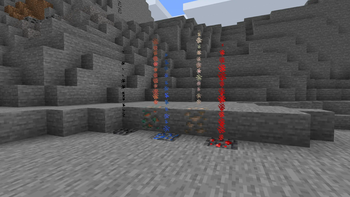
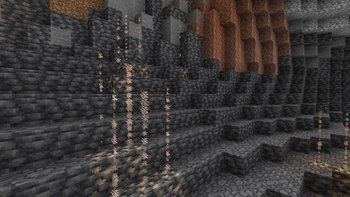
A very simple mod that spawns a beam of colored particles above a block.
Screenshots
About this Mod
Block Beams
A very simple mod that spawns a beam of colored particles above a block
A very simple mod that spawns a beam of colored particles above a block if the block has 3 block of air or other
"passable" blocks above it (see config for more info). Which helps you spot the block better. I
originally came up with this idea when I was mining for ores with my world eater. But with how big the 1.18 caves are
this is going to be useful there as well. Plus it can also be used as an aesthetic feature, in case you want to have a
water fountain you can make a not useful block have blue particles and boom you have a fountain.
Warning
Some server owners / admins may see this mod as unfair. So be respectful and ask the server owners / admins if you can
you this mod. Also mention the "server side" config of the mod. (Se bellow)
Dependencies
This mod Depends on: Kotlin (My apologies for dependency)
Config
This mod has extensive configuration for what little it adds.
There are 2 types of config :
"Server" side
Block Beams is not supported on the server but there is a server side type config.The only think you can configure server side is the block pass list. It is configured by a vanilla tag, so you just
have to set up a tag on the severer, then all the clients that use the mod will be configured, no need to install the
mod on the server. (Only thing to add is that the clients can override if they use the server tag or not)
If you wish to:
- make your own tag just
go here for the example pack and then
just reconfigure it as you like. - use the default pack
- disable to mod empty pack
Client side
As stated in server config most configs are on the client:
- "blockBeams" is the list of blocks that will emit the particles and there color. It has a very simple format
of["namespace:block": hex color] - "blockCheckType" is the way the mod check for what blocks to pass through
- SERVER_ONLY - Gets the tag from the server and checks based on that, if the server has no tag then the mod is
disabled [DEFAULT] - CLIENT_ONLY - Uses the client tag from his config (Use only if it is okay to do on the server)
- SERVER_ONLY - Gets the tag from the server and checks based on that, if the server has no tag then the mod is
- "clientTag" The client equivalent of the server side tag. Works like vanilla tag.
 Click on the banner or here to support me and my projects! :)

Available Versions
How to Install Block Beams on Your Server
Order Server
Order a Minecraft Java server with at least 3 GB RAM (4 GB recommended).
Set fabric Loader
In the panel under "Egg", select the fabric loader and matching Minecraft version (1.21.11).
Install Mod
Open the mod browser in the dashboard and search for "Block Beams". Click "Install" – done! Alternatively, upload the .jar via SFTP to the /mods folder.
Compatibility
Mod Loaders
Minecraft Versions
1.21.11, 1.21.10, 1.21.9 (+16 more)
Server-side
✗ UnsupportedRecommended RAM
4 GB(min. 3 GB)Frequently Asked Questions
Block Beams server crashes on startup – what to do?
Most common cause: wrong fabric version or insufficient RAM. Check the server log (latest.log) for "OutOfMemoryError" or "Mixin" errors. With Mado Hosting: ensure at least 3 GB RAM is allocated and the loader matches the mod version (1.21.11). You can switch loaders with one click in the panel.
Is Block Beams compatible with fabric and quilt?
Block Beams officially supports fabric, quilt for Minecraft 1.21.11, 1.21.10, 1.21.9. The Mado dashboard automatically detects incompatible loader combinations.
Server lagging with Block Beams – how to optimize performance?
Recommended RAM: 4 GB (per 8 players). Use /spark profiler to check if Block Beams consumes the most tick time. Common fixes: reduce server view-distance to 8-10, install "performant" or "starlight" as supplementary mods on Forge. With Mado Hosting, your server runs on NVMe SSDs with dedicated CPU cores for minimal latency.
Similar Mods

![[ETF] Entity Texture Features](https://cdn.modrinth.com/data/BVzZfTc1/af683d206d50b05258d865b0d6e4aa2f2cee12f2_96.webp)
![[EMF] Entity Model Features](https://cdn.modrinth.com/data/4I1XuqiY/6e5bbd0d06b1741bfdab6c0cfab6de8fdaf0064c_96.webp)



Rent Modded Server
Install Block Beams with just one click on your server.