
Block Pack
📦 Add 1200+ decorative furniture blocks & functional furniture vanilla style blocks in Minecraft
Screenshots
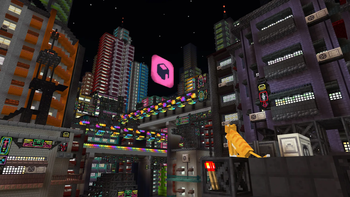
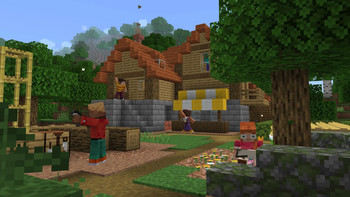
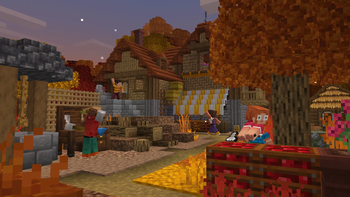

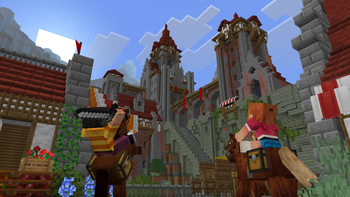
About this Mod



Block Pack adds 1200+ building blocks. Build literally anything.
📋 About
Block Pack adds over 1200 building and decoration blocks to Minecraft - one mod, every style. Build in medieval, Japanese, Greek, cyberpunk, modern, or underwater themes from a single pack. Made for vanilla builders who want more shapes, more detail, and full customization without losing the base-game feel.
🧱 More Than Decoration
Block Pack blocks actually do things:
Fillable storage - crates, fish barrels, baskets and sacks: right-click to stash items and pull them back out
Lights everywhere - paper lanterns and hanging lamps that sway on their chains, neon signs, string lights, candlesticks in every color, and glowing hologram blocks
Living streets - air conditioners, smoking chimneys, weather vanes, vents and gutters that bring a town to life
The Wrench - change block states and swap variants right in the world, no menus
A custom Wandering Trader - roaming your world with exclusive Block Pack goods
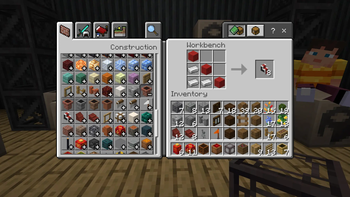
🔨 The Workbench
Every block is crafted at the Workbench, a dedicated station with its own recipe book - so 1200 fresh recipes never clutter your vanilla crafting table.
🔧 Compatibility
Full support for JEI, EMI, Jade, and Chipped.
🚀 Supported Versions
1.21.1 - NeoForge · Fabric
1.20.1 - Forge · Fabric
Fabric requires the Fabric API.
Available Versions
How to Install Block Pack on Your Server
Order Server
Order a Minecraft Java server with at least 3 GB RAM (4 GB recommended).
Set fabric Loader
In the panel under "Egg", select the fabric loader and matching Minecraft version (1.21.1).
Install Mod
Open the mod browser in the dashboard and search for "Block Pack". Click "Install" – done! Alternatively, upload the .jar via SFTP to the /mods folder.
Compatibility
Mod Loaders
Minecraft Versions
1.21.1, 1.20.1
Server-side
✓ RequiredRecommended RAM
4 GB(min. 3 GB)Frequently Asked Questions
Block Pack server crashes on startup – what to do?
Most common cause: wrong fabric version or insufficient RAM. Check the server log (latest.log) for "OutOfMemoryError" or "Mixin" errors. With Mado Hosting: ensure at least 3 GB RAM is allocated and the loader matches the mod version (1.21.1). You can switch loaders with one click in the panel.
Is Block Pack compatible with fabric and forge and neoforge?
Block Pack officially supports fabric, forge, neoforge for Minecraft 1.21.1, 1.20.1. Note: Forge and Fabric mods are NOT cross-compatible – pick one loader and stick with it. The Mado dashboard automatically detects incompatible loader combinations.
Server lagging with Block Pack – how to optimize performance?
Recommended RAM: 4 GB (per 8 players). Use /spark profiler to check if Block Pack consumes the most tick time. Common fixes: reduce server view-distance to 8-10, install "performant" or "starlight" as supplementary mods on Forge. With Mado Hosting, your server runs on NVMe SSDs with dedicated CPU cores for minimal latency.
Similar Mods

![[ETF] Entity Texture Features](https://cdn.modrinth.com/data/BVzZfTc1/af683d206d50b05258d865b0d6e4aa2f2cee12f2_96.webp)
![[EMF] Entity Model Features](https://cdn.modrinth.com/data/4I1XuqiY/6e5bbd0d06b1741bfdab6c0cfab6de8fdaf0064c_96.webp)



Rent Modded Server
Install Block Pack with just one click on your server.