
Block Plus
A lightweight and vanilla-friendly decoration mod for Forge, inspired by Fabric's Blockus. Block Plus adds around 130 new blocks: detailed timber frames, unique themed stone families, ornate bricks, and marble blocks to expand your building possibilities.
Screenshots
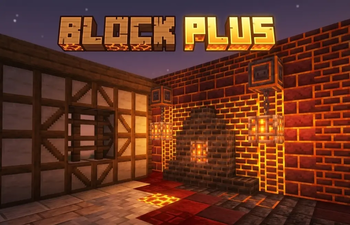
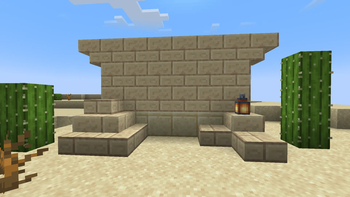
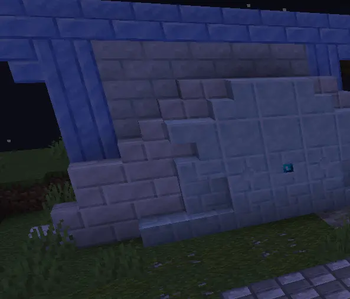
About this Mod
🧱 Block Plus
Welcome to Block Plus, the ultimate building and decoration expansion designed exclusively for Forge!
Have you ever looked at Fabric-exclusive decoration mods and wished you had those gorgeous textures on your Forge modpack? This mod was born out of that exact necessity. Block Plus is a passionate, standalone "reforged" tribute inspired by the brilliant aesthetics of Blockus, combined with nostalgic block families from legendary classic mods (like Astral Sorcery), alongside entirely custom creations.
✨** Features**
Block Plus expands your creative toolkit with complete, cohesive block families (including custom bricks, tiles, pillars, slabs, stairs, and polished variants) categorized by unique themes:
The Timber Frames: Perfect for medieval and rustic builds. Available in Oak, Dark Oak, and Spruce, featuring cross and diagonal patterns.
🏰 Ornate & Mystical Stones: Decorate your castles and dungeons with Viridite (with chiseled variants), Dark Limestone, Archaic Bricks, and Sculk-infused architecture.
Cosmetic & Themed Bricks: Build winter fortresses with Snow Quartz and Ice Bricks, or go spooky with Sooty Bricks, Lava Bricks, and Small Magma Bricks.
🏛️ Nostalgic Tributes: Beautifully recreated Marble inspired by classic magic mods, perfect for grand altars and temples.
Fun & Unique Textures: From Chocolate Blocks (and tiles!) to unique patterns like Checkertone (Andesite/Diorite, Granite, Sandstone).
And all blocks are fully configurable via KubeJS
🌍 World Generation
Block Plus isn't just about crafting; it rewards exploration!
Dark Limestone: Generates as a somewhat rare find hidden deep within Swamps and Mangrove biomes.
Slate: Scattered naturally across various cold and freezing biomes.
Marble: It awaits you on the top of the mountain peaks and elevated terrain.
🛠️ Crafting & Integration
All blocks are fully survival-friendly, feature horizontal expansion recipes balance-tested for Vanilla+ environments, and integrate perfectly with standard Minecraft materials. Cross-mod compatibility is also included (specific recipes activate automatically if Sully's Mod is installed).
🚀 Modpacks
Yes! You can absolutely include Block Plus in your modpack. No explicit permission is required, though a link back to this page is always appreciated.
📄** Credits & Inspiration**
Block Plus is an independent project built from scratch for the Forge ecosystem.
Concept & Palette: Portions of the aesthetic choices and block concepts are heavily inspired by the amazing Blockus mod (Fabric).
Nostalgic Assets: Certain textures are visual tributes to assets from historical mods, adapted and re-coded specifically to bring their beloved atmosphere into modern Forge versions. Massive thanks to the original creators who continue to inspire the Minecraft modding community!
Available Versions
How to Install Block Plus on Your Server
Order Server
Order a Minecraft Java server with at least 3 GB RAM (4 GB recommended).
Set forge Loader
In the panel under "Egg", select the forge loader and matching Minecraft version (1.20.1).
Install Mod
Open the mod browser in the dashboard and search for "Block Plus". Click "Install" – done! Alternatively, upload the .jar via SFTP to the /mods folder.
Compatibility
Mod Loaders
Minecraft Versions
1.20.1
Server-side
✓ RequiredRecommended RAM
4 GB(min. 3 GB)Frequently Asked Questions
Block Plus server crashes on startup – what to do?
Most common cause: wrong forge version or insufficient RAM. Check the server log (latest.log) for "OutOfMemoryError" or "Mixin" errors. With Mado Hosting: ensure at least 3 GB RAM is allocated and the loader matches the mod version (1.20.1). You can switch loaders with one click in the panel.
Is Block Plus compatible with forge?
Block Plus officially supports forge for Minecraft 1.20.1. The Mado dashboard automatically detects incompatible loader combinations.
Server lagging with Block Plus – how to optimize performance?
Recommended RAM: 4 GB (per 8 players). Use /spark profiler to check if Block Plus consumes the most tick time. Common fixes: reduce server view-distance to 8-10, install "performant" or "starlight" as supplementary mods on Forge. With Mado Hosting, your server runs on NVMe SSDs with dedicated CPU cores for minimal latency.
Similar Mods

![[ETF] Entity Texture Features](https://cdn.modrinth.com/data/BVzZfTc1/af683d206d50b05258d865b0d6e4aa2f2cee12f2_96.webp)
![[EMF] Entity Model Features](https://cdn.modrinth.com/data/4I1XuqiY/6e5bbd0d06b1741bfdab6c0cfab6de8fdaf0064c_96.webp)



Rent Modded Server
Install Block Plus with just one click on your server.