
Block Particle Spawning
Allows you to attach particle effects to any block in Minecraft, allowing modpack authors to enhance the visual aspects of blocks with many use cases.
Screenshots
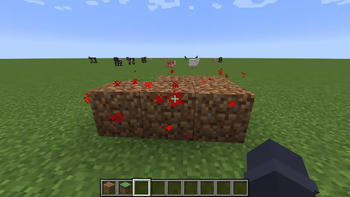
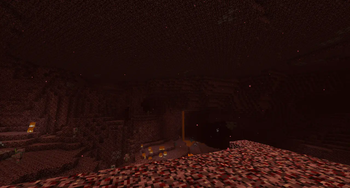
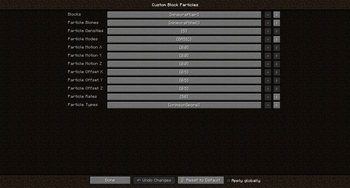
About this Mod
Block Particle Spawning
Spawn custom block particle effects with ease!
Block Particle Spawning allows you to attach particle effects to any block in Minecraft, allowing modpack authors to enhance the visual aspects of blocks with many use cases.
Requires MixinBooter
Configuration Settings
The following five config settings enable fine-tuning of particle spawning.
The settings go by ordinal numbers, so the first block takes the first value of each category, the second block takes every second value and so on...
Blocks
Specifies which blocks will have particle effects.
Example: minecraft:grass
Particle Densities
Determines the number of particles that will be spawned.
Example: 5
Particle Modes
Specifies the method by which particles are spawned. Valid values include BASIC, DRIP, FIRE_SMOKE, MYCELIUM, REDSTONE_ORE, TORCH.
Example: MYCELIUM
Particle Rates
Sets the cooldown time in ticks between each particle spawning.
Example: 10
Particle Types
Defines the types of particles that will be spawned around the specified blocks.
Any particle that can be spawned with the /particle command is supported.
Example: note
Configuration Example
# Example: minecraft:grass
S:Blocks <
    minecraft:grass
    minecraft:obsidian
 >

# The amount of particles that are spawned
# Example: 5
I:"Particle Densities" <
    10
    20
 >

# The way particles are spawned
# Valid values: FIRE_SMOKE, MYCELIUM, REDSTONE_ORE
# TORCH
S:"Particle Modes" <
    MYCELIUM
    FIRE_SMOKE
 >

# The cooldown between each particle spawning
# Example: 10
I:"Particle Rates" <
    5
    10
 >

# Example: minecraft:note
S:"Particle Types" <
    note
    spell
 >
This mod was commissioned for Minecraft 1.12.2 to be used in the modpack Rebirth of the Night (RotN).
Available Versions
How to Install Block Particle Spawning on Your Server
Order Server
Order a Minecraft Java server with at least 3 GB RAM (4 GB recommended).
Set forge Loader
In the panel under "Egg", select the forge loader and matching Minecraft version (1.12.2).
Install Mod
Open the mod browser in the dashboard and search for "Block Particle Spawning". Click "Install" – done! Alternatively, upload the .jar via SFTP to the /mods folder.
Compatibility
Mod Loaders
Minecraft Versions
1.12.2
Server-side
✗ UnsupportedRecommended RAM
4 GB(min. 3 GB)Frequently Asked Questions
Block Particle Spawning server crashes on startup – what to do?
Most common cause: wrong forge version or insufficient RAM. Check the server log (latest.log) for "OutOfMemoryError" or "Mixin" errors. With Mado Hosting: ensure at least 3 GB RAM is allocated and the loader matches the mod version (1.12.2). You can switch loaders with one click in the panel.
Is Block Particle Spawning compatible with forge?
Block Particle Spawning officially supports forge for Minecraft 1.12.2. The Mado dashboard automatically detects incompatible loader combinations.
Server lagging with Block Particle Spawning – how to optimize performance?
Recommended RAM: 4 GB (per 8 players). Use /spark profiler to check if Block Particle Spawning consumes the most tick time. Common fixes: reduce server view-distance to 8-10, install "performant" or "starlight" as supplementary mods on Forge. With Mado Hosting, your server runs on NVMe SSDs with dedicated CPU cores for minimal latency.
Similar Mods

![[ETF] Entity Texture Features](https://cdn.modrinth.com/data/BVzZfTc1/af683d206d50b05258d865b0d6e4aa2f2cee12f2_96.webp)
![[EMF] Entity Model Features](https://cdn.modrinth.com/data/4I1XuqiY/6e5bbd0d06b1741bfdab6c0cfab6de8fdaf0064c_96.webp)



Rent Modded Server
Install Block Particle Spawning with just one click on your server.