
blocktuner-pitchsmith
A mod which helps you tune note blocks. (fork of Lumine1909/BlockTuner_Continue with enhanced pitch controls)
About this Mod
BlockTuner pitchsmith
About
This is the fabric version of BlockTuner and requires fabric API.
If you are using forge, you can check out the forge version by A_Peng215.
If you want the data pack for older versions of Minecraft, please visit this page.
BlockTuner-pitchsmith is a Fabric fork of the original BlockTuner_Continue (also forked from orginal BlockTuner), adjusted for builders who spend more time repeatedly tuning note blocks.
This branch keeps the familiar tuning workflow, but focuses on a setup that is more practical for heavy tune usage: cleaner input handling, configurable pitch-copy behavior, and a more maintainable configuration and build setup.
Highlights
- Better suited for builders who repeatedly tune note blocks during large builds
- Added a YACL-powered config screen with Mod Menu integration
- Added
require-ctrl-to-copy-pitchso pitch-copy behavior can be configured explicitly - Some hard-coded key bindings now refer to Minecraft keys
- Reworked input handling around GUI access, note display, and related interactions
- Updated build, Stonecutter, Gradle, and Loom setup for ongoing maintenance
Instructions
Required Dependencies
Installation
Put this mod in your mods folder. You also need to install Fabric API if you haven't installed it yet. For the client, also YetAnotherConfigLib (YACL) is needed.
How to Use BlockTuner
Ctrl + Right click on a note block to open up tuning UI. Placing a note block while holding Ctrl also opens the UI automatically.
Ctrl to show the note of the note block at crosshair.
Ctrl + Middle click on note blocks to pick up readily tuned note blocks.
Right click note blocks with blaze rods to play with right clicks without tuning.
[!NOTE]
- If you are using BlockTuner 1.0.0 (Minecraft 1.18.2) or lower, you don't need to hold
Ctrlto open up the tuning UI. Instead, use/blocktunerto toggle this.- If you have Tweakeroo installed and have no access to the
Ctrlkey, please go to Tweakaroo configs, findflexibleBlockPlacementOffsetunderHot Keysand set it to something else. e.g.Right Alt. Sorry for the inconvenience.
Tuning UI
Top-right corner (from left to right)
 Play mode - toggle whether the GUI will turn off immediately upon clicking a note on the piano keyboard.
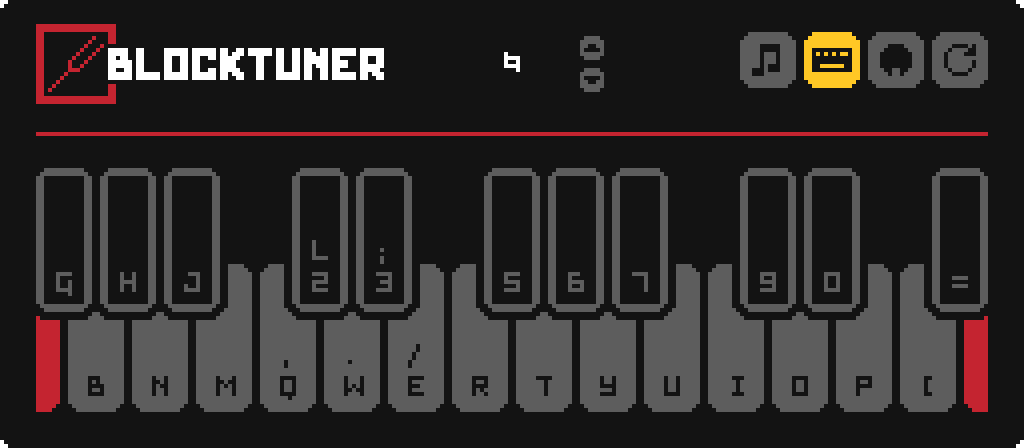
 Typing keyboard to piano keyboard - toggle whether you want to play the piano keyboard using your computer keyboard.
 MIDI Device - Click to cycle through available MIDI input devices. The icon shows red if the device is currently unavailable. This usually means it is being used by another program.
Keyboard Mapping:
Credits
Localization
- Russian - Felix14-v2 (Currently outdated)
- Japanese - misaka10843 & hakkaku
Forge Port
License
Copyright (C) 2021, xwjcool;
Copyright (C) 2025, Lumine1909;
Copyright (c) 2026, rs256;
This fork is distributed under the GNU Lesser General Public License v3.0.
That is intentional. This repository was forked from upstream while the upstream codebase was still licensed under LGPLv3, and this fork has not synchronized commits from upstream after upstream changed its license to GPLv3.
Accordingly, this repository remains distributed under LGPLv3 based on the code snapshot it originally forked from. This does not imply that newer upstream code, or upstream changes made after the GPLv3 relicensing, are available under LGPLv3 here.
This program is free software: you can redistribute it and/or modify it under the terms of the GNU Lesser General Public License as published by the Free Software Foundation, either version 3 of the License, or (at your option) any later version.
This program is distributed in the hope that it will be useful, but WITHOUT ANY WARRANTY; without even the implied warranty of MERCHANTABILITY or FITNESS FOR A PARTICULAR PURPOSE. See the GNU Lesser General Public License for more details.
You should have received a copy of the GNU Lesser General Public License along with this program. If not, see https://www.gnu.org/licenses/.
Available Versions
How to Install blocktuner-pitchsmith on Your Server
Order Server
Order a Minecraft Java server with at least 3 GB RAM (4 GB recommended).
Set fabric Loader
In the panel under "Egg", select the fabric loader and matching Minecraft version (1.21.11).
Install Mod
Open the mod browser in the dashboard and search for "blocktuner-pitchsmith". Click "Install" – done! Alternatively, upload the .jar via SFTP to the /mods folder.
Compatibility
Mod Loaders
Minecraft Versions
1.21.11, 1.21.10
Server-side
✓ RequiredRecommended RAM
4 GB(min. 3 GB)Frequently Asked Questions
blocktuner-pitchsmith server crashes on startup – what to do?
Most common cause: wrong fabric version or insufficient RAM. Check the server log (latest.log) for "OutOfMemoryError" or "Mixin" errors. With Mado Hosting: ensure at least 3 GB RAM is allocated and the loader matches the mod version (1.21.11). You can switch loaders with one click in the panel.
Is blocktuner-pitchsmith compatible with fabric?
blocktuner-pitchsmith officially supports fabric for Minecraft 1.21.11, 1.21.10. The Mado dashboard automatically detects incompatible loader combinations.
Server lagging with blocktuner-pitchsmith – how to optimize performance?
Recommended RAM: 4 GB (per 8 players). Use /spark profiler to check if blocktuner-pitchsmith consumes the most tick time. Common fixes: reduce server view-distance to 8-10, install "performant" or "starlight" as supplementary mods on Forge. With Mado Hosting, your server runs on NVMe SSDs with dedicated CPU cores for minimal latency.
Similar Mods




![[ETF] Entity Texture Features](https://cdn.modrinth.com/data/BVzZfTc1/af683d206d50b05258d865b0d6e4aa2f2cee12f2_96.webp)
![[EMF] Entity Model Features](https://cdn.modrinth.com/data/4I1XuqiY/6e5bbd0d06b1741bfdab6c0cfab6de8fdaf0064c_96.webp)
Rent Modded Server
Install blocktuner-pitchsmith with just one click on your server.