
Blocky Outline
The mods let you customize your block outline
Screenshots
About this Mod
Blocky Outline
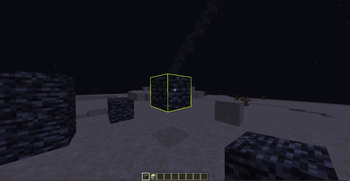
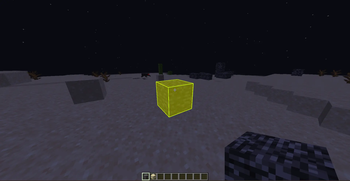
Blocky Outline is a highly polished, premium client-side Fabric mod for Minecraft that completely transforms how you interact with the world by adding highly customizable block-targeting outlines and solid face fills. Say goodbye to the boring, static default outline—with Blocky Outline, you can fully personalize your targeting visual style to match your aesthetic!
✨ Features
- Custom Block Outlines & Face Fills: Choose between rendering a beautiful custom outline around targeted blocks, a sleek translucent solid face fill, or both at the same time.
- Dynamic HSL Rainbow Transitions: Elevate your game with gorgeous, smooth color transitions. Configure a dynamic rainbow effect that shifts through the HSL spectrum with adjustable speeds.
- Vibrant & Precise Color Customization: Tweak red, green, blue, and alpha/opacity channels individually to create perfect custom colors for both the outline and the fill.
- Sodium, Iris & Canvas Compatibility: Built with advanced modern rendering methods. The mod utilizes a double-faced vertex consumer structure and a micro-inflation factor (
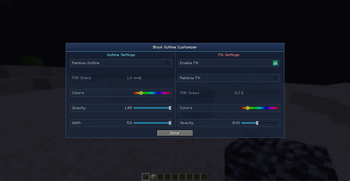
0.005D) to completely eliminate z-fighting, backface culling, or clipping issues commonly found when using modern performance shaders like Iris and Sodium. - Native Keybinding Integration: Seamlessly integrated into Minecraft’s native control settings. Simply press the M key (fully rebindable in the standard Controls options) to open the interactive customization menu screen in-game.
- Frame-Synchronized Caching: Implements intelligent rendering pipeline optimization to prevent rendering bugs (such as outline elements getting stuck to the ground), ensuring buttery-smooth performance.
- Client-Side Only: Purely client-side! You can join any multiplayer server, vanilla or modded, and enjoy your stunning custom block highlights.
🛠️ Configuration & Customization
Once you are in-game, simply press M to open the customizer dashboard. From there, you can toggle:
- Outline Mode: Adjust the outline width, transparency (alpha), and exact color.
- Fill Mode: Enable or disable targeted block face highlighting, customize its transparency so it doesn't block your view, and configure independent custom colors or HSL rainbow transitions.
🚀 Installation & Versions
This mod is optimized for Minecraft 1.21+ (fully verified on 1.21.11) and requires:
- Fabric Loader (>=0.19.2)
- Fabric API
Simply drag the .jar file into your mods folder and you are ready to play!
Created by CharaZ. Check out the source code or report issues on our GitHub Repository.
Available Versions
How to Install Blocky Outline on Your Server
Order Server
Order a Minecraft Java server with at least 3 GB RAM (4 GB recommended).
Set fabric Loader
In the panel under "Egg", select the fabric loader and matching Minecraft version (26.1.2).
Install Mod
Open the mod browser in the dashboard and search for "Blocky Outline". Click "Install" – done! Alternatively, upload the .jar via SFTP to the /mods folder.
Compatibility
Mod Loaders
Minecraft Versions
26.1.2, 26.1.1, 26.1 (+19 more)
Server-side
✗ UnsupportedRecommended RAM
4 GB(min. 3 GB)Frequently Asked Questions
Blocky Outline server crashes on startup – what to do?
Most common cause: wrong fabric version or insufficient RAM. Check the server log (latest.log) for "OutOfMemoryError" or "Mixin" errors. With Mado Hosting: ensure at least 3 GB RAM is allocated and the loader matches the mod version (26.1.2). You can switch loaders with one click in the panel.
Is Blocky Outline compatible with fabric?
Blocky Outline officially supports fabric for Minecraft 26.1.2, 26.1.1, 26.1. The Mado dashboard automatically detects incompatible loader combinations.
Server lagging with Blocky Outline – how to optimize performance?
Recommended RAM: 4 GB (per 8 players). Use /spark profiler to check if Blocky Outline consumes the most tick time. Common fixes: reduce server view-distance to 8-10, install "performant" or "starlight" as supplementary mods on Forge. With Mado Hosting, your server runs on NVMe SSDs with dedicated CPU cores for minimal latency.
Similar Mods




![[ETF] Entity Texture Features](https://cdn.modrinth.com/data/BVzZfTc1/af683d206d50b05258d865b0d6e4aa2f2cee12f2_96.webp)
![[EMF] Entity Model Features](https://cdn.modrinth.com/data/4I1XuqiY/6e5bbd0d06b1741bfdab6c0cfab6de8fdaf0064c_96.webp)
Rent Modded Server
Install Blocky Outline with just one click on your server.