BloodyParticlesMod
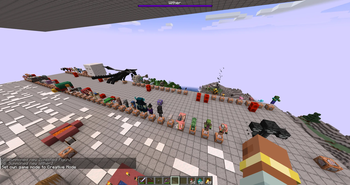
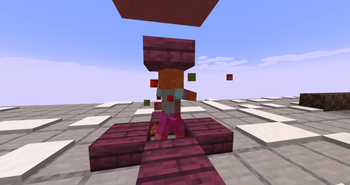
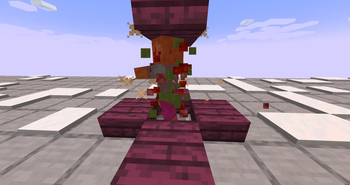
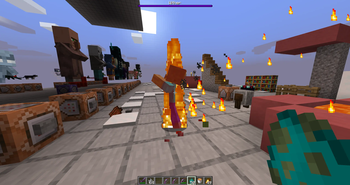
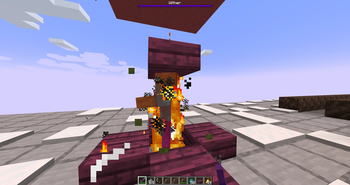
Make every hit feel meaningful. Mobs splash thematic blood and impact particles when damaged different effects per mob, scaling with attack charge and critical hits.
Screenshots
About this Mod
BloodyParticles
Make every hit feel meaningful. Mobs splash thematic blood and impact particles when damaged — different effects per mob, scaling with attack charge and critical hits.
Features
- 74 vanilla mobs covered out of the box, each with their own thematic effect (zombie redstone-blood, bee honey, blaze flame, axolotl pink-dye, ...).
- 100% client-side — works on any vanilla server, no server install needed.
- Configurable in-game: native config GUI with sliders for intensity, view radius, critical multiplier. English / Spanish.
- Hit-aware: particle count scales with attack charge and critical hits.
- Custom particles: registers its own (e.g. falling feathers for chickens and parrots) with proper sprite-based physics.
This mod is a rework of a datapack that did the same thing but wasn't very user-friendly when it came to scaling the project, nor was it particularly efficient. You can view the datapack here:
This release expands BloodyParticles from a mob-blood mod into a full visual feedback layer for combat, movement, enchantments, and projectiles. Every effect below can be toggled or fine-tuned from the in-game config GUI (Mods → BloodyParticles → Config) — including thresholds, intensities, and texture variants.
Damage Source Variants
Mobs now react to how they're hit, not just that they were hit:
- Fire (flame + small_flame), Lava (flame + lava drops), Drowning (bubble pops), Suffocation (stone block crack)
- Poison → custom green skull smoke (rising, fading)
- Wither → custom black skull smoke
- Freezing → custom snowflakes (rotating, drifting)
Defaults apply to every mob automatically. Addon resourcepacks can override per mob.
Animated Custom Particles
Custom particles now support multi-frame animation via standard mcmeta. Drop name_0.png, name_1.png, ... and list them in the particles JSON — feather, skulls, snowflake, and ender pearl particles all animate automatically when given multiple frames.
Low-HP Visuals
- Red vignette overlay with two texture variants (V1 subtle / V2 bloody) and configurable HP threshold (1–99%).
- Blood particles that pulse sparsely below the threshold and become continuous below half-threshold, with adjustable intensity.
Player Movement Effects
- Sprint trail — campfire smoke behind you, with configurable warmup time. Works while riding a mount (horse galloping). Auto-skipped on ice and snow.
- Falling trail — white smoke streaming behind during freefall.
- Landing burst — smoke + dust + stone shards on impact (3+ block falls).
- Water entry splash — biome-tinted water chunks + snow foam + dolphin sound on jumping into water.
Each can be toggled independently.
Shield Block
Wood + crit particles project forward in your look direction when blocking an attack — fully reliable even when the shield absorbs 100% of damage.
Enchanted Arrows (Bow)
- Flame: fire + smoke trail; bigger flame + lava + large_smoke burst on mob impact.
- Power:
enchanted_hit+ witch trail (count scales with level);sweep_attack+dragon_breathburst on impact. - Detection works for any combination of both enchants on the same arrow.
Fire Aspect (Sword)
Melee hits with a Fire-Aspect-enchanted weapon trigger the same flame burst as Flame arrows.
Boot Enchantments
- Feather Falling — 2–5 feathers on landing.
- Frost Walker — snowflakes + occasional
end_rodsparks at your feet over water. - Soul Speed — soul + dust_plume on soul sand / soul soil. Configurable intensity.
- Depth Strider — bubble, fishing, dolphin, and small white air particles around your legs underwater. Configurable intensity.
Ender Pearl
- Custom wave_enderpearl anchored at each pearl tick — grows + fades, creating a "tunnel" along the pearl's path.
- Custom dot_enderpearl scattering with dispersion.
- Portal + occasional
dragon_breathas the magical undertone. - Teleport burst of all of the above when the pearl impacts and teleports you.
On-Fire Continuous Loop
Any burning mob (or player) emits continuous flame + smoke. Smoke-dominant for a believable charred look. Fire-immune mobs (blaze, magma cube, ghast, wither) are skipped automatically. Configurable intensity.
Everything is configurable
The mod ships with a native NeoForge config screen — every feature in this list has its own toggle, and many expose sliders for thresholds, frequencies, and intensity.
- Don't like an effect? Disable it.
- Want it more dramatic? Crank the slider.
- Hot-reloadable from the GUI: changes apply instantly without restarting.
v3.2 -What's new
- Knockback / Punch Wave;
Shockwave with swords and a bow, featuring the knockback and punch enchantments.
- Full multiplayer functionality
Multiplayer support for other players' visual effects (still 100% client-side, compatible with any vanilla server)
Available Versions
How to Install BloodyParticlesMod on Your Server
Order Server
Order a Minecraft Java server with at least 3 GB RAM (4 GB recommended).
Set neoforge Loader
In the panel under "Egg", select the neoforge loader and matching Minecraft version (1.21.1).
Install Mod
Open the mod browser in the dashboard and search for "BloodyParticlesMod". Click "Install" – done! Alternatively, upload the .jar via SFTP to the /mods folder.
Compatibility
Mod Loaders
Minecraft Versions
1.21.1
Server-side
✗ UnsupportedRecommended RAM
4 GB(min. 3 GB)Frequently Asked Questions
BloodyParticlesMod server crashes on startup – what to do?
Most common cause: wrong neoforge version or insufficient RAM. Check the server log (latest.log) for "OutOfMemoryError" or "Mixin" errors. With Mado Hosting: ensure at least 3 GB RAM is allocated and the loader matches the mod version (1.21.1). You can switch loaders with one click in the panel.
Is BloodyParticlesMod compatible with neoforge?
BloodyParticlesMod officially supports neoforge for Minecraft 1.21.1. The Mado dashboard automatically detects incompatible loader combinations.
Server lagging with BloodyParticlesMod – how to optimize performance?
Recommended RAM: 4 GB (per 8 players). Use /spark profiler to check if BloodyParticlesMod consumes the most tick time. Common fixes: reduce server view-distance to 8-10, install "performant" or "starlight" as supplementary mods on Forge. With Mado Hosting, your server runs on NVMe SSDs with dedicated CPU cores for minimal latency.
Similar Mods

![[ETF] Entity Texture Features](https://cdn.modrinth.com/data/BVzZfTc1/af683d206d50b05258d865b0d6e4aa2f2cee12f2_96.webp)
![[EMF] Entity Model Features](https://cdn.modrinth.com/data/4I1XuqiY/6e5bbd0d06b1741bfdab6c0cfab6de8fdaf0064c_96.webp)



Rent Modded Server
Install BloodyParticlesMod with just one click on your server.