
BlurCords
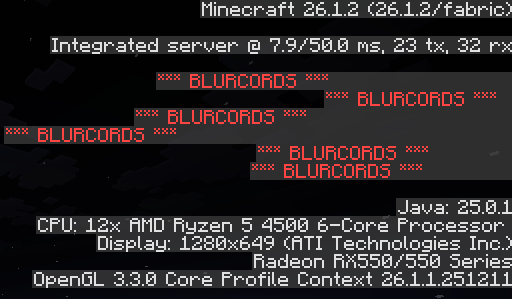
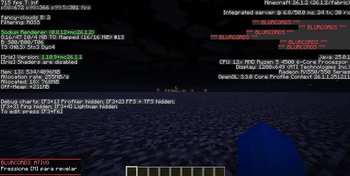
BlurCords is a security-focused mod that automatically censors your coordinates and sensitive data from the debug screen (F3). It's a perfect tool for streamers and players on Anarchy servers to protect their base locations from accidental leaks with just
Screenshots
About this Mod
BlurCords
Keep your base safe from accidental coordinate leaks.
I made BlurCords because accidentally leaking your base on an anarchy server or during a stream is the worst feeling ever. It's a simple, straightforward client-side mod that automatically censors sensitive information on your F3 debug screen.
What it does:
Auto-Censor: Whenever you open the F3 screen, your XYZ, Block, Chunk, Facing, and Biome are instantly blurred out and replaced with "*** BLURCORDS ***".
Toggle Key: Need to check your coords real quick? Just press the M key to reveal the numbers. Press it again to hide them back.
HUD Status: There is a clean, unobtrusive text on the corner of your screen telling you if BlurCords is active, so you're never guessing if you're safe.
Auto-Save: The mod remembers your choice. If you close the game with the coords hidden, they will stay hidden when you log back in.
Why use it?
On no-rules servers, a single screenshot on Discord or a random video frame with F3 open is enough to lose months of grinding. With this mod, even if you press the F3 button by mistake, your location stays an absolute secret.
Technical details:
Modloader: Fabric
Client-Side only: You only need to install it on your PC. It works on any multiplayer server, Realms, or single-player world.
Developed by Gatosmias/MiausDEV. same person
Available Versions
How to Install BlurCords on Your Server
Order Server
Order a Minecraft Java server with at least 3 GB RAM (4 GB recommended).
Set fabric Loader
In the panel under "Egg", select the fabric loader and matching Minecraft version (26.1.2).
Install Mod
Open the mod browser in the dashboard and search for "BlurCords". Click "Install" – done! Alternatively, upload the .jar via SFTP to the /mods folder.
Compatibility
Mod Loaders
Minecraft Versions
26.1.2, 26.1.1, 26.1
Server-side
✗ UnsupportedRecommended RAM
4 GB(min. 3 GB)Frequently Asked Questions
BlurCords server crashes on startup – what to do?
Most common cause: wrong fabric version or insufficient RAM. Check the server log (latest.log) for "OutOfMemoryError" or "Mixin" errors. With Mado Hosting: ensure at least 3 GB RAM is allocated and the loader matches the mod version (26.1.2). You can switch loaders with one click in the panel.
Is BlurCords compatible with fabric?
BlurCords officially supports fabric for Minecraft 26.1.2, 26.1.1, 26.1. The Mado dashboard automatically detects incompatible loader combinations.
Server lagging with BlurCords – how to optimize performance?
Recommended RAM: 4 GB (per 8 players). Use /spark profiler to check if BlurCords consumes the most tick time. Common fixes: reduce server view-distance to 8-10, install "performant" or "starlight" as supplementary mods on Forge. With Mado Hosting, your server runs on NVMe SSDs with dedicated CPU cores for minimal latency.
Similar Mods




![[ETF] Entity Texture Features](https://cdn.modrinth.com/data/BVzZfTc1/af683d206d50b05258d865b0d6e4aa2f2cee12f2_96.webp)
![[EMF] Entity Model Features](https://cdn.modrinth.com/data/4I1XuqiY/6e5bbd0d06b1741bfdab6c0cfab6de8fdaf0064c_96.webp)
Rent Modded Server
Install BlurCords with just one click on your server.