
BlxckoutFX
Let darkness fall everywhere for your eyes.
Screenshots
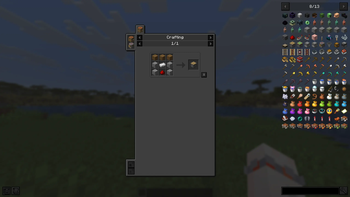
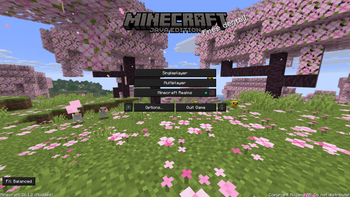
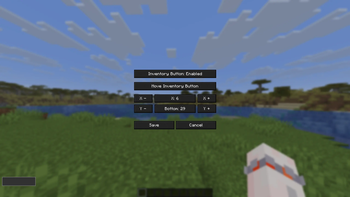
About this Mod



BlxckoutFX
A lightweight Minecraft mod that applies a consistent dark theme to buttons and in-game GUI surfaces using shader-based rendering.
By transforming the default white panels into a sleek custom mode, this shader-based solution brings a refined dark aesthetic to your interface everywhere you look, delivering an eye-friendly experience across all screens.
Let darkness fall everywhere for your eyes.
📖 About
This is my very first Minecraft mod. I originally created it because bright and white Minecraft interfaces were uncomfortable for my eyes. After building it for myself, I decided to share it with other players who might want the same kind of darker GUI experience.
BlxckoutFX is intentionally focused: it changes GUI rendering, not the world itself. Menu backgrounds, the Minecraft logo, and mod images are kept intact, while buttons and in-game GUI panels receive the darkening effect.
✨ Features
⚙️ Core Principles
- Shader-Based: The effect is handled through shader rendering instead of replacing vanilla textures.
- GUI Focused: The mod targets interface elements only.
- Lightweight: It avoids extra systems and keeps the feature set focused.
- Menu-Safe: Main menu backgrounds, logos, and mod list images are not darkened.
🎮 Mod Details
- Button Darkening in Menus: Menu screens darken buttons only.
- In-Game GUI Dark Theme: In-game screens can darken both buttons and GUI panels.
- Shader-Based Visual Styling: No manual shader setup is required.
- Loader Support: Supports NeoForge and Fabric Loader.
- Draggable FX Button: The on-screen
FXbutton cycles themes on left click and can be moved by holding and dragging. - Config Screen: Toggle the inventory button and adjust its saved position.
- Readable Text Handling: Soft, Balanced, and Dark modes use fixed readable text colors for better consistency.
🌑 Available Themes / Modes
- ⚪ Off: Disables the visual effect.
- 🔘 Soft: A lighter darkening mode for subtle interface dimming.
- ⚫ Balanced: The default mode, designed for regular use.
- ⬛ Dark: A stronger darkening mode for brighter interfaces.
- 👁️🗨️ Blxckout: The strongest preset for users who want the darkest look.
📥 Versions
| Minecraft Version | Loader | Mod Version | Status |
|---|---|---|---|
| 26.1.2 | NeoForge + Fabric | 1.1.0 | Main Release |
| 1.21.1 | NeoForge + Fabric | 1.1.0 | Legacy Branch |
| 1.20.1 | Forge + Fabric | 1.1.0 | Unsupported Port |
| 1.12.2 | Forge | - | In Development |
🚀 Installation
- Install your target Minecraft version via the Minecraft Launcher.
- Install NeoForge or Fabric Loader.
- Place the matching BlxckoutFX jar file into the
modsfolder. - Launch the game.
💡 Important Version Notice: The mod prioritizes support for the latest NeoForge and Fabric versions available for its target Minecraft version. If a compatibility issue appears, update to the minimum loader version listed on the release page.
📂 Branch Structure
main→ Minecraft 26.1.2 development1.21.1→ Minecraft 1.21.1 support branch1.20.1→ Minecraft 1.20.1 unsupport branch1.12.2→ Minecraft 1.12.2 backport branch (In Development)
🛠️ Support & Maintenance Policy
⚠️ Note for 1.20.1: This specific version has no active support. Issues may be fixed in bulk batches or left as-is depending on necessity.
If you encounter bugs, issues, or have suggestions, you can report them through either of the following channels:
- GitHub Issues: Open an issue directly in this repository.
- Discord Server: Join the community via Discord.
When reporting an issue, please include:
- Minecraft version
- Loader and loader version
- BlxckoutFX version
- A short description of what happened
- Screenshots if the issue is visual
💖 Support Me
If you would like to support the project, you can visit my Patreon page:
👉 Patreon
📜 License
This project is licensed under the MIT License.
Available Versions
How to Install BlxckoutFX on Your Server
Order Server
Order a Minecraft Java server with at least 3 GB RAM (4 GB recommended).
Set fabric Loader
In the panel under "Egg", select the fabric loader and matching Minecraft version (26.1.2).
Install Mod
Open the mod browser in the dashboard and search for "BlxckoutFX". Click "Install" – done! Alternatively, upload the .jar via SFTP to the /mods folder.
Compatibility
Mod Loaders
Minecraft Versions
26.1.2, 1.21.11, 1.21.10 (+15 more)
Server-side
✗ UnsupportedRecommended RAM
4 GB(min. 3 GB)Frequently Asked Questions
BlxckoutFX server crashes on startup – what to do?
Most common cause: wrong fabric version or insufficient RAM. Check the server log (latest.log) for "OutOfMemoryError" or "Mixin" errors. With Mado Hosting: ensure at least 3 GB RAM is allocated and the loader matches the mod version (26.1.2). You can switch loaders with one click in the panel.
Is BlxckoutFX compatible with fabric and forge and neoforge?
BlxckoutFX officially supports fabric, forge, neoforge for Minecraft 26.1.2, 1.21.11, 1.21.10. Note: Forge and Fabric mods are NOT cross-compatible – pick one loader and stick with it. The Mado dashboard automatically detects incompatible loader combinations.
Server lagging with BlxckoutFX – how to optimize performance?
Recommended RAM: 4 GB (per 8 players). Use /spark profiler to check if BlxckoutFX consumes the most tick time. Common fixes: reduce server view-distance to 8-10, install "performant" or "starlight" as supplementary mods on Forge. With Mado Hosting, your server runs on NVMe SSDs with dedicated CPU cores for minimal latency.
Similar Mods




![[ETF] Entity Texture Features](https://cdn.modrinth.com/data/BVzZfTc1/af683d206d50b05258d865b0d6e4aa2f2cee12f2_96.webp)
![[EMF] Entity Model Features](https://cdn.modrinth.com/data/4I1XuqiY/6e5bbd0d06b1741bfdab6c0cfab6de8fdaf0064c_96.webp)
Rent Modded Server
Install BlxckoutFX with just one click on your server.