
Bok's Banging Butterflies
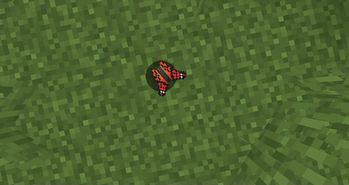
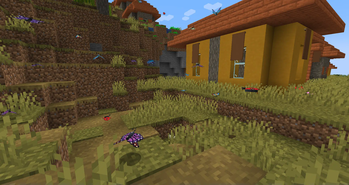
This mod adds butterflies with a full life cycle to the world of Minecraft. Butterflies can be caught or released using a butterfly net. Once caught, they can be bottled and placed in the world as decorative objects.
Screenshots
About this Mod
Bok's Banging Butterflies
This mod adds butterflies with a full life cycle to the world of Minecraft. It
features several butterfly species as well as several moth species. Most are
based on real-life butterflies but a few are pure fantasy creatures.
Features
Butterflies and Moths
There are several species of butterfly and moths in the mod, each with their
own design and behaviour. Some will be larger, some will move faster, some will
live longer than others. Some are dimorphic, some love apples, some will live
in wood or fruit.
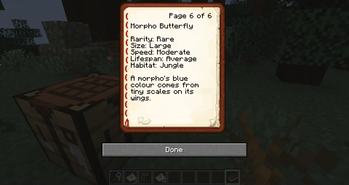
Butterflies can be caught or released using a butterfly net. Once caught, they
can be bottled and placed in the world as decorative objects. They can also be
stored in a butterfly book where you can learn more about them.
Eggs
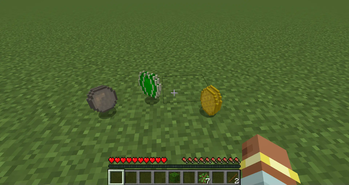
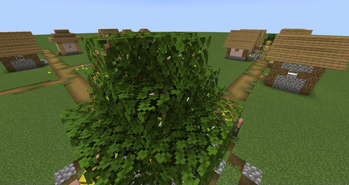
Butterflies will lay eggs in leaves if they get close to them. The eggs will
eventually hatch into caterpillars. If a player breaks the eggs, they will
drop. Players can then replant these eggs on other leaves.
Caterpillars
After living on the leaves for a short time, a caterpillar will eventually
build a chrysalis. If the caterpillars end up on any other block, they will
instead starve to death.
Players can pick up caterpillars and move them to other leaf blocks if they
wish.
Chrysalises
Built by caterpillars, these will eventually hatch into new butterflies within
the world. These cannot be moved by players and will be destroyed if they
attempt to do so.
Silk
Some moth cocoons will drop silk, which can be crafted into string or paper.
Unfortunately, this kills the moth.
Scrolls, Microscopes, and Books
Scrolls can be examined using the butterfly microscope, so you can learn more
about the various species. You can also use the microscope to place the scrolls
in a book, allowing the player to collect all the information in one place.
Jars
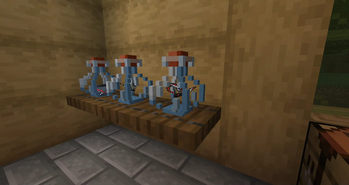
Butterflies and caterpillars can be placed into jars. These are decorative
items that can be placed in the world. Butterflies and caterpillars placed
this way will not die, lay eggs or create chrysalises.
If you want to get the butterfly or caterpillar back, they can be released by
using the bottle while not highlighting a block.
Flower Pollination
Butterflies will occasionally fly toward and pollinate flowers. This will spawn
flower buds that will eventually bloom into full flowers.
Breeding
Butterflies can be bred by players feeding them their favourite flower (or
other plant). You will need to learn what their favourite food is by studying
the butterfly book.
Server Config
There are now server config options to help manage butterfly growth. You can
find them in your world folder, under /serverconfig/butterflies-server.toml.
The available options are:
double_egg_chance: Defines the chance a butterfly has double the eggs
(default: 0.0625).
egg_limit: Defines how many eggs each butterfly can lay (default: 1).
max_density: Defines how many butterflies can be in a 32x32x32 region
before breeding is disabled. If set to zero, this is ignored (default: 16).
enable_lifespan: If set to TRUE butterflies will die naturally
(default: true).
enable_pollination: If set to TRUE butterflies will pollinate flowers and
cause them to spread (default: true)
Development Diary
Source Code
Available Versions
How to Install Bok's Banging Butterflies on Your Server
Order Server
Order a Minecraft Java server with at least 3 GB RAM (4 GB recommended).
Set forge Loader
In the panel under "Egg", select the forge loader and matching Minecraft version (1.21.4).
Install Mod
Open the mod browser in the dashboard and search for "Bok's Banging Butterflies". Click "Install" – done! Alternatively, upload the .jar via SFTP to the /mods folder.
Compatibility
Mod Loaders
Minecraft Versions
1.21.4, 1.21.1, 1.20.4 (+4 more)
Server-side
✓ RequiredRecommended RAM
4 GB(min. 3 GB)Frequently Asked Questions
Bok's Banging Butterflies server crashes on startup – what to do?
Most common cause: wrong forge version or insufficient RAM. Check the server log (latest.log) for "OutOfMemoryError" or "Mixin" errors. With Mado Hosting: ensure at least 3 GB RAM is allocated and the loader matches the mod version (1.21.4). You can switch loaders with one click in the panel.
Is Bok's Banging Butterflies compatible with forge and neoforge?
Bok's Banging Butterflies officially supports forge, neoforge for Minecraft 1.21.4, 1.21.1, 1.20.4. The Mado dashboard automatically detects incompatible loader combinations.
Server lagging with Bok's Banging Butterflies – how to optimize performance?
Recommended RAM: 4 GB (per 8 players). Use /spark profiler to check if Bok's Banging Butterflies consumes the most tick time. Common fixes: reduce server view-distance to 8-10, install "performant" or "starlight" as supplementary mods on Forge. With Mado Hosting, your server runs on NVMe SSDs with dedicated CPU cores for minimal latency.
Similar Mods

![[ETF] Entity Texture Features](https://cdn.modrinth.com/data/BVzZfTc1/af683d206d50b05258d865b0d6e4aa2f2cee12f2_96.webp)
![[EMF] Entity Model Features](https://cdn.modrinth.com/data/4I1XuqiY/6e5bbd0d06b1741bfdab6c0cfab6de8fdaf0064c_96.webp)



Rent Modded Server
Install Bok's Banging Butterflies with just one click on your server.