
Boring Default Game Rules
A mod that allows to change the default game rule values through convenient methods.
Screenshots
About this Mod
Boring Default Game Rules

Boring Default Game Rules is a simple mod that allows for changing the default values of all games rules. This mod aims to be the most convenient way to edit the default values of a game rule by not only offering a config screen, but also easy off-game configuration by generating a JSON Schema!
Part of the Boring series. Don't forget to check out Boring Backgrounds and Damage Incorporated!
Dependencies
As of Minecraft 1.20.6+, this mod requires Fabric API and either Fabric Loader or Quilt Loader.
This mod also has optional support with Mod Menu.
Configuration
With this mod, there are two main methods in which you can edit the default game rules.
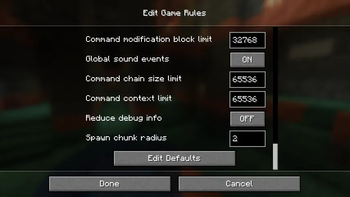
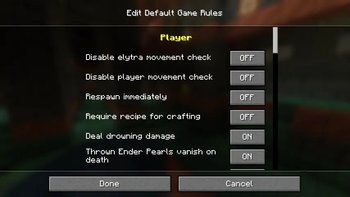
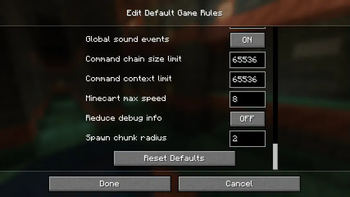
The main way to edit the defaults is through the "Edit Default Game Rules" screen, which can be opened either thanks to a button at the bottom of Vanilla's "Game Rules" screen or through the mod's config button on Mod Menu. On this screen, you can change the defaults like you would change the game rule values on a regular world, with a "Reset Defaults" button being available at the bottom of the list if needed.
However, If you aren't in-game and have at least started it once, don't worry! There is a config file is located at .minecraft/config/boring_default_game_rules/config.json, and if you have a JSON Schema-compatible editor (Visual Studio Code is recommended if you have none), it will make use of the automatically-generated JSON Schema in order to enhance your editing experience! The generated JSON Schema contains not only documentation on the config itself, but also provides suggestions for all game rules detected on the game.
Below here is the commented format (if you are offline, the JSON Schema also contains information about the options):
{
    // The file path of this mod's JSON schema. Don't worry about changing this value!
    "$schema": "config.schema.json",
    // A map of game rules and the new default value that will override the original
    "default_game_rules": {
        // This will set "keepInventory" to true as the default value
        // Autocompletions are provided by the JSON schema, so don't worry about having to memorize all game rule options
        "keepInventory": true
    },
    // Defines if a JSON schema should be generated or not. Only disable this if you know what you are doing
    "generate_json_schema": true
}
Available Versions
How to Install Boring Default Game Rules on Your Server
Order Server
Order a Minecraft Java server with at least 3 GB RAM (4 GB recommended).
Set fabric Loader
In the panel under "Egg", select the fabric loader and matching Minecraft version (1.21.8).
Install Mod
Open the mod browser in the dashboard and search for "Boring Default Game Rules". Click "Install" – done! Alternatively, upload the .jar via SFTP to the /mods folder.
Compatibility
Mod Loaders
Minecraft Versions
1.21.8, 1.21.7, 1.21.6 (+27 more)
Server-side
✓ RequiredRecommended RAM
4 GB(min. 3 GB)Frequently Asked Questions
Boring Default Game Rules server crashes on startup – what to do?
Most common cause: wrong fabric version or insufficient RAM. Check the server log (latest.log) for "OutOfMemoryError" or "Mixin" errors. With Mado Hosting: ensure at least 3 GB RAM is allocated and the loader matches the mod version (1.21.8). You can switch loaders with one click in the panel.
Is Boring Default Game Rules compatible with fabric and quilt?
Boring Default Game Rules officially supports fabric, quilt for Minecraft 1.21.8, 1.21.7, 1.21.6. The Mado dashboard automatically detects incompatible loader combinations.
Server lagging with Boring Default Game Rules – how to optimize performance?
Recommended RAM: 4 GB (per 8 players). Use /spark profiler to check if Boring Default Game Rules consumes the most tick time. Common fixes: reduce server view-distance to 8-10, install "performant" or "starlight" as supplementary mods on Forge. With Mado Hosting, your server runs on NVMe SSDs with dedicated CPU cores for minimal latency.
Similar Mods




Rent Modded Server
Install Boring Default Game Rules with just one click on your server.