
BossBarTools
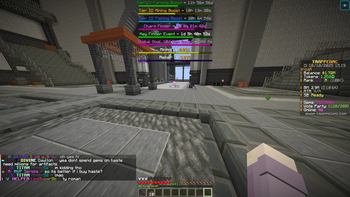
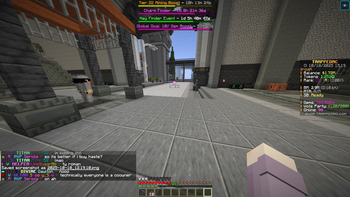
A simple and configurable Fabric mod for Minecraft that allows you to hide boss bars completely or toggle their visibility on demand
Screenshots


About this Mod
Boss Bar Tools
A powerful and configurable Fabric mod that gives you complete control over boss bars in Minecraft 1.21.4.
🎯 What does it do?
Tired of boss bars cluttering your screen? Boss Bar Tools lets you hide them completely or selectively filter which ones to show. Perfect for streamers, builders, or anyone who wants a cleaner HUD experience.
✨ Key Features
🔧 Complete Control
- Global Toggle: Hide all boss bars with a single keypress (default:
H) - Smart Filtering: Choose exactly which boss bars to hide based on their text
- Instant Toggle: Quick on/off switching with customizable keybind
🎯 Advanced Filtering
- Exact Match: Hide boss bars with specific titles like "Ender Dragon"
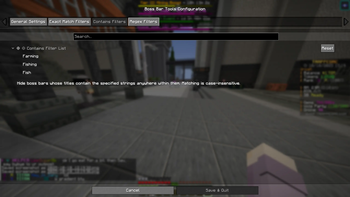
- Contains Filter: Hide any boss bar containing words like "loading" or "fish"
- Regex Support: Advanced pattern matching for power users
⚙️ Easy Configuration
- ModMenu Integration: Beautiful in-game configuration interface
- Four organized tabs: General, Exact Match, Contains, and Regex filters
- Live Preview: See changes immediately without restarting
🌍 Quality of Life
- Multilingual: Supports English and Spanish
- Persistent Settings: Your preferences are automatically saved
- Performance Friendly: Minimal impact using efficient Mixin injection
🚀 Perfect For
- Streamers who want cleaner gameplay footage
- Builders who need unobstructed views
- Modpack Players dealing with too many boss bars
- Anyone who wants a customizable HUD experience
📖 How to Use
Quick Start
- Install the mod
- Press
Hin-game to toggle all boss bars - Use ModMenu to access detailed configuration
Advanced Filtering
Open the configuration menu and set up filters:
Hide specific bosses:
- Add "Ender Dragon" to Exact Match filters
- Add "Wither" to Exact Match filters
Hide loading bars:
- Add "loading" to Contains filters
- Add "progress" to Contains filters
Hide percentage displays:
- Add
\d+%to Regex filters (matches "Loading 50%", etc.)
🔧 Technical Details
- Client-side only: Works on any server
- Mod compatibility: Works with all modded boss bars
- Clean removal: No empty spaces or ghost titles
- Mixin-based: Efficient performance with minimal overhead
📋 Requirements
- Minecraft 1.21.4
- Fabric Loader 0.17.3+
- Fabric API (any compatible version)
- ModMenu (recommended for configuration)
🤝 Open Source
This mod is completely free and open source under MIT license. Feel free to:
- Modify and redistribute
- Include in modpacks
- Contribute improvements
- Learn from the code
🔗 Links
- Source Code: Available on GitHub
- Issues & Support: Report bugs or request features
- Documentation: Detailed guides and examples
Made with ❤️ for the Minecraft community
Clean HUDs, better gameplay!
Available Versions
How to Install BossBarTools on Your Server
Order Server
Order a Minecraft Java server with at least 3 GB RAM (4 GB recommended).
Set fabric Loader
In the panel under "Egg", select the fabric loader and matching Minecraft version (1.21.4).
Install Mod
Open the mod browser in the dashboard and search for "BossBarTools". Click "Install" – done! Alternatively, upload the .jar via SFTP to the /mods folder.
Compatibility
Mod Loaders
Minecraft Versions
1.21.4
Server-side
✗ UnsupportedRecommended RAM
4 GB(min. 3 GB)Frequently Asked Questions
BossBarTools server crashes on startup – what to do?
Most common cause: wrong fabric version or insufficient RAM. Check the server log (latest.log) for "OutOfMemoryError" or "Mixin" errors. With Mado Hosting: ensure at least 3 GB RAM is allocated and the loader matches the mod version (1.21.4). You can switch loaders with one click in the panel.
Is BossBarTools compatible with fabric?
BossBarTools officially supports fabric for Minecraft 1.21.4. The Mado dashboard automatically detects incompatible loader combinations.
Server lagging with BossBarTools – how to optimize performance?
Recommended RAM: 4 GB (per 8 players). Use /spark profiler to check if BossBarTools consumes the most tick time. Common fixes: reduce server view-distance to 8-10, install "performant" or "starlight" as supplementary mods on Forge. With Mado Hosting, your server runs on NVMe SSDs with dedicated CPU cores for minimal latency.
Similar Mods

![[ETF] Entity Texture Features](https://cdn.modrinth.com/data/BVzZfTc1/af683d206d50b05258d865b0d6e4aa2f2cee12f2_96.webp)
![[EMF] Entity Model Features](https://cdn.modrinth.com/data/4I1XuqiY/6e5bbd0d06b1741bfdab6c0cfab6de8fdaf0064c_96.webp)



Rent Modded Server
Install BossBarTools with just one click on your server.