
Screenshots
About this Mod
Have You ever dreamt about better mana pools, spreaders or sparks for your beloved Botania?
Well, dream no more, meet new extremely flexible and configurable addon: Botaniverse!



Depends on HammerLib: 
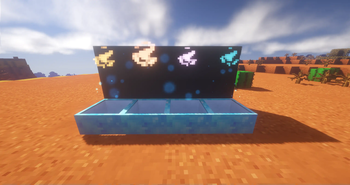
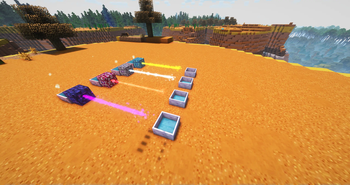
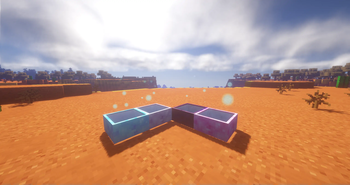
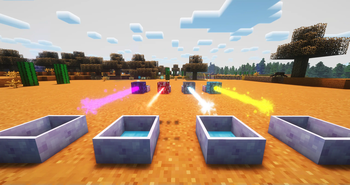
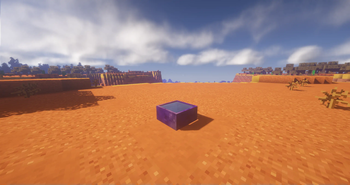
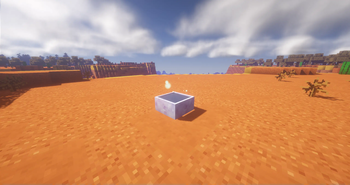
Currently this mod adds 4 types of Mana Pools, and 4 types of Sparks. Each subsequent Spark or Pool
drastically surpasses the previous one.
Pools:
 - Nilfheim Mana Pool. Stores 10 times the default Mana Pool.
 - Muspelheim Mana Pool. Stores 100 times the default Mana Pool.
 - Alfheim Mana Pool. Stores 1000 times the default Mana Pool.
 - Asgard Mana Pool. Stores 2000 times the default Mana Pool.
Config also allows you to set a value for pools transfer rate IN and OUT of items. Example is when you throw a tablet into the pool trying to discharge or charge it. Now this can be adjusted and will give a user more freedom.
Spreades:
 - Nilfheim Mana spreader. Carries 2400 Mana per burst
 - Muspelheim Mana spreader. Carries 9600 Mana per burst
 - Alfheim Mana spreader. Carries 38400 Mana per burst
 - Asgard Mana spreader. Carries 153600 Mana per burst
Also adds a Creative Mana spreader capable of carrying 107374182 Mana per burst
Sparks:
 - Nilfheim Spark. Has a Range of 18 and capable of transferring up to 100000 Mana/t.
 - Muspelheim Spark. Has a Range of 24 and capable of transferring up to 250000Mana/t.
 - Alfheim Spark. Has a Range of 30 and capable of transferring up to 625000Mana/t.
 - Asgard Spark. Has a Range of 36 and capable of transferring up to 1562500Mana/t.
Runes:
 - Nilfheim Rune
 - Muspelheim Rune
 - Alfheim Rune
 - Asgard Rune
For modpack's devs. You can configure various parameters according to your needs and balance in your modpack, if the values by default seem to be too OP.
Beta version!: Here be dragons!
Credits:
Special thanks to @PrySHio for design and textures
Permissions:
1.You are allowed to redistribute this mod, but you must credit the download source as 'CurseForge' or 'Modrinth' and include a direct link that leads to the page of this mod
2.You can use this mod in your modpacks
3.You are allowed to modify the source code of the mod
Available Versions
How to Install Botaniverse on Your Server
Order Server
Order a Minecraft Java server with at least 3 GB RAM (4 GB recommended).
Set forge Loader
In the panel under "Egg", select the forge loader and matching Minecraft version (1.12.2).
Install Mod
Open the mod browser in the dashboard and search for "Botaniverse". Click "Install" – done! Alternatively, upload the .jar via SFTP to the /mods folder.
Compatibility
Mod Loaders
Minecraft Versions
1.12.2
Server-side
✓ RequiredRecommended RAM
4 GB(min. 3 GB)Frequently Asked Questions
Botaniverse server crashes on startup – what to do?
Most common cause: wrong forge version or insufficient RAM. Check the server log (latest.log) for "OutOfMemoryError" or "Mixin" errors. With Mado Hosting: ensure at least 3 GB RAM is allocated and the loader matches the mod version (1.12.2). You can switch loaders with one click in the panel.
Is Botaniverse compatible with forge?
Botaniverse officially supports forge for Minecraft 1.12.2. The Mado dashboard automatically detects incompatible loader combinations.
Server lagging with Botaniverse – how to optimize performance?
Recommended RAM: 4 GB (per 8 players). Use /spark profiler to check if Botaniverse consumes the most tick time. Common fixes: reduce server view-distance to 8-10, install "performant" or "starlight" as supplementary mods on Forge. With Mado Hosting, your server runs on NVMe SSDs with dedicated CPU cores for minimal latency.
Similar Mods





Rent Modded Server
Install Botaniverse with just one click on your server.