
Boulders
Just boulders on the surface
Screenshots
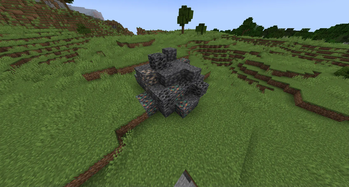
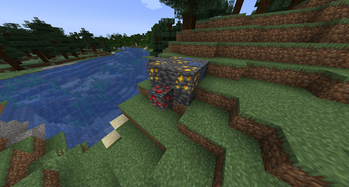
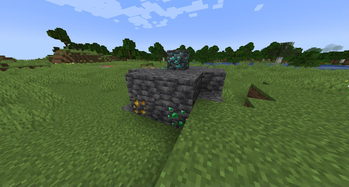
About this Mod




🏠 About
No more wasting time digging for your first resources! Boulders adds a little surface boulders filled with deepslate
and ores, so you can gear up quickly and jump straight into the adventure.
- Find some ores right on the surface, no caves needed!
- Spend less time mining and more time discovering the world.
- Get tools and armor faster than ever!
The original idea behind this mod and part of its source code were shamelessly borrowed from
the Oritech mod. All credit and thanks should go to the original author!
🔧 Configuration
Many aspects of boulder generation can be customized using datapacks. Each boulder is defined as a configured_feature,
and its properties can be overridden in the following JSON files:
data/boulders/worldgen/configured_feature/boulder_common.jsondata/boulders/worldgen/configured_feature/boulder_uncommon.jsondata/boulders/worldgen/configured_feature/boulder_rare.json
Available properties:
material– The material used to generate the boulder (block identifier).ratio– The proportion of the material compared to ores.radius– The minimum and maximum radius of the boulder. The min value must be at least 1, and max can go up to 64 (
creating an exceptionally large boulder!).ores– A list of ore identifiers. These can include both vanilla and modded ores.
📢 Feedback
Feel free to reach out in our Discord if you encounter any bugs, have questions, or would like to share suggestions for
improving the mod: https://discord.gg/CJFGMTB6kN
Available Versions
How to Install Boulders on Your Server
Order Server
Order a Minecraft Java server with at least 4 GB RAM (6 GB recommended).
Set fabric Loader
In the panel under "Egg", select the fabric loader and matching Minecraft version (1.21.4).
Install Mod
Open the mod browser in the dashboard and search for "Boulders". Click "Install" – done! Alternatively, upload the .jar via SFTP to the /mods folder.
Compatibility
Mod Loaders
Minecraft Versions
1.21.4, 1.21.3, 1.21.2 (+1 more)
Server-side
✓ RequiredRecommended RAM
6 GB(min. 4 GB)Frequently Asked Questions
Boulders server crashes on startup – what to do?
Most common cause: wrong fabric version or insufficient RAM. Check the server log (latest.log) for "OutOfMemoryError" or "Mixin" errors. With Mado Hosting: ensure at least 4 GB RAM is allocated and the loader matches the mod version (1.21.4). You can switch loaders with one click in the panel.
Is Boulders compatible with fabric and neoforge?
Boulders officially supports fabric, neoforge for Minecraft 1.21.4, 1.21.3, 1.21.2. The Mado dashboard automatically detects incompatible loader combinations.
Server lagging with Boulders – how to optimize performance?
Recommended RAM: 6 GB (per 5 players). Use /spark profiler to check if Boulders consumes the most tick time. Common fixes: reduce server view-distance to 8-10, install "performant" or "starlight" as supplementary mods on Forge. With Mado Hosting, your server runs on NVMe SSDs with dedicated CPU cores for minimal latency.
Similar Mods



Rent Modded Server
Install Boulders with just one click on your server.