
BowCharge
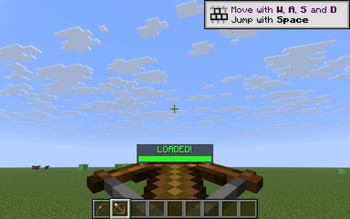
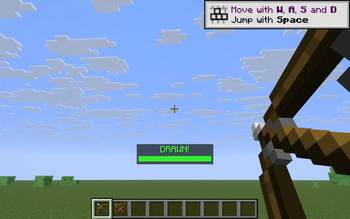
Centered HUD bar showing the exact draw % of your bow and charge % of a crossbow, with a red-yellow-green gradient and a clear DRAWN!/LOADED! cue at full power. Toggle with B.
Screenshots
About this Mod
BowCharge answers a question vanilla never quite does: "is my bow ready yet?" When you start drawing a bow — or charging a crossbow — a thin progress bar fades in above your hotbar showing the exact charge percentage. A red->yellow->green gradient tracks the pull, and the moment you hit full draw the bar locks green and the label flips to DRAWN! (or LOADED! for crossbows). Release; bar disappears. No fluff, no config screens, just the one number you actually want to see while aiming.
What it shows
While drawing a bow the bar shows Draw: 73%; at full draw it locks green and reads DRAWN!. For a crossbow being cranked it shows Load: 60%, flipping to LOADED! when it locks in.
How it works
- Bow draw progress uses vanilla's own pull curve
(t^2 + 2t) / 3, so the bar lines up exactly with when your shot becomes a power-3 arrow. - Crossbow progress is a straight 25-tick charge (the vanilla unenchanted load time).
- The HUD is drawn through Fabric's
HudRenderCallback, so it respects F1 (hide HUD) automatically and never overlaps the hotbar. - Everything is read-only — no mixins, no input interception, no movement changes. Drop it on any server.
Controls
- B — toggle the bar on / off (default: on)
The key is read via raw GLFW polling so it works identically on every supported Minecraft version without a separate rebind screen.
Compatibility
Works on Minecraft 1.21.8, 1.21.9, 1.21.10, and 1.21.11 (Fabric Loader 0.16+). One JAR for all four versions — install with Fabric API and drop into your mods/ folder.
- Pure client-side — install on the client only, works on any server, no anti-cheat impact.
- Hides automatically when you press F1 to hide the rest of the HUD.
- Zero config files; nothing to set up.
Why
Vanilla gives you a hand-animation hint that the bow is drawn, but no precise feedback — and crossbows give you almost nothing until the click. BowCharge turns "feel" into a number you can read at a glance, which matters in PvP, long-shot archery, and anywhere you want to time a max-power release.
Available Versions
How to Install BowCharge on Your Server
Order Server
Order a Minecraft Java server with at least 3 GB RAM (4 GB recommended).
Set fabric Loader
In the panel under "Egg", select the fabric loader and matching Minecraft version (1.21.11).
Install Mod
Open the mod browser in the dashboard and search for "BowCharge". Click "Install" – done! Alternatively, upload the .jar via SFTP to the /mods folder.
Compatibility
Mod Loaders
Minecraft Versions
1.21.11, 1.21.10, 1.21.9 (+1 more)
Server-side
✗ UnsupportedRecommended RAM
4 GB(min. 3 GB)Frequently Asked Questions
BowCharge server crashes on startup – what to do?
Most common cause: wrong fabric version or insufficient RAM. Check the server log (latest.log) for "OutOfMemoryError" or "Mixin" errors. With Mado Hosting: ensure at least 3 GB RAM is allocated and the loader matches the mod version (1.21.11). You can switch loaders with one click in the panel.
Is BowCharge compatible with fabric?
BowCharge officially supports fabric for Minecraft 1.21.11, 1.21.10, 1.21.9. The Mado dashboard automatically detects incompatible loader combinations.
Server lagging with BowCharge – how to optimize performance?
Recommended RAM: 4 GB (per 8 players). Use /spark profiler to check if BowCharge consumes the most tick time. Common fixes: reduce server view-distance to 8-10, install "performant" or "starlight" as supplementary mods on Forge. With Mado Hosting, your server runs on NVMe SSDs with dedicated CPU cores for minimal latency.
Similar Mods




![[ETF] Entity Texture Features](https://cdn.modrinth.com/data/BVzZfTc1/af683d206d50b05258d865b0d6e4aa2f2cee12f2_96.webp)
![[EMF] Entity Model Features](https://cdn.modrinth.com/data/4I1XuqiY/6e5bbd0d06b1741bfdab6c0cfab6de8fdaf0064c_96.webp)
Rent Modded Server
Install BowCharge with just one click on your server.