
Bramble Mob
A parkour-based hostile mob in the Blaze & Breeze family
Screenshots
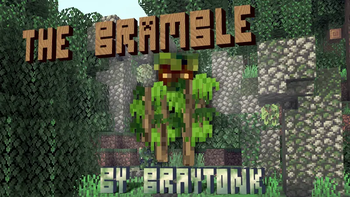
About this Mod
This is the mob-only version of the bramble datapack. If you want the bramble structure, that version can be found at https://modrinth.com/datapack/bramble-henge. If you want to add the bramble to the Lush Cave Ruins structure, that can be found at https://modrinth.com/datapack/lush-cave-bramble.
The Bramble
This datapack adds a custom earth-themed mob that is desinged to be vanilla-friendly in the vein of the blaze and the breeze. The bramble provides a unique parkour-based combat experience—do you have the platforming skill to take it down?
Meet the Bramble:
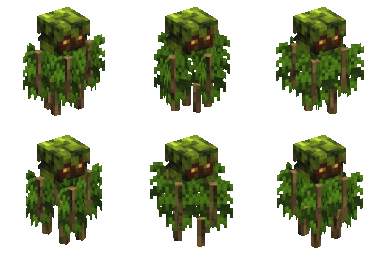
The bramble has the following behaviors:
- The bramble will steadily float upwards as you fight, and will float more when damaged.
- The bramble places temporary leaf blocks that you must climb to reach the bramble.
- The bramble attacks by throwing a poisonous azalea bush into the air. You need to move before it lands!
- The bramble slowly descends when not in combat.
Using the Bramble
If you want to use the bramble in your own structures/datapacks/whatever feel free to do so, and here is what you will need:
- To summon a bramble directly, use the function
keeb_mob_bramble:summon. - There are pre-set template pools
keeb_mob_bramble:bramble/mobandkeeb_mob_bramble:bramble/spawnerfor the mob and a spawner respectively: just use theminecraft:bottomjigsaw name. - There is a trial spawner configuration set for the bramble
keeb_mob_bramble:bramble.
Additionally, if you want even more control, there are a couple of function tags you can use:
#keeb_mob_bramble:bramble/spawnis called once on a Bramble when it spawns#keeb_mob_bramble:bramble/despawnis called once at a Bramble's last position after it despawns#keeb_mob_bramble:bramble/dieis called once at a Bramble's last position after it dies
Available Versions
How to Install Bramble Mob on Your Server
Order Server
Order a Minecraft Java server with at least 3 GB RAM (4 GB recommended).
Set datapack Loader
In the panel under "Egg", select the datapack loader and matching Minecraft version (26.2).
Install Mod
Open the mod browser in the dashboard and search for "Bramble Mob". Click "Install" – done! Alternatively, upload the .jar via SFTP to the /mods folder.
Compatibility
Mod Loaders
Minecraft Versions
26.2, 26.1.2, 26.1.1 (+8 more)
Server-side
✓ RequiredRecommended RAM
4 GB(min. 3 GB)Frequently Asked Questions
Bramble Mob server crashes on startup – what to do?
Most common cause: wrong datapack version or insufficient RAM. Check the server log (latest.log) for "OutOfMemoryError" or "Mixin" errors. With Mado Hosting: ensure at least 3 GB RAM is allocated and the loader matches the mod version (26.2). You can switch loaders with one click in the panel.
Is Bramble Mob compatible with datapack and fabric and forge and neoforge and quilt?
Bramble Mob officially supports datapack, fabric, forge, neoforge, quilt for Minecraft 26.2, 26.1.2, 26.1.1. Note: Forge and Fabric mods are NOT cross-compatible – pick one loader and stick with it. The Mado dashboard automatically detects incompatible loader combinations.
Server lagging with Bramble Mob – how to optimize performance?
Recommended RAM: 4 GB (per 8 players). Use /spark profiler to check if Bramble Mob consumes the most tick time. Common fixes: reduce server view-distance to 8-10, install "performant" or "starlight" as supplementary mods on Forge. With Mado Hosting, your server runs on NVMe SSDs with dedicated CPU cores for minimal latency.
Similar Mods
![[EMF] Entity Model Features](https://cdn.modrinth.com/data/4I1XuqiY/6e5bbd0d06b1741bfdab6c0cfab6de8fdaf0064c_96.webp)


Rent Modded Server
Install Bramble Mob with just one click on your server.