BreakWarn
A one-shot sound + on-screen banner the moment a tool or armor piece you're carrying drops below 10% durability - so you don't snap your good pickaxe deep in a cave without noticing.
Screenshots
About this Mod
BreakWarn quietly watches every damageable item you're carrying and warns you the moment one is about to snap. No HUD clutter when nothing's wrong, no spam when something is — just one alert per item, exactly when you need it.
What it does
- Monitors the 9 hotbar slots, the off-hand, and all 4 armor slots every tick.
- When the remaining durability of any monitored item drops to <= 10%, it fires a one-shot warning:
- Sound — a sharp anvil-land thud, so you notice even when you're not looking at the corner.
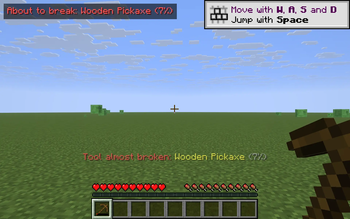
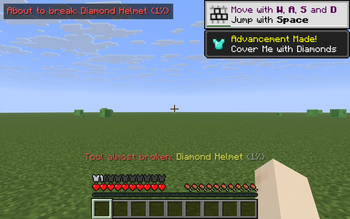
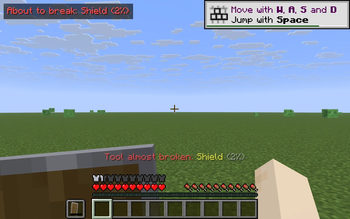
- Action-bar message above the hotbar: "Tool almost broken:
- (
.%)" - (
- HUD banner in the top-left for ~3.5 s: "About to break:
- (
.%)" - (
- Each item gets exactly one warning per damage cycle. Repair it (anvil, grindstone, Mending) and BreakWarn will warn you again if the same item dips back below the threshold. Swap to a different item and the new item starts fresh.
- Built-in hysteresis: the warning resets at 20% remaining, so a hovering 9-11% item won't spam you.
Controls
- B — toggle BreakWarn on/off. Action-bar confirmation tells you the current state.
Why
Caving with one good pickaxe, you find the ore vein — but eight blocks in, the pickaxe snaps and the diamonds vanish into the void. BreakWarn is the smallest possible fix: one banner, one sound, one alert per item, no config screens, no setup.
Notes
- Pure client-side — install on your client only. Works on any Fabric server, fully vanilla compatible.
- Sound and action-bar messages are suppressed while you're in an inventory/menu, so opening your chest doesn't spam alerts.
- The HUD banner respects F1 (hide HUD) and disappears on its own after a few seconds.
- ~180 lines of code, no config files, only Fabric API as a dependency.
Compatibility
Minecraft 1.21.8, 1.21.9, 1.21.10, 1.21.11 — Fabric Loader 0.16+. One JAR covers all four. Drop into your mods/ folder alongside Fabric API.
Available Versions
How to Install BreakWarn on Your Server
Order Server
Order a Minecraft Java server with at least 3 GB RAM (4 GB recommended).
Set fabric Loader
In the panel under "Egg", select the fabric loader and matching Minecraft version (1.21.11).
Install Mod
Open the mod browser in the dashboard and search for "BreakWarn". Click "Install" – done! Alternatively, upload the .jar via SFTP to the /mods folder.
Compatibility
Mod Loaders
Minecraft Versions
1.21.11, 1.21.10, 1.21.9 (+1 more)
Server-side
✗ UnsupportedRecommended RAM
4 GB(min. 3 GB)Frequently Asked Questions
BreakWarn server crashes on startup – what to do?
Most common cause: wrong fabric version or insufficient RAM. Check the server log (latest.log) for "OutOfMemoryError" or "Mixin" errors. With Mado Hosting: ensure at least 3 GB RAM is allocated and the loader matches the mod version (1.21.11). You can switch loaders with one click in the panel.
Is BreakWarn compatible with fabric?
BreakWarn officially supports fabric for Minecraft 1.21.11, 1.21.10, 1.21.9. The Mado dashboard automatically detects incompatible loader combinations.
Server lagging with BreakWarn – how to optimize performance?
Recommended RAM: 4 GB (per 8 players). Use /spark profiler to check if BreakWarn consumes the most tick time. Common fixes: reduce server view-distance to 8-10, install "performant" or "starlight" as supplementary mods on Forge. With Mado Hosting, your server runs on NVMe SSDs with dedicated CPU cores for minimal latency.
Similar Mods




![[ETF] Entity Texture Features](https://cdn.modrinth.com/data/BVzZfTc1/af683d206d50b05258d865b0d6e4aa2f2cee12f2_96.webp)
![[EMF] Entity Model Features](https://cdn.modrinth.com/data/4I1XuqiY/6e5bbd0d06b1741bfdab6c0cfab6de8fdaf0064c_96.webp)
Rent Modded Server
Install BreakWarn with just one click on your server.