
BreedTimer
BreedTimer shows countdown timers above animals and villagers so you know when they can breed again.
Screenshots
About this Mod
BreedTimer
Always know when your animals and villagers are ready to breed!
This lightweight client-side Fabric mod displays floating timers above breedable animals and villagers, showing exactly when they can breed again and how long babies take to grow up.
Features
Breed Cooldown Timers
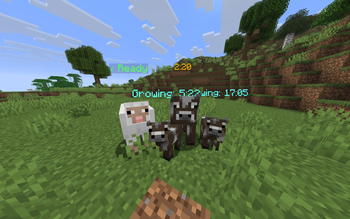
- Floating labels — Clear countdown timers displayed directly above each animal or villager
- Baby growth timers — See exactly when baby animals and villagers will grow up
- Love mode indicator — Visual feedback when animals are in love mode
- Ready indicator — Instantly see which animals and villagers are ready to breed
Villager Support
- Adult villagers show
✓ Readyby default - Breed cooldown starts after villagers stop showing heart particles — 5-minute timer identical to animals
- Baby villager growth countdown — 20 minutes until adult
- Compact HUD shows a dedicated villager line:
Villagers X ready Y cooldown Z babies
Turtle Egg Tracking
- Floating labels above turtle egg blocks showing the current hatch stage — Fresh (cyan), Cracking (orange), Hatching! (green)
- Compact HUD shows a dedicated egg line when eggs are nearby:
Turtle Eggs X fresh Y cracking Z hatching
Smart Rendering
- Distance-based fading — Timers fade out smoothly at longer distances
- FOV culling — Only renders timers for entities within your field of view
- Line-of-sight check — No timers through walls
- Configurable scan radius — Control how far the mod looks for animals and villagers
- Background opacity — Adjustable background for better readability
Player-Friendly
- Compact mode — Minimal two-line HUD display (Animals / Villagers) for less screen clutter
- Sound notifications — Optional audio alert when an animal or villager becomes ready to breed again
- Separate toggles — Enable or disable animals and villagers independently
- Timer sync — Timers speed up correctly when using
/tick sprint - In-game config — Full YACL config screen via ModMenu
- Keybinds — Dedicated "Breed Timer" category in controls
- Client-side only — No server installation required
Supported Animals
All breedable animals in MC 26.1 are covered:
Cow, Mooshroom, Sheep, Pig, Chicken, Rabbit, Horse, Donkey, Mule, Llama, Wolf, Cat, Ocelot, Fox, Panda, Goat, Camel, Sniffer, Bee, Turtle, Axolotl, Frog, Strider, Hoglin, Armadillo, Nautilus
Plus Villagers with full breed cooldown and baby tracking.
Customization
Configure everything in-game via ModMenu:
General
- Toggle mod on/off
- Show Animals (toggle independently)
- Show Villagers (toggle independently)
- Show/hide baby growth timers
- Enable compact mode
Keybinds (Controls > Breed Timer)
N— Toggle mod on/offB— Toggle compact mode
Rendering
- Scan radius (4–32 blocks)
- Fade start/end distance
- Field of view angle
- Background opacity
Notifications
- Play sound when an animal or villager becomes ready to breed
Requirements
- Minecraft: 26.1+
- Fabric Loader: 0.18.4 or higher
- Fabric API: Required
- Java: 25 or higher
- ModMenu + YACL: Optional (for in-game config screen)
Perfect For
- Breeders — Efficiently manage large animal farms and villager trading halls
- Farmers — Track breeding cooldowns across multiple pens at a glance
- Speedrunners — Know exactly when animals are ready without guessing
- Everyone — Anyone who breeds animals or villagers in Minecraft!
Links
- Issues & Bugs: GitHub Issues
- Source Code: GitHub Repository
License
This mod is open-source and licensed under the MIT License.
Made with love by DennisTheGamer
Available Versions
How to Install BreedTimer on Your Server
Order Server
Order a Minecraft Java server with at least 3 GB RAM (4 GB recommended).
Set fabric Loader
In the panel under "Egg", select the fabric loader and matching Minecraft version (26.1.2).
Install Mod
Open the mod browser in the dashboard and search for "BreedTimer". Click "Install" – done! Alternatively, upload the .jar via SFTP to the /mods folder.
Compatibility
Mod Loaders
Minecraft Versions
26.1.2, 26.1.1, 26.1 (+1 more)
Server-side
✗ UnsupportedRecommended RAM
4 GB(min. 3 GB)Frequently Asked Questions
BreedTimer server crashes on startup – what to do?
Most common cause: wrong fabric version or insufficient RAM. Check the server log (latest.log) for "OutOfMemoryError" or "Mixin" errors. With Mado Hosting: ensure at least 3 GB RAM is allocated and the loader matches the mod version (26.1.2). You can switch loaders with one click in the panel.
Is BreedTimer compatible with fabric?
BreedTimer officially supports fabric for Minecraft 26.1.2, 26.1.1, 26.1. The Mado dashboard automatically detects incompatible loader combinations.
Server lagging with BreedTimer – how to optimize performance?
Recommended RAM: 4 GB (per 8 players). Use /spark profiler to check if BreedTimer consumes the most tick time. Common fixes: reduce server view-distance to 8-10, install "performant" or "starlight" as supplementary mods on Forge. With Mado Hosting, your server runs on NVMe SSDs with dedicated CPU cores for minimal latency.
Similar Mods




![[ETF] Entity Texture Features](https://cdn.modrinth.com/data/BVzZfTc1/af683d206d50b05258d865b0d6e4aa2f2cee12f2_96.webp)
![[EMF] Entity Model Features](https://cdn.modrinth.com/data/4I1XuqiY/6e5bbd0d06b1741bfdab6c0cfab6de8fdaf0064c_96.webp)
Rent Modded Server
Install BreedTimer with just one click on your server.