
Breeze Bounce
Bounce to new heights with Wind-Charged blocks! Inflate them for extra spring, or use them to create crazy obstacle courses.
Screenshots


About this Mod
Breeze Bounce


Unleash chaos with Wind Charge-Infused blocks! Send your friends (or yourself) flying with bouncy fun!

Current Features
Velcro Armour
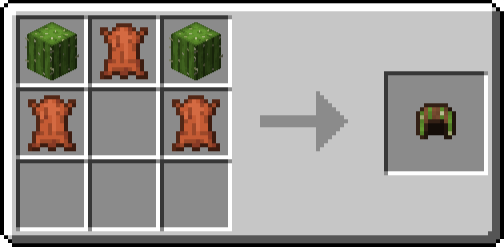
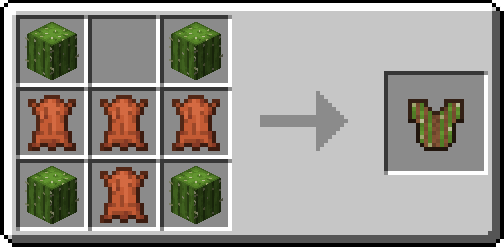
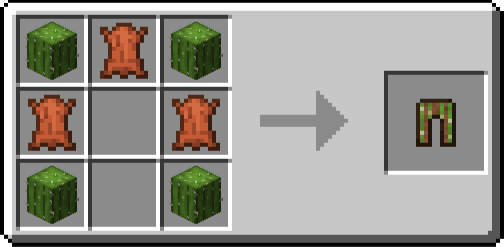
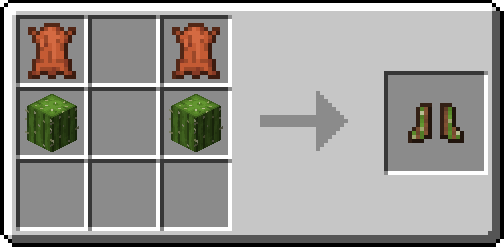
Crafted from leather and cactus, this dyeable armour set provides a unique "Velcro" effect when worn as a complete suit. While shifting, you can cling to and climb wool-like blocks with ease. Additionally, you can apply vanilla armour trims to personalize your gear.

Bounce Blocks
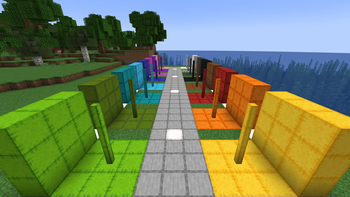
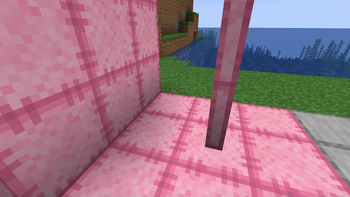
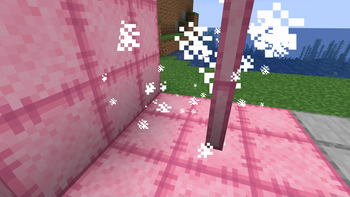
A set of Wind Charge-infused, wool-like blocks that will bounce entities that touch any side. When struck by a wind charge the block becomes ‘Inflated’ for a short duration, while inflated bounce power is increased. They are available as full blocks, stairs, slabs, and posts.
Double Bounce
If a sneaking player falls from a height of 2.8 blocks or more onto a non-inflated Bounce Block, the block along with any connected within a 1-block radius will become 'Inflated' for a short duration (4 seconds / 80 ticks). Entities on affected blocks bounce upward immediately.

Details
- Colours: White, Light Grey, Grey, Black, Brown, Red, Orange, Yellow, Lime, Green, Cyan, Light Blue, Blue, Magenta, Purple, Pink
- Posts can be placed horizontally
- Stairs, Slabs, and Posts can be waterlogged
Inflation Machine
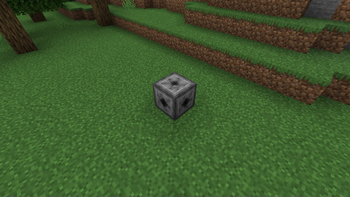
A functional block that keeps a group of connected Bounce Blocks ‘Inflated’ as long as it is fueled. Inflation can extend 5 blocks to the side and 1 block above/below in a 11x11x3 area. It can also be placed on its side allowing for greater vertical Inflation(3x11x11).
Crafting Recipes
Velcro Helmet
Velcro Chestplate
Velcro Leggings
Velcro Boots
Bounce Block

Bounce Stair Block

Bounce Slab Block

Bounce Post Block

Inflation Machine

Supported Versions
Breeze Bounce supports Fabric and NeoForge for Minecraft 1.21+.
Please submit bugs here. Planned features found here
Support Development
I've Partnered with RocketNode Hosting!
Elevate your Minecraft Hosting experience on RocketNode's robust network, with seamless support, instant server deployment and the ability to customize the server to your liking. Scalable, Powerful, & Affordable.
Use the code CHEFMOOON to get 25% off your first month on any of their gaming servers. Get started here: http://www.rocketnode.com/chefmooon

Available Versions
How to Install Breeze Bounce on Your Server
Order Server
Order a Minecraft Java server with at least 3 GB RAM (4 GB recommended).
Set fabric Loader
In the panel under "Egg", select the fabric loader and matching Minecraft version (26.1.2).
Install Mod
Open the mod browser in the dashboard and search for "Breeze Bounce". Click "Install" – done! Alternatively, upload the .jar via SFTP to the /mods folder.
Compatibility
Mod Loaders
Minecraft Versions
26.1.2, 26.1.1, 26.1 (+12 more)
Server-side
✓ RequiredRecommended RAM
4 GB(min. 3 GB)Frequently Asked Questions
Breeze Bounce server crashes on startup – what to do?
Most common cause: wrong fabric version or insufficient RAM. Check the server log (latest.log) for "OutOfMemoryError" or "Mixin" errors. With Mado Hosting: ensure at least 3 GB RAM is allocated and the loader matches the mod version (26.1.2). You can switch loaders with one click in the panel.
Is Breeze Bounce compatible with fabric and neoforge and quilt?
Breeze Bounce officially supports fabric, neoforge, quilt for Minecraft 26.1.2, 26.1.1, 26.1. The Mado dashboard automatically detects incompatible loader combinations.
Server lagging with Breeze Bounce – how to optimize performance?
Recommended RAM: 4 GB (per 8 players). Use /spark profiler to check if Breeze Bounce consumes the most tick time. Common fixes: reduce server view-distance to 8-10, install "performant" or "starlight" as supplementary mods on Forge. With Mado Hosting, your server runs on NVMe SSDs with dedicated CPU cores for minimal latency.
Similar Mods

![[ETF] Entity Texture Features](https://cdn.modrinth.com/data/BVzZfTc1/af683d206d50b05258d865b0d6e4aa2f2cee12f2_96.webp)
![[EMF] Entity Model Features](https://cdn.modrinth.com/data/4I1XuqiY/6e5bbd0d06b1741bfdab6c0cfab6de8fdaf0064c_96.webp)



Rent Modded Server
Install Breeze Bounce with just one click on your server.