
Brightbronze Horizons
Start in a void world with only an island of terrain. Expand your horizons one chunk at a time by unlocking new biomes and watching the world materialize around you. A unique progression experience that transforms exploration into a rewarding journey.
Screenshots
About this Mod
A Fabric & NeoForge Mod for Minecraft, inspired by Chunk by Chunk (immortius) & Gathering Chunks (Ryvione).
Field Log: Arrival
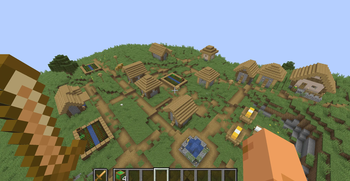
I remember the impact—then nothing. No sky I recognize, no horizon that behaves, no familiar pull of distance. Just a village, warm lamps, wheat in the breeze… and an emptiness beyond it that swallows sound. The locals don’t seem afraid. They build where the ground is solid and stop where it isn’t.
I learned why the first time I tried to leave.
A few steps past the village boundary, the realm fails to agree that I exist. My body unthreads. My senses scatter. I discorporate.. and below me is an infinite, patient void.
But I’m not helpless.
I know an alloy, an old explorer’s trick for anchoring unstable places. A bright metal that hums when reality is thin: Brightbronze. If I can make it here, I can do what I was trained to do: Stabilize the frontier. Expand the map. Turn "nowhere" into "somewhere".
Supported Versions
| Minecraft | Fabric | NeoForge |
|---|---|---|
| 1.21.10 | ✅ | ✅ |
| 1.21.1 | ✅ | ✅ |
Note: Neoforge 1.21.1 has been tested to work with All the Mods 10. When using with kitchen sink modpacks, please adjust the configuration via /docs/ModpackConfiguration.md to avoid accidentally spawning a massive dungeon with an Altered Horizon Anchor minutes into the mod. Initial world generation may also take a bit more time than usual.
Gameplay
Brightbronze Horizons drops you into a fragile realm: you always begin in a plains village, surrounded by the void. The village is safe. The edge is not.
Your goal is to craft Brightbronze and use it to create Horizon Anchors—special blocks that stabilize the realm and spawn new chunks when placed on the edge of your current world.
The rhythm of survival is simple and deliberate:
Scavenge and build within the village
Gather resources, set up a base, and prepare for long-term expansion.Forge Brightbronze
Combine familiar metals into something meant for the unreal—then refine it into ingots and nuggets for crafting.Craft a Horizon Anchor
Each anchor is a tuned stabilizer. Its "catalyst" determines what kind of land it can call forth.Place the Anchor at the frontier
Put it on the edge of the current generated area to extend the world by one new chunk, pushing the boundary outward.Repeat: expand, explore, upgrade
Start local. Reach the Overworld’s breadth. Push into stranger climates. Eventually, you’ll stabilize pathways into realms that should not be adjacent to a village at all.
Recipes
Brightbronze Progression
1× Copper Ingot + 2× Iron Nugget + 1× Gold Nugget→1× Brightbronze Amalgam- Smelt:
1× Brightbronze Amalgam→1× Brightbronze Ingot 1× Brightbronze Ingot→9× Brightbronze Nugget
Horizon Anchors
Horizon Anchors are crafted using a Brightbronze frame around a catalyst block. The catalyst determines what kind of terrain the anchor can stabilize into existence.
Anchor Frame Pattern
B= Brightbronze Ingotn= Brightbronze NuggetC= Catalyst block (varies by anchor)
B n B
n C n
B n B
Local Horizon Anchor
Catalyst: Block of Coal
Effect: Spawns a new chunk that matches the biome where the anchor is placed.
Overworld Horizon Anchor
Catalyst: Block of Copper
Effect: Spawns a new chunk from common and dry Overworld biomes (plains, forests, deserts, etc.).
Tidal Horizon Anchor
Catalyst: Block of Iron
Effect: Spawns a new chunk from rare and wet Overworld biomes (jungle, swamp, ocean, etc.).
Infernal Horizon Anchor
Catalyst: Block of Gold
Effect: Spawns a new chunk from Nether biomes.
Astral Horizon Anchor
Catalyst: Block of Diamond
Effect: Spawns a new chunk from End biomes.
Stabilize the edge of reality. Stitch a world into the void.
Available Versions
How to Install Brightbronze Horizons on Your Server
Order Server
Order a Minecraft Java server with at least 4 GB RAM (6 GB recommended).
Set fabric Loader
In the panel under "Egg", select the fabric loader and matching Minecraft version (1.21.10).
Install Mod
Open the mod browser in the dashboard and search for "Brightbronze Horizons". Click "Install" – done! Alternatively, upload the .jar via SFTP to the /mods folder.
Compatibility
Mod Loaders
Minecraft Versions
1.21.10, 1.21.1
Server-side
✓ RequiredRecommended RAM
6 GB(min. 4 GB)Frequently Asked Questions
Brightbronze Horizons server crashes on startup – what to do?
Most common cause: wrong fabric version or insufficient RAM. Check the server log (latest.log) for "OutOfMemoryError" or "Mixin" errors. With Mado Hosting: ensure at least 4 GB RAM is allocated and the loader matches the mod version (1.21.10). You can switch loaders with one click in the panel.
Is Brightbronze Horizons compatible with fabric and neoforge?
Brightbronze Horizons officially supports fabric, neoforge for Minecraft 1.21.10, 1.21.1. The Mado dashboard automatically detects incompatible loader combinations.
Server lagging with Brightbronze Horizons – how to optimize performance?
Recommended RAM: 6 GB (per 5 players). Use /spark profiler to check if Brightbronze Horizons consumes the most tick time. Common fixes: reduce server view-distance to 8-10, install "performant" or "starlight" as supplementary mods on Forge. With Mado Hosting, your server runs on NVMe SSDs with dedicated CPU cores for minimal latency.
Similar Mods



Rent Modded Server
Install Brightbronze Horizons with just one click on your server.