
BrownBloom
An add-on for Happy Wall Painting that brings warm and earthy brown tones to your world.
Screenshots


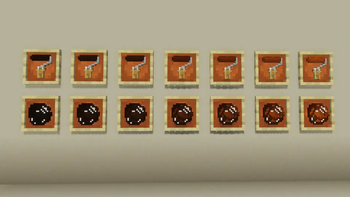
About this Mod

Browntone Bloom is an add-on for Happy Wall Painting, expanding your creative palette with rich, earthy brown gradients.
From the smoky hue of Charwood to the deep elegance of Mahogany Tint, this pack includes 7 natural tones designed for warm, grounded builds.
Fully compatible with the base mod's system (unlimited use rollers, cleaner, Color Palette, and Creative Catalog Scroll).
This add-on requires Happy Wall Painting v1.3.0 or later to function.
Build with warmth. Paint with character.
Special Thanks:The key visual artwork was created by ビスコ. Follow the account!: X
Subscribe to the UrotanMOD Official Guide for more updates and tutorials,
and follow me on X to see more of what’s coming!
日本語
Browntone Bloom は、Happy Wall Painting を拡張するアドオンMODです。
スモーキーな チャーウッド から、深みある マホガニーティント まで、自然なブラウングラデーション7色を追加し、温もりある建築を演出します。
本体MODのシステム(使用無制限ローラー、クリーナー、ペイントパレット、カタログスクロール)に完全対応しています。
このアドオンのご利用には Happy Wall Painting v1.3.0 以降のバージョンが必要です。
温もりで建て、味わいで彩る。
Special Thanks:キービジュアルの建築は ビスコさん です フォローはこちら!: X
アップデートやチュートリアルの情報はUrotanMOD Official Guideで、
最新の進捗はX (Twitter)で発信しています!
Available Versions
How to Install BrownBloom on Your Server
Order Server
Order a Minecraft Java server with at least 3 GB RAM (4 GB recommended).
Set neoforge Loader
In the panel under "Egg", select the neoforge loader and matching Minecraft version (1.21.1).
Install Mod
Open the mod browser in the dashboard and search for "BrownBloom". Click "Install" – done! Alternatively, upload the .jar via SFTP to the /mods folder.
Compatibility
Mod Loaders
Minecraft Versions
1.21.1
Server-side
✓ RequiredRecommended RAM
4 GB(min. 3 GB)Frequently Asked Questions
BrownBloom server crashes on startup – what to do?
Most common cause: wrong neoforge version or insufficient RAM. Check the server log (latest.log) for "OutOfMemoryError" or "Mixin" errors. With Mado Hosting: ensure at least 3 GB RAM is allocated and the loader matches the mod version (1.21.1). You can switch loaders with one click in the panel.
Is BrownBloom compatible with neoforge?
BrownBloom officially supports neoforge for Minecraft 1.21.1. The Mado dashboard automatically detects incompatible loader combinations.
Server lagging with BrownBloom – how to optimize performance?
Recommended RAM: 4 GB (per 8 players). Use /spark profiler to check if BrownBloom consumes the most tick time. Common fixes: reduce server view-distance to 8-10, install "performant" or "starlight" as supplementary mods on Forge. With Mado Hosting, your server runs on NVMe SSDs with dedicated CPU cores for minimal latency.
Similar Mods

![[ETF] Entity Texture Features](https://cdn.modrinth.com/data/BVzZfTc1/af683d206d50b05258d865b0d6e4aa2f2cee12f2_96.webp)
![[EMF] Entity Model Features](https://cdn.modrinth.com/data/4I1XuqiY/6e5bbd0d06b1741bfdab6c0cfab6de8fdaf0064c_96.webp)



Rent Modded Server
Install BrownBloom with just one click on your server.