
Bubblellaneous
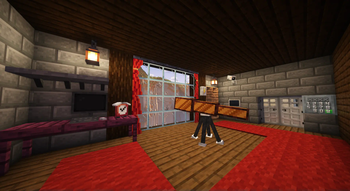
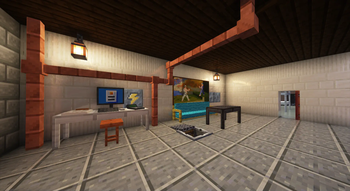
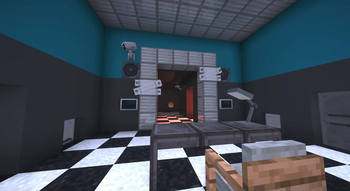
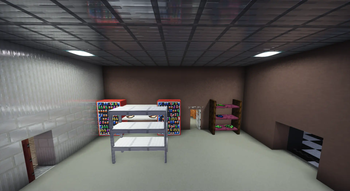
Adds Furniture, Technology, Food & Miscellaneous blocks and items.
Screenshots

About this Mod
🫧 Bubblellaneous Pack
This Minecraft pack adds Furniture, Technology, Food & Miscellaneous blocks and items.
To use it you must install the data pack in your world. All players playing on your server must have the resource pack installed.
- Use
/function menu:bubblellaneousfor settings/debugging! - Use
/function give:bubblellaneous/<item_name>to give an item. - Use
/function spawn:bubblellaneous/<item_name>to spawn an item. - Use
/function place:bubblellaneous/<block_name>to place a block.
| Minecraft version | Status |
|---|---|
| 1.20.2 and earlier | 🚫 Broken due to Minecraft limitations |
| 1.20.3 | ✅ Supported (only 2.0.0) |
| 1.20.4 | ✅ Supported (only 2.0.0) |
| 1.21.0—1.21.9 | ✅ Supported (only to 2.2.3) |
| 1.21.11 | ✅ Supported (only 3.0.0 and later) |
If you wish to contribute, refer to CONTRIBUTING.md
🔖 Translations
Thanks to wonderful people you can enjoy this pack in different languages:
| Maintainer | Translation |
|---|---|
| BubbleFish | 🇺🇸 English (US) [100%] |
| BubbleFish | 🇬🇧 English (UK) [100%] |
| BubbleFish | 🇷🇺 Russian [100%] |
| Unintegrated | 🇨🇿 Czech [100%] |
| Unintegrated | 🌍 Toki Pona [100%] |
| Atten007 | 🇩🇪 German [100%] |
| Caesar_Galahad | 🇨🇳 Chinese [100%] |
| Antoha256M | 🇷🇺 Russian Pre-Reform [100%] |
| FBreakDance30 | 🇮🇹 Italian [99%] |
| Dorlonkho | 🇯🇵 Japanesse [17%] |
If you want to help with translations, refer to CONTRIBUTING.md
🖥️ About Bubblellaneous
This data pack was originally published by me on Nov 21st, 2021. This is a complete rework, designed to be great for survival, map making, and the creation of your content.
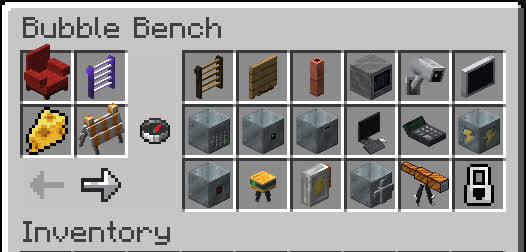
- You can obtain all custom content without memorizing recipes using Bubble Bench: Drop a glass bottle onto a crafting table!

- Many blocks/items have different variants (variating in color and material):

- Have fun with all the content! Feel free to join my discord:
📦 For Map Makers / Developers
Storing blocks
Bubblellaneous uses entities to display blocks, this may become inconvenient for mapmakers. For this reason, there's a way of restoring the block's state when loading from structures using structure blocks or /place:
- Prevent copying before you save all of the blocks:
/function bubblellaneous:blocks/copy_properties/prevent_copying. - Store blocks that you want to save:
/execute as @e[tag=bbln.block] run function bubblellaneous:blocks/copy_properties/save_to_block. - Save the structure. You can now break the blocks.
- Start copying state:
/function bubblellaneous:blocks/copy_properties/stop_prevent_copying. - Now you can place the saved structure template anywhere and it will automatically restore all data.
- If you encounter errors, create a GitHub Issue telling which block and how exactly it broke.
Events
Bubblellaneous has several events that can be used to extend the data pack logic. The way you hook to these events is by creating a Function tag in the specified path. The function tag is executed by a certain entity that you can refer to.
[!NOTE]
If your project requires more events, create a GitHub Issue or message me on Discord, and I'll add it.
Entity tag is @e[tag=bbln.<value>]. e.g. if the value is name.test, then the actual selector is @e[tag=bbln.name.test].
| Function tag | Entity tag | Description |
|---|---|---|
#bubblellaneous:settings/on_load |
- | Settings were loaded/changed |
#bubblellaneous:block/all/on_place |
block | A block was placed |
#bubblellaneous:block/all/on_break |
block | A block was broken. Use /return 1 to prevent the block from breaking |
#bubblellaneous:block/bear_trap/on_catch |
name.bear_trap | Bear Trap caught a player |
#bubblellaneous:block/bear_trap/on_release |
name.bear_trap | Bear Trap released the player |
#bubblellaneous:block/electrical_box/on_enable |
name.electrical_box | An electrical box was toggled on |
#bubblellaneous:block/electrical_box/on_disable |
name.electrical_box | An electrical box was toggled off |
#bubblellaneous:block/alarm_block/on_trigger |
name.alarm_block | An alarm block was triggered with redstone |
Bubble Bench Blacklist
You can hide certain blocks/items from Bubble Bench, preventing players from crafting them.
Substitute
<unit>/<id>with the following values:
<unit>is eitherblockoritem.<id>is the id of the block/item. The same ID is used in commands like/function give:bubblellaneous/...for reference.
Adding unit into blacklist:
data modify storage minecraft:bubblellaneous bench_blacklist append value {entry: "<unit>/<id>"}

# Example:
data modify storage minecraft:bubblellaneous bench_blacklist append value {entry: "block/acacia_table"}
Removing unit from blacklist:
data remove storage minecraft:bubblellaneous bench_blacklist[{entry: "<unit>/<id>"}]

# Example:
data remove storage minecraft:bubblellaneous bench_blacklist[{entry: "item/white_key"}]
The changes will apply on the next /reload.
🔗 Links
You can leave a comment on the PMC page!

Available Versions
How to Install Bubblellaneous on Your Server
Order Server
Order a Minecraft Java server with at least 3 GB RAM (4 GB recommended).
Set datapack Loader
In the panel under "Egg", select the datapack loader and matching Minecraft version (26.1.2).
Install Mod
Open the mod browser in the dashboard and search for "Bubblellaneous". Click "Install" – done! Alternatively, upload the .jar via SFTP to the /mods folder.
Compatibility
Mod Loaders
Minecraft Versions
26.1.2, 26.1.1, 26.1 (+16 more)
Server-side
✓ RequiredRecommended RAM
4 GB(min. 3 GB)Frequently Asked Questions
Bubblellaneous server crashes on startup – what to do?
Most common cause: wrong datapack version or insufficient RAM. Check the server log (latest.log) for "OutOfMemoryError" or "Mixin" errors. With Mado Hosting: ensure at least 3 GB RAM is allocated and the loader matches the mod version (26.1.2). You can switch loaders with one click in the panel.
Is Bubblellaneous compatible with datapack and fabric and forge and minecraft and neoforge and quilt?
Bubblellaneous officially supports datapack, fabric, forge, minecraft, neoforge, quilt for Minecraft 26.1.2, 26.1.1, 26.1. Note: Forge and Fabric mods are NOT cross-compatible – pick one loader and stick with it. The Mado dashboard automatically detects incompatible loader combinations.
Server lagging with Bubblellaneous – how to optimize performance?
Recommended RAM: 4 GB (per 8 players). Use /spark profiler to check if Bubblellaneous consumes the most tick time. Common fixes: reduce server view-distance to 8-10, install "performant" or "starlight" as supplementary mods on Forge. With Mado Hosting, your server runs on NVMe SSDs with dedicated CPU cores for minimal latency.
Similar Mods

![[ETF] Entity Texture Features](https://cdn.modrinth.com/data/BVzZfTc1/af683d206d50b05258d865b0d6e4aa2f2cee12f2_96.webp)
![[EMF] Entity Model Features](https://cdn.modrinth.com/data/4I1XuqiY/6e5bbd0d06b1741bfdab6c0cfab6de8fdaf0064c_96.webp)



Rent Modded Server
Install Bubblellaneous with just one click on your server.
Details
- License
- Creative Commons Attribution Share Alike 4.0 International
- Server-side
- Required