
Builders Hub 115
This project adds blocks to the game to help all builders. If you have an idea, request, or criticism, we are willing to listen and work accordingly.
Screenshots
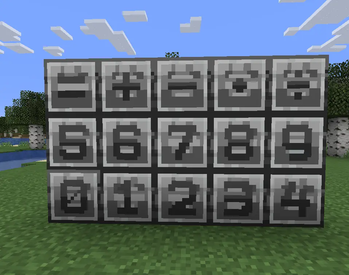
About this Mod
Welcome to our first mod. We observed a problematic situation in modding. While many try to fix this issue, such as Opaleqs Builders Palette, many of them fall short in certain regards. We aim not to fall short
Our mission is to help make a one-size-fits-all mod that can help with building almost anything for any builder, from industrial blocks to rustic blocks. We want to give back to our community. Obviously, in the mod's current state its just a few number and equation sign blocks, but we will be improving soon, we will be adding a lot to the pack to essentially overhaul Minecraft with mods
Contact us on our Discord here: https://discord.gg/Y9j8yKan7E
Or here at our team email: [email protected]
and our patreon is right here; NUY2K Central/Autonomy Corporation | Movies, Videos, Tutorials, Reviews | Patreon
And the channel we will be uploading releases and changelogs to will be right here: TV-115 - YouTube
Overall, we are running with an ARR license. Please contact us for individual allowances for changes or recommendations/requests
Available Versions
How to Install Builders Hub 115 on Your Server
Order Server
Order a Minecraft Java server with at least 3 GB RAM (4 GB recommended).
Set forge Loader
In the panel under "Egg", select the forge loader and matching Minecraft version (1.20.1).
Install Mod
Open the mod browser in the dashboard and search for "Builders Hub 115". Click "Install" – done! Alternatively, upload the .jar via SFTP to the /mods folder.
Compatibility
Mod Loaders
Minecraft Versions
1.20.1
Server-side
✓ RequiredRecommended RAM
4 GB(min. 3 GB)Frequently Asked Questions
Builders Hub 115 server crashes on startup – what to do?
Most common cause: wrong forge version or insufficient RAM. Check the server log (latest.log) for "OutOfMemoryError" or "Mixin" errors. With Mado Hosting: ensure at least 3 GB RAM is allocated and the loader matches the mod version (1.20.1). You can switch loaders with one click in the panel.
Is Builders Hub 115 compatible with forge?
Builders Hub 115 officially supports forge for Minecraft 1.20.1. The Mado dashboard automatically detects incompatible loader combinations.
Server lagging with Builders Hub 115 – how to optimize performance?
Recommended RAM: 4 GB (per 8 players). Use /spark profiler to check if Builders Hub 115 consumes the most tick time. Common fixes: reduce server view-distance to 8-10, install "performant" or "starlight" as supplementary mods on Forge. With Mado Hosting, your server runs on NVMe SSDs with dedicated CPU cores for minimal latency.
Similar Mods

![[ETF] Entity Texture Features](https://cdn.modrinth.com/data/BVzZfTc1/af683d206d50b05258d865b0d6e4aa2f2cee12f2_96.webp)
![[EMF] Entity Model Features](https://cdn.modrinth.com/data/4I1XuqiY/6e5bbd0d06b1741bfdab6c0cfab6de8fdaf0064c_96.webp)



Rent Modded Server
Install Builders Hub 115 with just one click on your server.