BuildStreak
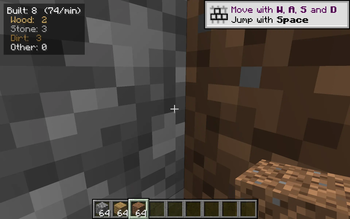
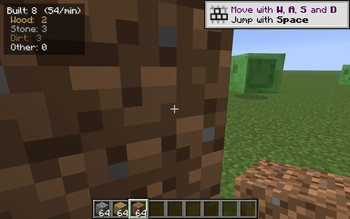
Tiny top-left HUD that counts how many blocks you placed this session, split by Wood / Stone / Dirt / Other, with a live blocks-per-minute pace. Toggle B, reset Shift+B.
Screenshots
About this Mod
BuildStreak is a one-purpose HUD that gives you a glanceable answer to how much have I actually built this session? It sits quietly in the top-left corner and ticks up every time you place a block — with a per-category breakdown and a rolling blocks-per-minute pace so you can see whether you have been on a real building grind or just placing the occasional torch.
It is the placement-side companion to mining-counter mods: where those track what you have torn down, BuildStreak tracks what you have put up.
What it shows
Built: 137  (74/min)
 Wood:  42
 Stone: 68
 Dirt:  21
 Other: 6
- Built — total blocks placed since the last reset.
- (N/min) — blocks per minute since your first placement this session.
- Wood — logs, planks, woods, stems and hyphae of every tree type.
- Stone — stone, cobblestone, deepslate, granite/diorite/andesite, basalt, blackstone, tuff, netherrack, end stone, calcite, dripstone, quartz, brick variants and their polished/cobbled siblings.
- Dirt — dirt, grass block, coarse/rooted dirt, podzol, mycelium, mud, sand, gravel, snow block, dirt path, farmland.
- Other — everything else (glass, wool, terracotta, decorative blocks, redstone, ...).
Controls
- B — toggle the HUD on / off.
- Shift + B — reset all counters to zero (and restart the pace clock).
Both keys use raw GLFW polling so they work on every supported Minecraft version with no rebind UI needed.
Compatibility
Works on Minecraft 1.21.8, 1.21.9, 1.21.10, and 1.21.11 (Fabric Loader 0.16+). One JAR for all four versions — install via Fabric and drop into your mods/ folder.
- Pure client-side — install on the client only, works on any server, no game-state changes.
- Hides automatically when you press F1 to hide the rest of the HUD.
- Counters live in memory only — they reset when you quit the game (intentionally; this is a session streak, not a lifetime stat).
Why
Most building stats either live in advancements or in a screen you have to open. BuildStreak just gives you a real-time pulse on what you have been laying down — handy for timed building challenges, megabase progress checks, or just satisfying numbers while you grind.
Available Versions
How to Install BuildStreak on Your Server
Order Server
Order a Minecraft Java server with at least 3 GB RAM (4 GB recommended).
Set fabric Loader
In the panel under "Egg", select the fabric loader and matching Minecraft version (1.21.11).
Install Mod
Open the mod browser in the dashboard and search for "BuildStreak". Click "Install" – done! Alternatively, upload the .jar via SFTP to the /mods folder.
Compatibility
Mod Loaders
Minecraft Versions
1.21.11, 1.21.10, 1.21.9 (+1 more)
Server-side
✗ UnsupportedRecommended RAM
4 GB(min. 3 GB)Frequently Asked Questions
BuildStreak server crashes on startup – what to do?
Most common cause: wrong fabric version or insufficient RAM. Check the server log (latest.log) for "OutOfMemoryError" or "Mixin" errors. With Mado Hosting: ensure at least 3 GB RAM is allocated and the loader matches the mod version (1.21.11). You can switch loaders with one click in the panel.
Is BuildStreak compatible with fabric?
BuildStreak officially supports fabric for Minecraft 1.21.11, 1.21.10, 1.21.9. The Mado dashboard automatically detects incompatible loader combinations.
Server lagging with BuildStreak – how to optimize performance?
Recommended RAM: 4 GB (per 8 players). Use /spark profiler to check if BuildStreak consumes the most tick time. Common fixes: reduce server view-distance to 8-10, install "performant" or "starlight" as supplementary mods on Forge. With Mado Hosting, your server runs on NVMe SSDs with dedicated CPU cores for minimal latency.
Similar Mods




![[ETF] Entity Texture Features](https://cdn.modrinth.com/data/BVzZfTc1/af683d206d50b05258d865b0d6e4aa2f2cee12f2_96.webp)
![[EMF] Entity Model Features](https://cdn.modrinth.com/data/4I1XuqiY/6e5bbd0d06b1741bfdab6c0cfab6de8fdaf0064c_96.webp)
Rent Modded Server
Install BuildStreak with just one click on your server.