
Bundle Tooltip
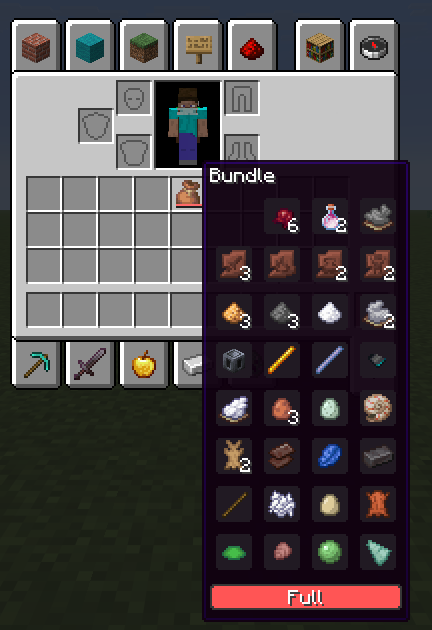
View the contents of bundle's from your inventory more clearly.
Screenshots
About this Mod


BundleUI
A small client-side Fabric mod that fixes the vanilla bundle tooltip preview cap.
Overview
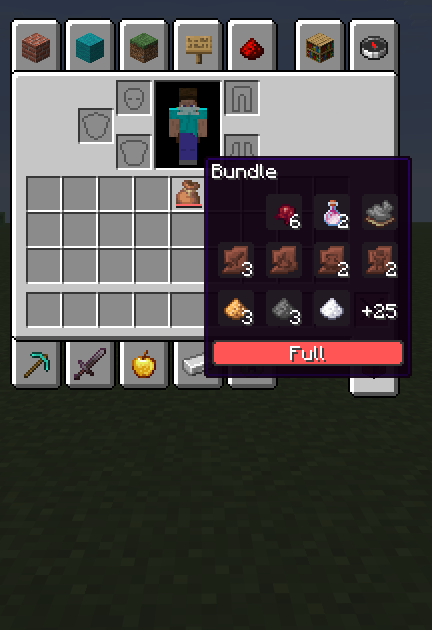
BundleUI improves the vanilla bundle tooltip in Minecraft 1.21.11 by removing the default preview limit.
When hovering a bundle, the tooltip keeps the vanilla slot grid, selection highlight styling, and progress bar, but renders every stored stack instead of cutting the preview short.
Features
- Shows all stored bundle contents in the tooltip
- Keeps the vanilla bundle tooltip style
- Preserves the vanilla slot grid and highlight visuals
- Keeps the vanilla progress bar
- Lightweight and focused on one simple fix
- Client-side only
Design Goals
BundleUI is meant to fix a vanilla UI limitation without changing how bundles work.
It does not touch bundle storage, item behavior, gameplay balance, or server logic. The goal is to keep the vanilla look and behavior intact while making the tooltip actually useful.
Supported Platform
- Fabric
- Yarn mappings
- Minecraft 1.21.11
Notes
- Client-side only
- Does not modify bundle mechanics
- Does not affect servers
- Keeps vanilla behavior intact
- Focused on a single clean quality-of-life improvement
License
MPL-2.0
Summary
BundleUI keeps the vanilla bundle tooltip style, but removes the pointless preview cap so you can actually see everything inside.
Available Versions
How to Install Bundle Tooltip on Your Server
Order Server
Order a Minecraft Java server with at least 3 GB RAM (4 GB recommended).
Set fabric Loader
In the panel under "Egg", select the fabric loader and matching Minecraft version (1.21.11).
Install Mod
Open the mod browser in the dashboard and search for "Bundle Tooltip". Click "Install" – done! Alternatively, upload the .jar via SFTP to the /mods folder.
Compatibility
Mod Loaders
Minecraft Versions
1.21.11
Server-side
✗ UnsupportedRecommended RAM
4 GB(min. 3 GB)Frequently Asked Questions
Bundle Tooltip server crashes on startup – what to do?
Most common cause: wrong fabric version or insufficient RAM. Check the server log (latest.log) for "OutOfMemoryError" or "Mixin" errors. With Mado Hosting: ensure at least 3 GB RAM is allocated and the loader matches the mod version (1.21.11). You can switch loaders with one click in the panel.
Is Bundle Tooltip compatible with fabric?
Bundle Tooltip officially supports fabric for Minecraft 1.21.11. The Mado dashboard automatically detects incompatible loader combinations.
Server lagging with Bundle Tooltip – how to optimize performance?
Recommended RAM: 4 GB (per 8 players). Use /spark profiler to check if Bundle Tooltip consumes the most tick time. Common fixes: reduce server view-distance to 8-10, install "performant" or "starlight" as supplementary mods on Forge. With Mado Hosting, your server runs on NVMe SSDs with dedicated CPU cores for minimal latency.
Similar Mods




![[ETF] Entity Texture Features](https://cdn.modrinth.com/data/BVzZfTc1/af683d206d50b05258d865b0d6e4aa2f2cee12f2_96.webp)

Rent Modded Server
Install Bundle Tooltip with just one click on your server.