
Cactus ViewModel
View Model is a client-side Fabric mod for Minecraft 1.21.4 that lets you customize the position, rotation, and scale of items held in first-person view through a clean in-game GUI.
Screenshots
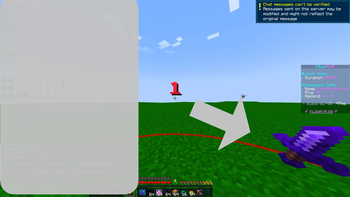
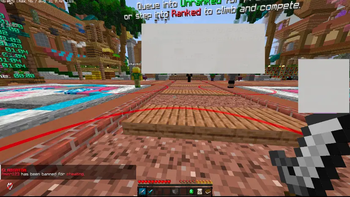
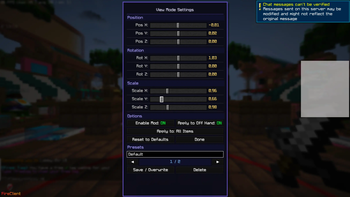
About this Mod
Cactus View Model
Cactus View Model is a client-side Fabric mod for Minecraft 1.21.4 that lets you
fully customize how items look in your hand during first-person gameplay.
Adjust position, rotation, and scale on all three axes — live, in-game,
with no resource packs or external tools required.
What does it add?
Vanilla Minecraft locks item positions in first-person view.
Cactus View Model breaks that limitation by giving you a full
transform editor built directly into the game.
Features
- 9 transform sliders — fine control over X/Y/Z position, rotation, and scale
- In-game GUI — open anytime with a keybind (default:
V), registered in
Minecraft's native Controls screen - Item filter — apply transforms to all items, only swords, only tools,
only blocks, or just your currently held item - Off-hand support — optionally apply transforms to the off-hand slot
- Auto-saving config — settings are stored in
config/viewmode.jsonand
loaded instantly on launch - Reset button — one click restores vanilla defaults
- Zero server requirement — works on any server, vanilla or modded
Why download it?
- You want your sword, tool, or block to sit exactly where you want it
- You're a content creator who needs items positioned perfectly on screen
- You play PvP and prefer a specific visual angle for your weapon
- You just want more control over your first-person experience
How to use
- Install Fabric Loader and
Fabric API for Minecraft 1.21.4 - Drop the
.jarinto yourmodsfolder - Launch the game and go to Options → Controls to set your keybind
- Press the keybind in-game to open the GUI
- Adjust sliders and hit Done — saved automatically
Client-side only. No server installation needed.
Available Versions
How to Install Cactus ViewModel on Your Server
Order Server
Order a Minecraft Java server with at least 3 GB RAM (4 GB recommended).
Set fabric Loader
In the panel under "Egg", select the fabric loader and matching Minecraft version (1.21.4).
Install Mod
Open the mod browser in the dashboard and search for "Cactus ViewModel". Click "Install" – done! Alternatively, upload the .jar via SFTP to the /mods folder.
Compatibility
Mod Loaders
Minecraft Versions
1.21.4
Server-side
✗ UnsupportedRecommended RAM
4 GB(min. 3 GB)Frequently Asked Questions
Cactus ViewModel server crashes on startup – what to do?
Most common cause: wrong fabric version or insufficient RAM. Check the server log (latest.log) for "OutOfMemoryError" or "Mixin" errors. With Mado Hosting: ensure at least 3 GB RAM is allocated and the loader matches the mod version (1.21.4). You can switch loaders with one click in the panel.
Is Cactus ViewModel compatible with fabric?
Cactus ViewModel officially supports fabric for Minecraft 1.21.4. The Mado dashboard automatically detects incompatible loader combinations.
Server lagging with Cactus ViewModel – how to optimize performance?
Recommended RAM: 4 GB (per 8 players). Use /spark profiler to check if Cactus ViewModel consumes the most tick time. Common fixes: reduce server view-distance to 8-10, install "performant" or "starlight" as supplementary mods on Forge. With Mado Hosting, your server runs on NVMe SSDs with dedicated CPU cores for minimal latency.
Similar Mods

![[ETF] Entity Texture Features](https://cdn.modrinth.com/data/BVzZfTc1/af683d206d50b05258d865b0d6e4aa2f2cee12f2_96.webp)
![[EMF] Entity Model Features](https://cdn.modrinth.com/data/4I1XuqiY/6e5bbd0d06b1741bfdab6c0cfab6de8fdaf0064c_96.webp)



Rent Modded Server
Install Cactus ViewModel with just one click on your server.