Camera Command
Bring Bedrock Edition's /camera command to Java Edition.
Screenshots
About this Mod
Bring Bedrock Edition's /camera command to Java Edition.
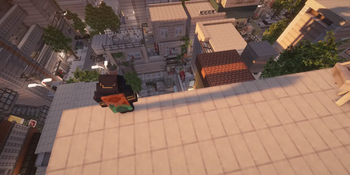
Camera Mod gives server operators full control over the player's camera - move it anywhere in the world, animate it with smooth easing, switch perspectives, and trigger cinematic screen fades. All without touching the player's actual position or sending anything suspicious to anti-cheat systems.
Features
/camera set - Camera Control
Place the camera at any position with optional rotation and smooth easing.
/camera set @p free ease 2 in_out_expo pos ~ ~10 ~ rot 90 0
/camera set @p third_person
/camera set @p first_person
Presets: first_person · third_person · third_person_front · free
Easing functions (30+): linear · spring · in_quad · out_quad · in_out_quad · in_cubic · out_cubic · in_out_cubic · in_quart · in_out_quart · in_sine · out_sine · in_out_sine · in_expo · out_expo · in_out_expo · in_circ · in_out_circ · in_back · out_back · in_out_back · in_elastic · out_elastic · in_out_elastic · in_bounce · out_bounce · in_out_bounce · and more
Rotation supports ~ (relative to current rotation):
rot 90 0      - absolute
rot ~ ~       - keep current
rot ~10 ~-45  - relative offset
Coordinates support ~ and ^:
pos ~ ~5 ~        - 5 blocks above current position
pos ^ ^ ^10       - 10 blocks forward from facing direction
/camera fade - Screen Fade
Trigger a full-screen color fade with configurable timing.
/camera fade @p time 0.5 1.0 0.5 color 0 0 0   - black fade
/camera fade @p time 0.2 0.1 0.3 color 1 1 1   - white flash
/camera clear - Reset
Instantly return the camera to vanilla behaviour.
/camera clear @p
Example - Cinematic Sequence
camera fade @p time 0 0.5 0.7 color 0 0 0
execute as @p at @s run camera set @p free ease 0.1 in_out_expo pos ~ ~3 ~ rot 90 0
camera fade @p time 0 0.1 0.2 color 1 1 1
execute as @p at @s run camera set @p free ease 3 in_out_quad pos ~ ~100 ~ rot 90 0
camera fade @p time 0.5 1.0 0.5 color 0 0 0
camera clear @p
Permissions
All /camera commands require operator level 2.
This mod was made exclusively for personal use and will not receive any updates. No support, no new versions - use as-is.
Available Versions
How to Install Camera Command on Your Server
Order Server
Order a Minecraft Java server with at least 3 GB RAM (4 GB recommended).
Set fabric Loader
In the panel under "Egg", select the fabric loader and matching Minecraft version (1.21.1).
Install Mod
Open the mod browser in the dashboard and search for "Camera Command". Click "Install" – done! Alternatively, upload the .jar via SFTP to the /mods folder.
Compatibility
Mod Loaders
Minecraft Versions
1.21.1
Server-side
✓ RequiredRecommended RAM
4 GB(min. 3 GB)Frequently Asked Questions
Camera Command server crashes on startup – what to do?
Most common cause: wrong fabric version or insufficient RAM. Check the server log (latest.log) for "OutOfMemoryError" or "Mixin" errors. With Mado Hosting: ensure at least 3 GB RAM is allocated and the loader matches the mod version (1.21.1). You can switch loaders with one click in the panel.
Is Camera Command compatible with fabric?
Camera Command officially supports fabric for Minecraft 1.21.1. The Mado dashboard automatically detects incompatible loader combinations.
Server lagging with Camera Command – how to optimize performance?
Recommended RAM: 4 GB (per 8 players). Use /spark profiler to check if Camera Command consumes the most tick time. Common fixes: reduce server view-distance to 8-10, install "performant" or "starlight" as supplementary mods on Forge. With Mado Hosting, your server runs on NVMe SSDs with dedicated CPU cores for minimal latency.
Similar Mods




Rent Modded Server
Install Camera Command with just one click on your server.