
CameraMod
With this mod you can swap your view to camera view and zooming / dezooming the world ! (inspired by citiesSkyline)
Screenshots
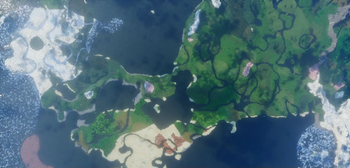
About this Mod
Introducing "CameraMod" for Minecraft, a groundbreaking mod inspired by the innovative features found in games like Cities: Skylines. With CameraMod, you can seamlessly switch to a dynamic camera view and zoom in and out of your Minecraft world, all from the comfort of your own client-side experience. 📷✨
Key Features:
Dynamic Camera View: Immerse yourself in a whole new perspective by toggling the dynamic camera mode. Explore your Minecraft creations from various angles, offering a fresh and unique viewpoint. 🔄
Zoom In and Out: Take control of your vision with the ability to zoom in and out of your Minecraft world. Whether you're admiring the intricate details of your builds or marveling at the expansive landscapes, CameraMod empowers you to do it all with ease. 🔍🔭
Enhanced Exploration: Dive deep into the heart of your Minecraft world with precision and flexibility. Zoom in to examine the fine details of your structures or zoom out to appreciate the vastness of your surroundings like never before. 🌐
Fully Client-Side: Enjoy the freedom to use CameraMod without any server dependencies or compatibility concerns. This mod operates entirely on the client-side, ensuring smooth performance and hassle-free usage. 💻
Why Choose CameraMod?
- Elevate your Minecraft experience with a new level of exploration and immersion.
- Perfect for builders, architects, and adventurers who seek greater control and perspective in their Minecraft worlds.
- Capture stunning screenshots and cinematic footage from unique and dynamic angles.
- Compatible with a wide range of modpacks and Minecraft versions, ensuring versatility and ease of use.
Download CameraMod now and unlock the power to see your Minecraft world in a whole new light. Experience the thrill of exploration and creativity like never before! 🌟
Available Versions
How to Install CameraMod on Your Server
Order Server
Order a Minecraft Java server with at least 3 GB RAM (4 GB recommended).
Set fabric Loader
In the panel under "Egg", select the fabric loader and matching Minecraft version (1.21.4).
Install Mod
Open the mod browser in the dashboard and search for "CameraMod". Click "Install" – done! Alternatively, upload the .jar via SFTP to the /mods folder.
Compatibility
Mod Loaders
Minecraft Versions
1.21.4, 1.21.3, 1.21.2 (+7 more)
Server-side
✗ UnsupportedRecommended RAM
4 GB(min. 3 GB)Frequently Asked Questions
CameraMod server crashes on startup – what to do?
Most common cause: wrong fabric version or insufficient RAM. Check the server log (latest.log) for "OutOfMemoryError" or "Mixin" errors. With Mado Hosting: ensure at least 3 GB RAM is allocated and the loader matches the mod version (1.21.4). You can switch loaders with one click in the panel.
Is CameraMod compatible with fabric?
CameraMod officially supports fabric for Minecraft 1.21.4, 1.21.3, 1.21.2. The Mado dashboard automatically detects incompatible loader combinations.
Server lagging with CameraMod – how to optimize performance?
Recommended RAM: 4 GB (per 8 players). Use /spark profiler to check if CameraMod consumes the most tick time. Common fixes: reduce server view-distance to 8-10, install "performant" or "starlight" as supplementary mods on Forge. With Mado Hosting, your server runs on NVMe SSDs with dedicated CPU cores for minimal latency.
Similar Mods




![[ETF] Entity Texture Features](https://cdn.modrinth.com/data/BVzZfTc1/af683d206d50b05258d865b0d6e4aa2f2cee12f2_96.webp)
![[EMF] Entity Model Features](https://cdn.modrinth.com/data/4I1XuqiY/6e5bbd0d06b1741bfdab6c0cfab6de8fdaf0064c_96.webp)
Rent Modded Server
Install CameraMod with just one click on your server.