
Cannizzaro's Utility Blocks Reforged
Tweaks to some utility blocks, enchantments and a new sawmill block
Screenshots
About this Mod
New Content
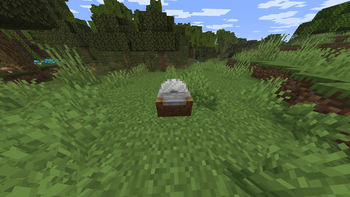
- Sawmill block (Functional tab), stonecutter-style workstation for wood conversions.
- Kiln block, furnace-like workstation with custom smelting rules and boosted speed.
- Quiver item (Combat tab), arrow storage and ranged-ammo management item.
- Cleaving enchantment (axes, max level III).
Sawmill
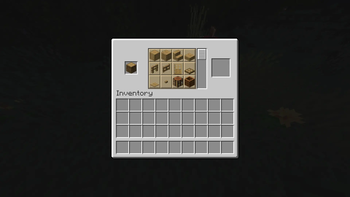
- Uses stonecutter workflow for wood processing.
- Custom ordering for wood outputs.
- Plank input uses the same order without Stripped Log and Planks.
- Comprehensive woodcutting dataset (986 stonecutting recipes in the current data pack).
- Sawmill can be used as fuel with crafting-table burn value.
Kiln
- Crafting recipe: furnace in center, bricks in top/left/right/bottom center slots.
- Smelts with furnace recipe type, but runs at boosted speed (blast-furnace/smoker pace behavior).
- Does not process items that have blast-furnace or smoker recipes.
- XP payout on output is reinforced for reliability.
Fletching Table Overhaul
- Vanilla fletching table opens a custom working GUI.
- Persistent inputs (items can remain stored in table).
- Input items render on top of the table in-world.
- Recipes:
- Feather + Stick + Flint = 5 Arrows
- Arrow + Lingering Potion = up to 64 Tipped Arrows per craft operation (consumes 1 lingering potion)
- Arrow + Glowstone Dust = 1 Spectral Arrow
- Tipped and spectral arrows are accepted in any fletching input slot.
Anvil Overhaul
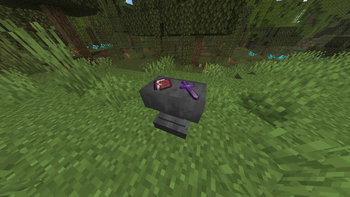
- Damaged/chipped anvils can be repaired by right-clicking with 1 iron block.
- Repair preserves anvil facing (no forced north rotation).
- Anvil input persistence: items can remain in anvil storage and render on top of the block.
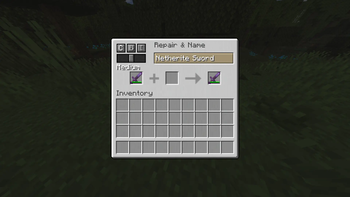
- Rename-only operations cost 0 levels.
- Rename-only operations do not damage the anvil.
- Formatting controls in anvil GUI:
- Color cycle
- Bold toggle
- Italic toggle
- Size slider (Tiny, Small, Medium, Large, Huge)
- Name parser supports formatting codes and hex colors.
Enchanting Table Changes
- Input item and lapis can persist in the table between uses.
- Custom reroll button in GUI: costs 10 lapis + 5 XP levels.
- Normal enchanting lapis cost is normalized to 1 lapis for all three enchant options.
- GUI book rendering is hidden; stored input item still renders above the enchanting table block in-world.
Grindstone Changes
- Enchantment extraction recipe: enchanted item + book => enchanted book output.
- Source item is kept but stripped of enchantments.
- No grindstone XP is granted for this extraction flow.
- Grindstone input slots allow books and enchanted books.
Quiver System
- 4 internal slots, up to 64 arrows per slot, 256 arrows total.
- Supports normal, tipped, and spectral arrows.
- Sneak-right-click in hand opens quiver inventory GUI.
- Right-click in hand cycles selected arrow type.
- Inventory interactions support moving arrows into/out of quiver by click actions.
- Ranged weapons can consume virtual projectile references from quiver storage directly.
- Arrow pickup auto-routing to quivers is enabled in survival (not creative).
Combat and Gameplay Rules
- Tipped arrow impact creates lingering cloud effects from potion data.
- When that lingering cloud is created, projectile recovery is normalized to regular arrows.
- Sneak-use with a damaged Mending item spends player XP to repair durability.
- After sleeping in a bed: player heals 5 hearts and harmful status effects are removed.
- Brewing stand grants 3 XP per potion taken from potion slots.
- Potion stack sizes increased to 16 for normal/splash/lingering potions.
Enchantment Rule Rework
- Global enchantment combination incompatibilities are removed.
- Item applicability is restricted by custom rules per enchantment family (weapons/tools/armor classes adjusted).
- Cleaving:
- Axes only
- Max level III
- Adds damage per level via data-driven effect
- Adds extra shield disable time (+0.5s per level, up to +1.5s)
Additional Recipe
- Smoker-only: Rotten Flesh => Leather
Arrow System Rework
Integrated projectile behavior and rendering upgrades, with credit to ToBinio.
- Custom bow and crossbow models for different loaded arrow types.
- Arrows render as sprites on the ground.
- Flame enchant now ignites blocks when hit.
Available Versions
How to Install Cannizzaro's Utility Blocks Reforged on Your Server
Order Server
Order a Minecraft Java server with at least 3 GB RAM (4 GB recommended).
Set fabric Loader
In the panel under "Egg", select the fabric loader and matching Minecraft version (1.21.11).
Install Mod
Open the mod browser in the dashboard and search for "Cannizzaro's Utility Blocks Reforged". Click "Install" – done! Alternatively, upload the .jar via SFTP to the /mods folder.
Compatibility
Mod Loaders
Minecraft Versions
1.21.11
Server-side
✓ RequiredRecommended RAM
4 GB(min. 3 GB)Frequently Asked Questions
Cannizzaro's Utility Blocks Reforged server crashes on startup – what to do?
Most common cause: wrong fabric version or insufficient RAM. Check the server log (latest.log) for "OutOfMemoryError" or "Mixin" errors. With Mado Hosting: ensure at least 3 GB RAM is allocated and the loader matches the mod version (1.21.11). You can switch loaders with one click in the panel.
Is Cannizzaro's Utility Blocks Reforged compatible with fabric?
Cannizzaro's Utility Blocks Reforged officially supports fabric for Minecraft 1.21.11. The Mado dashboard automatically detects incompatible loader combinations.
Server lagging with Cannizzaro's Utility Blocks Reforged – how to optimize performance?
Recommended RAM: 4 GB (per 8 players). Use /spark profiler to check if Cannizzaro's Utility Blocks Reforged consumes the most tick time. Common fixes: reduce server view-distance to 8-10, install "performant" or "starlight" as supplementary mods on Forge. With Mado Hosting, your server runs on NVMe SSDs with dedicated CPU cores for minimal latency.
Similar Mods




![[ETF] Entity Texture Features](https://cdn.modrinth.com/data/BVzZfTc1/af683d206d50b05258d865b0d6e4aa2f2cee12f2_96.webp)
![[EMF] Entity Model Features](https://cdn.modrinth.com/data/4I1XuqiY/6e5bbd0d06b1741bfdab6c0cfab6de8fdaf0064c_96.webp)
Rent Modded Server
Install Cannizzaro's Utility Blocks Reforged with just one click on your server.