
Cape Switcher
A client-side Fabric mod that lets you choose, preview, and switch local custom capes in-game.
Screenshots
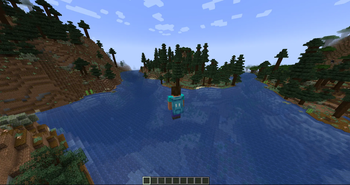
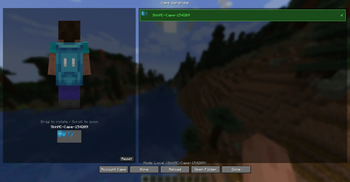
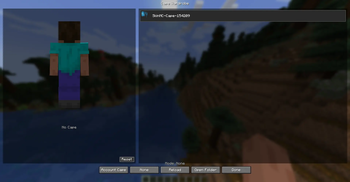
About this Mod
Cape Switcher
Cape Switcher is a client-side Fabric mod for Minecraft 1.21.4 that lets you choose, preview, and switch local custom capes directly in-game.
Cape Switcher — клиентский Fabric-мод для Minecraft 1.21.4, который позволяет выбирать, просматривать и менять локальные кастомные плащи прямо в игре.
Features / Возможности
Choose custom cape textures from local PNG files
Выбор кастомных текстур плащей из локальных PNG-файловThree cape modes: Account, Local, None
Три режима плаща: плащ аккаунта, локальный плащ, без плащаIn-game Cape Wardrobe GUI
Игровое меню Cape Wardrobe3D player preview
3D-превью модели игрокаDrag to rotate the model
Вращение модели мышьюScroll to zoom
Приближение и отдаление колёсиком мышиHover preview over cape cards
Предпросмотр плаща при наведении на карточкуHotkey to open the wardrobe
Хоткей для открытия гардеробаAuto-creates config and capes folders
Автоматическое создание папок конфига и плащейError-safe loading
Мод не крашит игру при отсутствующих или битых файлахEnglish and Russian localization
Английская и русская локализация
Installation / Установка
Install Fabric Loader for Minecraft 1.21.4.
Установите Fabric Loader для Minecraft 1.21.4.Install Fabric API.
Установите Fabric API.Put the mod
.jarfile into your.minecraft/mods/folder.
Поместите.jarфайл мода в папку.minecraft/mods/.Launch the game.
Запустите игру.
How to Add Capes / Как добавить плащи
- Open the capes folder:
.minecraft/config/cape-switcher/capes/
- Put your PNG cape files there.
Example:
.minecraft/config/cape-switcher/capes/my_cape.png
Open the Cape Wardrobe in-game.
Press Reload.
Select your cape.
- Откройте папку с плащами:
.minecraft/config/cape-switcher/capes/
- Поместите туда PNG-файлы плащей.
Пример:
.minecraft/config/cape-switcher/capes/my_cape.png
Откройте Cape Wardrobe в игре.
Нажмите Reload.
Выберите нужный плащ.
Cape Texture Format / Формат текстуры плаща
Cape textures should use the standard Minecraft cape format:
64x32
128x64
Текстуры плащей должны использовать стандартный формат Minecraft:
64x32
128x64
Cape Modes / Режимы плаща
Account Cape / Плащ аккаунта
Shows your official Minecraft account cape if you have one.
Показывает официальный плащ Minecraft-аккаунта, если он есть.
Local Cape / Локальный плащ
Shows a custom PNG cape from your local capes folder.
Показывает кастомный PNG-плащ из локальной папки с плащами.
None / Без плаща
Disables the cape display.
Отключает отображение плаща.
Controls / Управление
Default hotkey:
C
Controls inside the wardrobe:
Left Mouse Drag — rotate player preview
Зажать ЛКМ и двигать мышью — вращать модель игрокаMouse Wheel — zoom preview
Колёсико мыши — приближать или отдалять модельReset View — reset preview rotation
Reset View — сбросить поворот моделиReload — reload cape files
Reload — перезагрузить список плащейOpen Folder — open the capes folder
Open Folder — открыть папку с плащами
Important Notes / Важные замечания
This mod is client-side only.
Other players will not see your selected local cape unless they use a compatible sync system.
Этот мод работает только на клиенте.
Другие игроки не увидят ваш локальный плащ, если у них нет совместимой системы синхронизации.
Cape Switcher does not include or redistribute official Minecraft/Mojang cape textures.
Cape Switcher не содержит и не распространяет официальные текстуры плащей Minecraft/Mojang.
Official account capes are displayed only through the normal Minecraft account system using the Account Cape mode.
Официальные плащи отображаются только через стандартную систему Minecraft-аккаунта в режиме Account Cape.
Building from Source / Сборка из исходников
To build the mod from source, run:
./gradlew build
The built .jar file will be located in:
build/libs/
Для сборки мода из исходников выполните:
./gradlew build
Готовый .jar файл будет находиться в:
build/libs/
License / Лицензия
This project is licensed under the MIT License.
Этот проект распространяется под лицензией MIT.
Available Versions
How to Install Cape Switcher on Your Server
Order Server
Order a Minecraft Java server with at least 3 GB RAM (4 GB recommended).
Set fabric Loader
In the panel under "Egg", select the fabric loader and matching Minecraft version (26.1.2).
Install Mod
Open the mod browser in the dashboard and search for "Cape Switcher". Click "Install" – done! Alternatively, upload the .jar via SFTP to the /mods folder.
Compatibility
Mod Loaders
Minecraft Versions
26.1.2, 1.21.11, 1.21.9 (+1 more)
Server-side
✗ UnsupportedRecommended RAM
4 GB(min. 3 GB)Frequently Asked Questions
Cape Switcher server crashes on startup – what to do?
Most common cause: wrong fabric version or insufficient RAM. Check the server log (latest.log) for "OutOfMemoryError" or "Mixin" errors. With Mado Hosting: ensure at least 3 GB RAM is allocated and the loader matches the mod version (26.1.2). You can switch loaders with one click in the panel.
Is Cape Switcher compatible with fabric?
Cape Switcher officially supports fabric for Minecraft 26.1.2, 1.21.11, 1.21.9. The Mado dashboard automatically detects incompatible loader combinations.
Server lagging with Cape Switcher – how to optimize performance?
Recommended RAM: 4 GB (per 8 players). Use /spark profiler to check if Cape Switcher consumes the most tick time. Common fixes: reduce server view-distance to 8-10, install "performant" or "starlight" as supplementary mods on Forge. With Mado Hosting, your server runs on NVMe SSDs with dedicated CPU cores for minimal latency.
Similar Mods




![[ETF] Entity Texture Features](https://cdn.modrinth.com/data/BVzZfTc1/af683d206d50b05258d865b0d6e4aa2f2cee12f2_96.webp)
![[EMF] Entity Model Features](https://cdn.modrinth.com/data/4I1XuqiY/6e5bbd0d06b1741bfdab6c0cfab6de8fdaf0064c_96.webp)
Rent Modded Server
Install Cape Switcher with just one click on your server.