
CaptureZone
Territory capture mod for Forge 1.20.1. Create zones, fight for control, earn rewards. Animated borders, cooldowns, fully configurable messages and HUD.
Screenshots

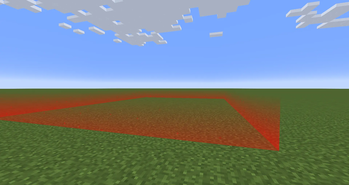
About this Mod
CaptureZone
CaptureZone is a Minecraft Forge mod that adds a fully configurable territory capture system to your server. Create custom zones, set up rewards, and let players fight for control!
⚑ Features
- Create capture zones of any size anywhere in the world
- Animated zone borders — red (available), green (capturing), blue (on cooldown)
- Progress bar HUD with custom PNG textures
- Item & command rewards for capturing a zone
- Cooldown system — zones become unavailable for a configurable time after capture
- Minimum player requirement — zones stay locked until enough players are online
- Rollback system — progress resets if the capturer dies or leaves the zone
- Fully configurable messages with color codes and placeholders
- No restart needed — reload config with
/womzone reload
🛠 Commands
| Command | Description |
|---|---|
/womzone pos1 |
Set first corner of the zone |
/womzone pos2 |
Set second corner of the zone |
/womzone create <name> |
Create a zone from selected corners |
/womzone delete <name> |
Delete a zone |
/womzone reload |
Reload all configs without restart |
/womzone delay |
Show active cooldowns |
/womzone checkzone |
List all zones |
/womzone checkzone <name> |
Show info about a specific zone |
Permission level required: 2 (operator)
⚙ Zone Configuration
Each zone is stored as a JSON file in config/CaptureZone/zones/:
{
  "name": "base",
  "world": "minecraft:overworld",
  "nameworlds": "Raid",
  "namelocation": "Military Base",
  "captureSeconds": 120,
  "cooldownSeconds": 300,
  "playerresetSeconds": 30,
  "maxPlayers": 10,
  "rewardItems": [
    { "itemId": "minecraft:diamond", "amount": 1, "chance": 100.0 }
  ],
  "rewardCommand": {
    "enabled": true,
    "command": "give %player% minecraft:emerald 1"
  }
}
💬 Messages
All HUD messages are stored in config/CaptureZone/messages.yml with full support for:
- Color codes (
§a,§c,§e, etc.) - Placeholders (
%player%,%zone%,%location%,%secs%, etc.) - Enable/disable each message individually
- Hot reload via
/womzone reload
📋 Requirements
- Minecraft 1.20.1
- Forge 47.x
Made by Сухарик
Available Versions
How to Install CaptureZone on Your Server
Order Server
Order a Minecraft Java server with at least 3 GB RAM (4 GB recommended).
Set forge Loader
In the panel under "Egg", select the forge loader and matching Minecraft version (1.20.1).
Install Mod
Open the mod browser in the dashboard and search for "CaptureZone". Click "Install" – done! Alternatively, upload the .jar via SFTP to the /mods folder.
Compatibility
Mod Loaders
Minecraft Versions
1.20.1
Server-side
✓ RequiredRecommended RAM
4 GB(min. 3 GB)Frequently Asked Questions
CaptureZone server crashes on startup – what to do?
Most common cause: wrong forge version or insufficient RAM. Check the server log (latest.log) for "OutOfMemoryError" or "Mixin" errors. With Mado Hosting: ensure at least 3 GB RAM is allocated and the loader matches the mod version (1.20.1). You can switch loaders with one click in the panel.
Is CaptureZone compatible with forge?
CaptureZone officially supports forge for Minecraft 1.20.1. The Mado dashboard automatically detects incompatible loader combinations.
Server lagging with CaptureZone – how to optimize performance?
Recommended RAM: 4 GB (per 8 players). Use /spark profiler to check if CaptureZone consumes the most tick time. Common fixes: reduce server view-distance to 8-10, install "performant" or "starlight" as supplementary mods on Forge. With Mado Hosting, your server runs on NVMe SSDs with dedicated CPU cores for minimal latency.
Similar Mods




Rent Modded Server
Install CaptureZone with just one click on your server.