
Carbink Gemstone Variations
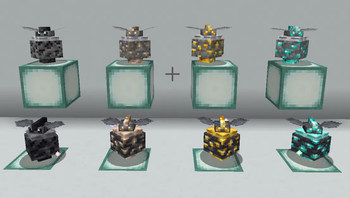
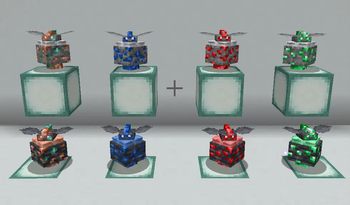
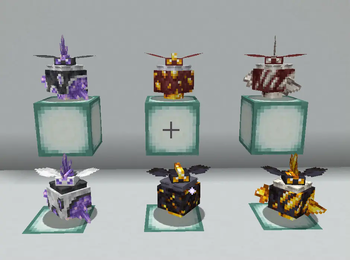
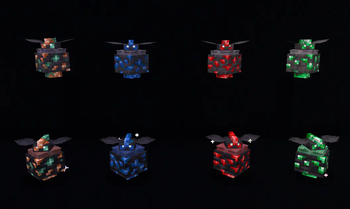
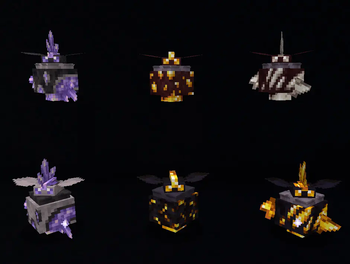
Carbink variations! All based on different Minecraft ores.
Screenshots
About this Mod
This Resource/Data Pack adds in extra variations of Carbink for you to adventure with in your Cobblemon world!
It adds forms for every single vanilla ore in minecraft, which you can rarely find in the wild around the ore associated with it, or evolve a carbink into it. However, you may need a Silk Touch pickaxe first!
Carbink Forms in this pack:
Coalbink - Use Coal Ore Block on Carbink
Irbink - Use Iron Ore Block on Carbink
Golbink - Use Gold Ore Block on Carbink
Dibink - Use Diamond Ore Block on Carbink
Coppink - Use Copper Ore Block on Carbink
Labink - Use Lapis Ore Block on Carbink
Rubink - Use Redstone Ore Block on Carbink
Emebink - Use Emerald Ore Block on Carbink
And some extra special evolutions that can't be found in the wild:
Amebink - Use Amethyst Cluster on Carbink
Netherbink - Use Nether Gold Ore OR Gilded Blackstone on Carbink
Quarbink - Use Nether Quartz Ore Block on Carbink
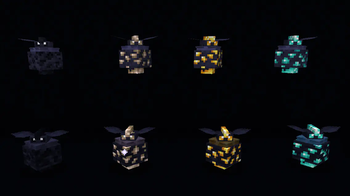
Shiny forms are based on deepslate ores, and deepslate ores can also be used to evolve them! The Nether-based shinies are based on guilded blackstone.
All are emissive!
How to use:
- Download (Unzipping Not Required)
- Copy file into your Resource Packs and Data Packs folders (Don't forget to add it to your world saves folder too!)
- Enable Resource Pack upon entering the world via the settings
Note: When enabling the resource pack, the game might flag the add-on as outdated. Ignore it and proceed, as it still works fine!
Cobblemon is required to use this mod!
This is a collab between KuukiKookie and Nimbosaur!
Available Versions
How to Install Carbink Gemstone Variations on Your Server
Order Server
Order a Minecraft Java server with at least 3 GB RAM (4 GB recommended).
Set datapack Loader
In the panel under "Egg", select the datapack loader and matching Minecraft version (1.21.1).
Install Mod
Open the mod browser in the dashboard and search for "Carbink Gemstone Variations". Click "Install" – done! Alternatively, upload the .jar via SFTP to the /mods folder.
Compatibility
Mod Loaders
Minecraft Versions
1.21.1
Server-side
✓ RequiredRecommended RAM
4 GB(min. 3 GB)Frequently Asked Questions
Carbink Gemstone Variations server crashes on startup – what to do?
Most common cause: wrong datapack version or insufficient RAM. Check the server log (latest.log) for "OutOfMemoryError" or "Mixin" errors. With Mado Hosting: ensure at least 3 GB RAM is allocated and the loader matches the mod version (1.21.1). You can switch loaders with one click in the panel.
Is Carbink Gemstone Variations compatible with datapack and fabric and minecraft?
Carbink Gemstone Variations officially supports datapack, fabric, minecraft for Minecraft 1.21.1. The Mado dashboard automatically detects incompatible loader combinations.
Server lagging with Carbink Gemstone Variations – how to optimize performance?
Recommended RAM: 4 GB (per 8 players). Use /spark profiler to check if Carbink Gemstone Variations consumes the most tick time. Common fixes: reduce server view-distance to 8-10, install "performant" or "starlight" as supplementary mods on Forge. With Mado Hosting, your server runs on NVMe SSDs with dedicated CPU cores for minimal latency.
Similar Mods
![[EMF] Entity Model Features](https://cdn.modrinth.com/data/4I1XuqiY/6e5bbd0d06b1741bfdab6c0cfab6de8fdaf0064c_96.webp)


Rent Modded Server
Install Carbink Gemstone Variations with just one click on your server.