
Carpet Sky Additionals
Adding Additional Additions to Carpet Sky Additions
Screenshots
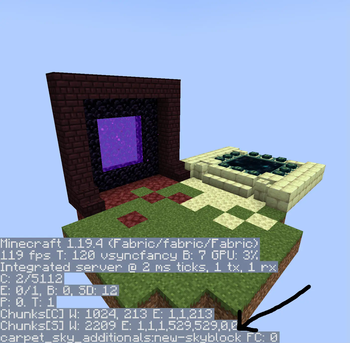


About this Mod
Carpet Sky Additionals
What is Carpet Sky Additionals?
Carpet Sky Additionals (CSA) is an addon for Carpet Sky Additions that makes the mod more suitable for multiplayer. By default, Carpet Sky Additions has all players in the same world, but thousands of blocks away from each other. This presents difficulties when wanting to interact with other players, but also wanting privacy. How do we combat this? Well by making each SkyBlock its own 3 dimensions of course!
How can the mod be configured?
- Carpet commands can be accessed by
/carpet <command>sneakingGrowsPlants: Classic SkyBlock spam crouching to grow all types of plantssneakGrowingProbability: 1/n chance that a random block will be grown when crouchingsneakGrowingRadius: The radius in which the game will select a random block
- CSA's command can be accessed by
/islandsCreate An Island: Creates 3 new dimensions for your new SkyBlockDelete An Island: Deletes the specified SkyBlockRename An Island: Currently is not implementedManage Your Islands: Allows you to manage SkyBlock join invitesJoin An Island: Sends a Join Request to the owner of the SkyBlockLeave An Island: Removes you from the specified SkyBlockVisit An Island: Allows you to spectate any SkyBlockGo To Your Island: Teleports you to one of your SkyBlocksGo To The Hub: Teleports you to the main Overworld
- CSA's admin command can be accessed by
/islands-admin- Select the SkyBlock you want to manage
Additional Notes
- As of right now,
Go To The Hubwill take the player to8, 64, 9in the Overworld
Available Versions
How to Install Carpet Sky Additionals on Your Server
Order Server
Order a Minecraft Java server with at least 4 GB RAM (6 GB recommended).
Set fabric Loader
In the panel under "Egg", select the fabric loader and matching Minecraft version (1.20.1).
Install Mod
Open the mod browser in the dashboard and search for "Carpet Sky Additionals". Click "Install" – done! Alternatively, upload the .jar via SFTP to the /mods folder.
Compatibility
Mod Loaders
Minecraft Versions
1.20.1, 1.20, 1.19.4
Server-side
✓ RequiredRecommended RAM
6 GB(min. 4 GB)Frequently Asked Questions
Carpet Sky Additionals server crashes on startup – what to do?
Most common cause: wrong fabric version or insufficient RAM. Check the server log (latest.log) for "OutOfMemoryError" or "Mixin" errors. With Mado Hosting: ensure at least 4 GB RAM is allocated and the loader matches the mod version (1.20.1). You can switch loaders with one click in the panel.
Is Carpet Sky Additionals compatible with fabric and quilt?
Carpet Sky Additionals officially supports fabric, quilt for Minecraft 1.20.1, 1.20, 1.19.4. The Mado dashboard automatically detects incompatible loader combinations.
Server lagging with Carpet Sky Additionals – how to optimize performance?
Recommended RAM: 6 GB (per 5 players). Use /spark profiler to check if Carpet Sky Additionals consumes the most tick time. Common fixes: reduce server view-distance to 8-10, install "performant" or "starlight" as supplementary mods on Forge. With Mado Hosting, your server runs on NVMe SSDs with dedicated CPU cores for minimal latency.
Similar Mods




Rent Modded Server
Install Carpet Sky Additionals with just one click on your server.