
Castia Inventory Tools (Season 3)
Small mod to make your game on Castia MC server even better
Screenshots
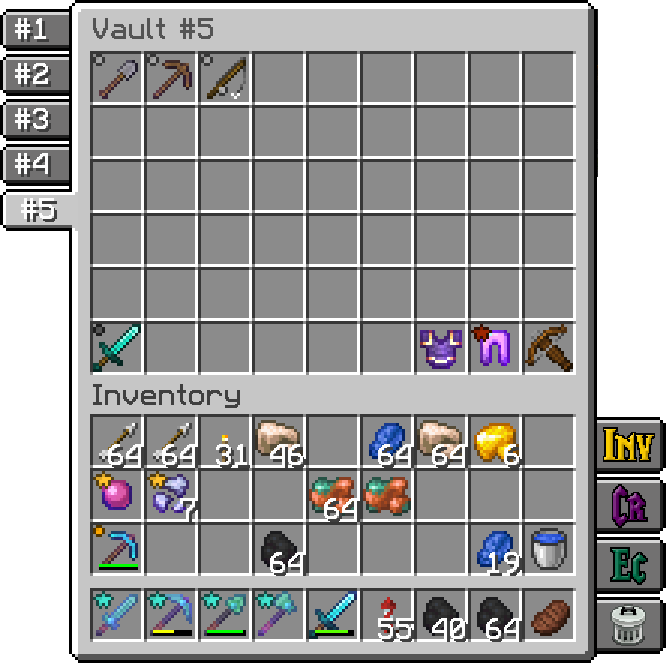
About this Mod
A companion mod for CastiaMC players. Enhances your gameplay with inventory shortcuts, item tier highlighting, job earnings tracking, and more. Works on Forge, Fabric, and NeoForge.
This mod is designed exclusively for the https://castiamc.com server. Features activate automatically when you connect.
Features
Item Tier Highlighting
See item rarity at a glance! Colored tier icons appear on items in your hotbar, inventory, and containers — including inside InventoryHUD+ if you have it installed.
Each tier can be individually toggled on or off.


Quick Container Navigation
Access your most-used containers with one click. Buttons appear on the side of your inventory and container screens:
- Inventory · Crafting Table · Ender Chest · Trash
- Player Vaults — browse up to 6 vaults with paginated numbered buttons
- Town Vaults — same paginated navigation for town storage
Each button can be toggled individually. Choose whether buttons appear only on your inventory, on all container screens, or hidden entirely.


Homes GUI
Press Y to open a searchable list of all your homes. Click any home to teleport instantly. Start typing to filter — press Enter to jump to the first match. Results are cached so reopening is instant.

Job Earnings Tracker
Press J to see how much you've earned. Tracks both money and experience across multiple time windows:
- Last hour · Last N minutes (configurable) · Session · Daily · Weekly · Monthly · Overall
Income message display is configurable — show in chat, action bar, or hide completely.


Emoji Buttons
A compact grid of 48+ server emojis appears in the chat screen. Click to insert into your message, Shift+click to send immediately. Toggle on/off in settings.

Sound Controls
Fine-tune the volume of individual server sounds — Level Up, Quest Complete, RTP, Vein Miner, Treefeller, Gemstone, Bomb, Mithril Core, and more. Each has its own slider, plus a master volume control.

Command Keybindings
Quick keys for common server commands:
C- /craftR- /ec (ender chest)H- /h homeB- /backJ- Job Earnings sreenY- Homes GUIX- Toggle scoreboard sidebar[- Open config screenNumpad 0- Last opened Player VaultNumpad .- Last opened Town Vault(unbound)- /trash, /condense
All keybindings are fully rebindable in Minecraft's controls menu.
InventoryHUD+ Integration
If you use InventoryHUD+ mod, tier icons are rendered directly on its HUD display — supporting vertical, horizontal, and mini layouts.
Configuration
undefinedPress [ to open the config screen where you can customize:
- Which container buttons are visible
- Tier icon visibility (per tier)
- Emoji buttons on/off
- Job tracking time window and message routing
- Vault counts
- Server sound volumes
- Button placement mode
Made for the Castia community.
Available Versions
How to Install Castia Inventory Tools (Season 3) on Your Server
Order Server
Order a Minecraft Java server with at least 3 GB RAM (4 GB recommended).
Set fabric Loader
In the panel under "Egg", select the fabric loader and matching Minecraft version (1.21.8).
Install Mod
Open the mod browser in the dashboard and search for "Castia Inventory Tools (Season 3)". Click "Install" – done! Alternatively, upload the .jar via SFTP to the /mods folder.
Compatibility
Mod Loaders
Minecraft Versions
1.21.8, 1.21.4, 1.21.1 (+4 more)
Server-side
✗ UnsupportedRecommended RAM
4 GB(min. 3 GB)Frequently Asked Questions
Castia Inventory Tools (Season 3) server crashes on startup – what to do?
Most common cause: wrong fabric version or insufficient RAM. Check the server log (latest.log) for "OutOfMemoryError" or "Mixin" errors. With Mado Hosting: ensure at least 3 GB RAM is allocated and the loader matches the mod version (1.21.8). You can switch loaders with one click in the panel.
Is Castia Inventory Tools (Season 3) compatible with fabric and forge and neoforge?
Castia Inventory Tools (Season 3) officially supports fabric, forge, neoforge for Minecraft 1.21.8, 1.21.4, 1.21.1. Note: Forge and Fabric mods are NOT cross-compatible – pick one loader and stick with it. The Mado dashboard automatically detects incompatible loader combinations.
Server lagging with Castia Inventory Tools (Season 3) – how to optimize performance?
Recommended RAM: 4 GB (per 8 players). Use /spark profiler to check if Castia Inventory Tools (Season 3) consumes the most tick time. Common fixes: reduce server view-distance to 8-10, install "performant" or "starlight" as supplementary mods on Forge. With Mado Hosting, your server runs on NVMe SSDs with dedicated CPU cores for minimal latency.
Similar Mods




![[ETF] Entity Texture Features](https://cdn.modrinth.com/data/BVzZfTc1/af683d206d50b05258d865b0d6e4aa2f2cee12f2_96.webp)
![[EMF] Entity Model Features](https://cdn.modrinth.com/data/4I1XuqiY/6e5bbd0d06b1741bfdab6c0cfab6de8fdaf0064c_96.webp)
Rent Modded Server
Install Castia Inventory Tools (Season 3) with just one click on your server.