
CasualPvP
CasualPvP is a client-side Fabric mod that combines clean PvP visuals, shield status tinting, profile-based settings, and lightweight PvP/SMP quality-of-life tools in one menu.
Screenshots
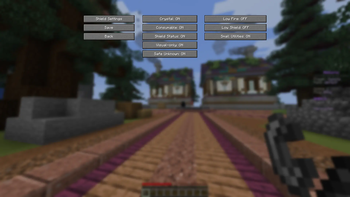
About this Mod
CasualPvP
CasualPvP is a client-side Fabric mod for players who want cleaner PvP visuals, practical profile-based settings, and server-respectful quality-of-life tools in one place.
It is built for SMP, crystal PvP practice, and general 1.21+ PvP packs. The goal is simple: fewer tiny utility mods, less config hunting, and no hidden gameplay cheats.
Features
In-game settings menu
- Opens with Right Ctrl by default.
- Also opens through Mod Menu or
/casualpvp menu. - Settings save automatically when changed.
Crystal Optimizer
- Client-side feedback for attacked end crystals.
- Keeps local crystal removal/caches lightweight and clears state on disconnect.
- Respects server opt-out signals.
Consumable Optimizer
- Smooths local consumable-use feedback at vanilla duration.
- Avoids changing reach, hitboxes, or server interaction rules.
- Respects server opt-out signals.
Shield Status
- Tints shield models based on cooldown/readiness.
- Configurable ready, almost-ready, and disabled colors.
- Supports opacity, interpolation, first-person, third-person, and inventory visibility toggles.
- This is a shield/item model overlay, not a HUD bar.
Built-in visual packs
- Low Fire
- Low Shield
- Small Utilities
- Packs can be toggled from the CasualPvP menu and are applied through Minecraft's resource-pack list.
Supported Versions
Current build targets:
- Minecraft
1.21.1 - Minecraft
1.21.4 - Minecraft
1.21.5 - Minecraft
1.21.10 - Minecraft
1.21.11 - Minecraft
26.1 - Minecraft
26.1.1 - Minecraft
26.1.2
Minecraft 1.20.x is not supported.
Requirements
- Fabric Loader
- Fabric API
- Mod Menu is optional but recommended
- Java 21 for Minecraft 1.21.x targets
- Java 25 for Minecraft 26.1+ targets
Usage
- Press Right Ctrl to open the CasualPvP menu.
- Use the first menu page for one-click module and visual-pack toggles.
- Open Shield Settings for detailed shield color/visibility controls.
- Use
/casualpvp menuif the keybind is changed or unavailable.
Credits
CasualPvP is by kyssta.
Reference/inspiration credits:
- Marlow's Crystal Optimizer
- Walksy Consumable Optimizer
- Walksy Shield Statuses
License
CasualPvP is licensed under the Apache License 2.0.
Redistributions, forks, modpacks, and modified builds must preserve LICENSE, NOTICE, and credit:
CasualPvP by kyssta
Available Versions
How to Install CasualPvP on Your Server
Order Server
Order a Minecraft Java server with at least 3 GB RAM (4 GB recommended).
Set fabric Loader
In the panel under "Egg", select the fabric loader and matching Minecraft version (26.1.2).
Install Mod
Open the mod browser in the dashboard and search for "CasualPvP". Click "Install" – done! Alternatively, upload the .jar via SFTP to the /mods folder.
Compatibility
Mod Loaders
Minecraft Versions
26.1.2, 26.1.1, 26.1 (+5 more)
Server-side
✗ UnsupportedRecommended RAM
4 GB(min. 3 GB)Frequently Asked Questions
CasualPvP server crashes on startup – what to do?
Most common cause: wrong fabric version or insufficient RAM. Check the server log (latest.log) for "OutOfMemoryError" or "Mixin" errors. With Mado Hosting: ensure at least 3 GB RAM is allocated and the loader matches the mod version (26.1.2). You can switch loaders with one click in the panel.
Is CasualPvP compatible with fabric?
CasualPvP officially supports fabric for Minecraft 26.1.2, 26.1.1, 26.1. The Mado dashboard automatically detects incompatible loader combinations.
Server lagging with CasualPvP – how to optimize performance?
Recommended RAM: 4 GB (per 8 players). Use /spark profiler to check if CasualPvP consumes the most tick time. Common fixes: reduce server view-distance to 8-10, install "performant" or "starlight" as supplementary mods on Forge. With Mado Hosting, your server runs on NVMe SSDs with dedicated CPU cores for minimal latency.
Similar Mods




Rent Modded Server
Install CasualPvP with just one click on your server.