CatBud Mod(unofficial)
中文:這是一個適用於貓芽伺服器的輔助模組|English:This is an auxiliary module for the Catbud server.
Screenshots
About this Mod
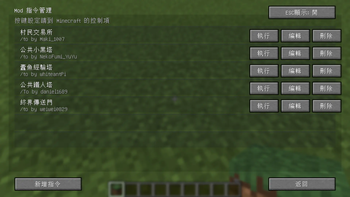
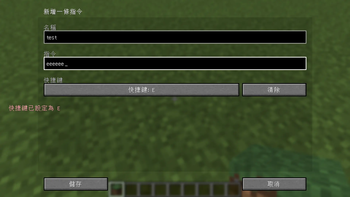
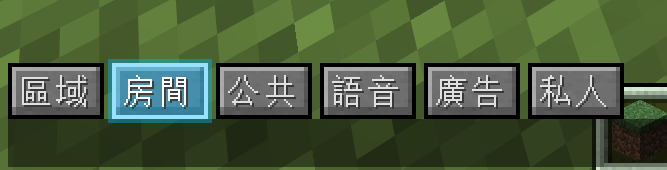
這是一個專為貓芽伺服器設計的輔助模組,提供快捷指令、聊天頻道切換以及自訂指令按鈕等便利功能,讓玩家能更快
速地使用伺服器功能。
- 可一鍵執行指令
- 切換聊天頻道
- 本模組僅針對貓芽伺服器進行設計與測試,其他伺服器可能無法正常運作。
English
This is an auxiliary module designed specifically for the [catbud](- One-click command execution
- Switch chat channels
- This module is designed and tested only for the catbud server; it may not function properly on other servers.
Available Versions
How to Install CatBud Mod(unofficial) on Your Server
Order Server
Order a Minecraft Java server with at least 3 GB RAM (4 GB recommended).
Set fabric Loader
In the panel under "Egg", select the fabric loader and matching Minecraft version (26.1.2).
Install Mod
Open the mod browser in the dashboard and search for "CatBud Mod(unofficial)". Click "Install" – done! Alternatively, upload the .jar via SFTP to the /mods folder.
Compatibility
Mod Loaders
Minecraft Versions
26.1.2
Server-side
✗ UnsupportedRecommended RAM
4 GB(min. 3 GB)Frequently Asked Questions
CatBud Mod(unofficial) server crashes on startup – what to do?
Most common cause: wrong fabric version or insufficient RAM. Check the server log (latest.log) for "OutOfMemoryError" or "Mixin" errors. With Mado Hosting: ensure at least 3 GB RAM is allocated and the loader matches the mod version (26.1.2). You can switch loaders with one click in the panel.
Is CatBud Mod(unofficial) compatible with fabric?
CatBud Mod(unofficial) officially supports fabric for Minecraft 26.1.2. The Mado dashboard automatically detects incompatible loader combinations.
Server lagging with CatBud Mod(unofficial) – how to optimize performance?
Recommended RAM: 4 GB (per 8 players). Use /spark profiler to check if CatBud Mod(unofficial) consumes the most tick time. Common fixes: reduce server view-distance to 8-10, install "performant" or "starlight" as supplementary mods on Forge. With Mado Hosting, your server runs on NVMe SSDs with dedicated CPU cores for minimal latency.
Similar Mods




![[ETF] Entity Texture Features](https://cdn.modrinth.com/data/BVzZfTc1/af683d206d50b05258d865b0d6e4aa2f2cee12f2_96.webp)
![[EMF] Entity Model Features](https://cdn.modrinth.com/data/4I1XuqiY/6e5bbd0d06b1741bfdab6c0cfab6de8fdaf0064c_96.webp)
Rent Modded Server
Install CatBud Mod(unofficial) with just one click on your server.