
CatSkinC
A simple skin mod for use in other server and make your skin can use with high resolution up to 8192x!
Screenshots
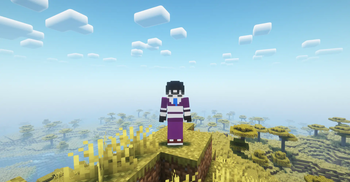
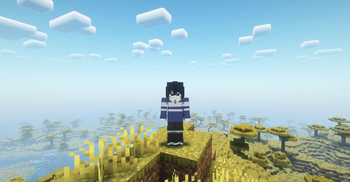
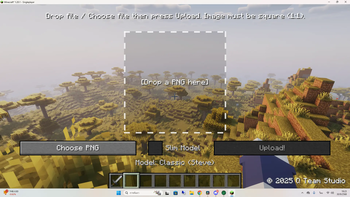
About this Mod
🐾CatSkinC – Easy Minecraft Skin Manager



Upload your own skin from inside the game and have everyone see it instantly — no server-side setup, works on any server.
CatSkinC is a client-side skin mod. Press a key, drop a PNG, and your skin is uploaded to the CatSkinC cloud and pushed live to every other player running the mod. It even gives your character a talking mouth that moves while you speak in voice chat.
This mod is designed for players who frequently switch skins, artists who create high-detail textures, and anyone who wants more control and flexibility over their Minecraft appearance.
✨ Features
- 🎨 In-game skin upload — press
Kto open the workspace, then drag-and-drop a PNG. No website, no relog. - 🌍 Live sync for everyone — when you change your skin, every player with the mod sees it update in real time (Server-Sent Events under the hood).
- 🗣️ Talking mouths — add optional mouth-open / mouth-close overlay images and your skin's mouth animates while you talk in voice chat.
- 🖼️ Local library — your uploaded skins are kept in a reusable library with thumbnails, quick re-select, and delete.
- 👤 Live 3D preview — preview skins on a rotatable player model before you commit, with a dedicated Slim / Wide model toggle.
- 🧩 Plays nice with other mods — built-in compatibility with Figura, plus soft integration with Simple Voice Chat and Plasmo Voice.
- 🔒 Secure by design — identity is verified through Mojang, transfers are HTTPS-only with integrity checks, and only premium accounts can upload.
🎮 How it works
- Install the mod on your client (and any friends who want to see custom skins).
- Join any world or server.
- Press
K, drag in a PNG skin (64×64 or higher, square, power-of-two). - (Optional) Add mouth-open / mouth-close overlays for the talking effect.
- Pick Slim or Wide, hit upload — done. Everyone running the mod sees it live.
Skin data travels through the CatSkinC cloud, not the Minecraft server — so the people you play with sync skins peer-to-peer regardless of what server you're on.
📦 Requirements
This is a client-side mod — you do NOT need to install it on your Minecraft server. Vanilla servers are fine.
| Required | |
|---|---|
| Fabric API | ✅ Yes |
| Architectury API | ✅ Yes |
| Account | Premium / Mojang account (offline/cracked uploads are rejected) |
Supported versions & loaders
| Minecraft | Loaders |
|---|---|
| 1.21.1 | Fabric, NeoForge |
| 1.20.1 | Fabric, Forge |
Players without the mod simply see you with your normal vanilla skin — nothing breaks for them.
🔌 Optional integrations (install only if you want them)
- Simple Voice Chat / Plasmo Voice — drives the talking-mouth animation from your real voice activity.
- Figura — fully compatible. If you have an active Figura avatar, CatSkinC steps aside and lets Figura render your character, so the two never fight over your skin.
- Emotecraft — detected and supported alongside emotes.
All of these are soft dependencies: if they aren't installed, CatSkinC just runs without those features.
❓ FAQ
Do I need this on the server?
No. It's purely client-side. Install it on each player's game.
Will players without the mod see my skin?
No — they'll see your default vanilla skin. Only players with CatSkinC installed see custom skins.
Does it work with shaders / Figura / voice mods?
Yes. Figura takes priority when you have an avatar loaded, and voice mods power the mouth animation.
My skin won't upload?
Make sure you're on a premium (paid) Minecraft account and your image is a square PNG sized to a power of two (64, 128, 256, …).
🔧Compatibility
- Minecraft: Java Edition (tested on 1.20.x & 1.21.x)
- Loaders: Fabric,Forge,NeoForge
- Environment: Client-side only
ℹ️Notes
- Skin data is managed via Cloud (stored and retrieved online)
- Client-only mod, no server-side installation required
- One player = one skin file
Community & Development
CatSkinC is community-friendly and open source. You can:
- community on Discord
- Report bugs or request features on GitHub Issues
- Explore or contribute at the GitHub Repository
📜 License
Made by Cat Lab_ 9Creations Club (Q Team Studio).
Available Versions
How to Install CatSkinC on Your Server
Order Server
Order a Minecraft Java server with at least 3 GB RAM (4 GB recommended).
Set fabric Loader
In the panel under "Egg", select the fabric loader and matching Minecraft version (26.1.2).
Install Mod
Open the mod browser in the dashboard and search for "CatSkinC". Click "Install" – done! Alternatively, upload the .jar via SFTP to the /mods folder.
Compatibility
Mod Loaders
Minecraft Versions
26.1.2, 1.21.1, 1.20.1
Server-side
✗ UnsupportedRecommended RAM
4 GB(min. 3 GB)Frequently Asked Questions
CatSkinC server crashes on startup – what to do?
Most common cause: wrong fabric version or insufficient RAM. Check the server log (latest.log) for "OutOfMemoryError" or "Mixin" errors. With Mado Hosting: ensure at least 3 GB RAM is allocated and the loader matches the mod version (26.1.2). You can switch loaders with one click in the panel.
Is CatSkinC compatible with fabric and forge and neoforge?
CatSkinC officially supports fabric, forge, neoforge for Minecraft 26.1.2, 1.21.1, 1.20.1. Note: Forge and Fabric mods are NOT cross-compatible – pick one loader and stick with it. The Mado dashboard automatically detects incompatible loader combinations.
Server lagging with CatSkinC – how to optimize performance?
Recommended RAM: 4 GB (per 8 players). Use /spark profiler to check if CatSkinC consumes the most tick time. Common fixes: reduce server view-distance to 8-10, install "performant" or "starlight" as supplementary mods on Forge. With Mado Hosting, your server runs on NVMe SSDs with dedicated CPU cores for minimal latency.
Similar Mods

![[ETF] Entity Texture Features](https://cdn.modrinth.com/data/BVzZfTc1/af683d206d50b05258d865b0d6e4aa2f2cee12f2_96.webp)
![[EMF] Entity Model Features](https://cdn.modrinth.com/data/4I1XuqiY/6e5bbd0d06b1741bfdab6c0cfab6de8fdaf0064c_96.webp)



Rent Modded Server
Install CatSkinC with just one click on your server.