
Cement Mod
Realistic cement production for Minecraft.
Screenshots
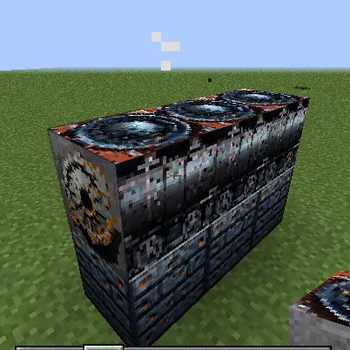
About this Mod
Cement Mod: Brings industrial automation and structural engineering to Minecraft
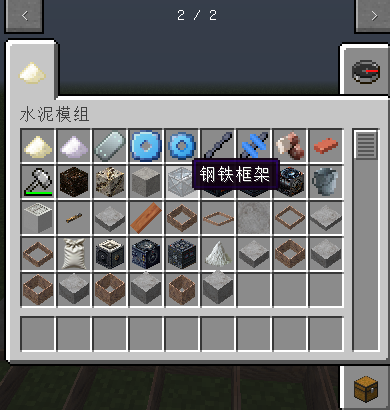
Cement Mod revolutionizes the gameplay of concrete in Minecraft, transforming it from a simple building material to a challenging and deep industrial ecosystem core. With a focus on realistic cement production chains, critical structural integrity physics, and dynamic environmental hazards, this module brings a whole new experience to engineers, architects, and survival players.
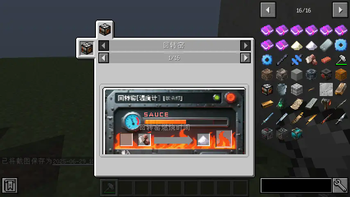
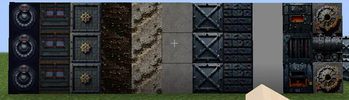
Immersive industrial production line: Establish an automated factory and use multiple machines (crusher, rotary kiln, cement mixer, cement encapsulator) to process raw materials (limestone, deep clay) into cement powder, wet concrete, and finally into packaging cement bags that are easy to transport. Experience the complete industrial process from mine to finished product.
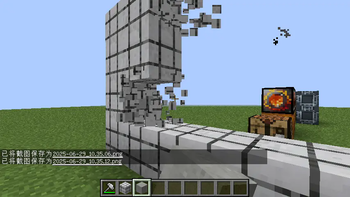
Vital Structural Engineering: Say goodbye to unrealistic floating buildings! Introduce advanced structural integrity mechanisms. Large-scale structures constructed of reinforced concrete that lack proper support (e.g., beams, columns, frames) will undergo a physically-driven collapse process. Experience realistic debris falls, particle effects, and sound feedback to challenge your architectural design abilities. (Optimize the algorithm to ensure smooth performance).
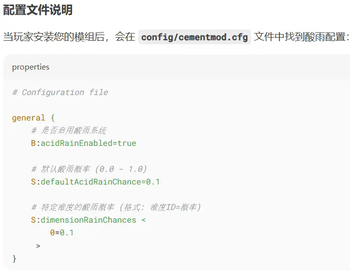
Dynamic Environmental Threat - Acid Rain: In a hot biome (or other configurable dimension), there is a 10% chance that rain will turn into corrosive acid rain. Not only does this add to the immersion of the environment, but it also brings a real threat, accompanied by unique corrosive sound effects that will test your survival strategy and building protection.
Automation-ready: Built-in Item Extractor blocks make it easy to automatically extract products from adjacent machines and integrate seamlessly into your factory pipeline.
Seamless Integration & Performance: Integrates perfectly with JEI (Just Enough Items) and The One Probe for easy recipe lookup and block information display. Focus on performance optimizations (e.g., cache structure verification calculations, batch rendering) to ensure a smooth gaming experience even in complex factories and structures.
Cement Mod is ideal for players who:
Engineer: Players who aspire to design and automate complex production lines.
Architects: Players who seek to design grand structures that are both aesthetically pleasing and physically compliant, stable and reliable.
Survivors: Players seeking to challenge themselves under dynamic environmental threats (acid rain) and physical constraints (structural collapse).
Transform concrete from a simple block to a high-risk industrial and engineering core!
Required Environmental Information:
Install dependencies on client and server: Forge 1.12.2 - 14.23.5.2860
Client/Server: Required on both Client and Server
Causes: The mod adds new blocks (machines, cement-related blocks), items (raw materials, cement products), and entities (collapses).
Available Versions
How to Install Cement Mod on Your Server
Order Server
Order a Minecraft Java server with at least 4 GB RAM (6 GB recommended).
Set forge Loader
In the panel under "Egg", select the forge loader and matching Minecraft version (1.12.2).
Install Mod
Open the mod browser in the dashboard and search for "Cement Mod". Click "Install" – done! Alternatively, upload the .jar via SFTP to the /mods folder.
Compatibility
Mod Loaders
Minecraft Versions
1.12.2
Server-side
✓ RequiredRecommended RAM
6 GB(min. 4 GB)Frequently Asked Questions
Cement Mod server crashes on startup – what to do?
Most common cause: wrong forge version or insufficient RAM. Check the server log (latest.log) for "OutOfMemoryError" or "Mixin" errors. With Mado Hosting: ensure at least 4 GB RAM is allocated and the loader matches the mod version (1.12.2). You can switch loaders with one click in the panel.
Is Cement Mod compatible with forge?
Cement Mod officially supports forge for Minecraft 1.12.2. The Mado dashboard automatically detects incompatible loader combinations.
Server lagging with Cement Mod – how to optimize performance?
Recommended RAM: 6 GB (per 5 players). Use /spark profiler to check if Cement Mod consumes the most tick time. Common fixes: reduce server view-distance to 8-10, install "performant" or "starlight" as supplementary mods on Forge. With Mado Hosting, your server runs on NVMe SSDs with dedicated CPU cores for minimal latency.
Similar Mods

![[ETF] Entity Texture Features](https://cdn.modrinth.com/data/BVzZfTc1/af683d206d50b05258d865b0d6e4aa2f2cee12f2_96.webp)
![[EMF] Entity Model Features](https://cdn.modrinth.com/data/4I1XuqiY/6e5bbd0d06b1741bfdab6c0cfab6de8fdaf0064c_96.webp)



Rent Modded Server
Install Cement Mod with just one click on your server.