
CFX
Fabric mod that patches certain hazardous exploits
Screenshots
About this Mod
CFX
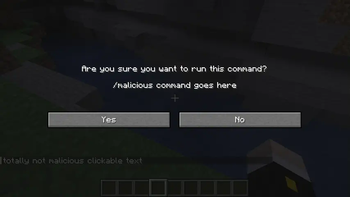
CFX is a Fabric mod for Minecraft 1.14 to 1.21.4 that patches or otherwise mitigates hazardous exploits. It was originally included as a submodule of the WNT project, but it is now its own project.
Why?
For almost a decade now, Minecraft exploiting has become increasingly common and increasingly dangerous. While Mojang has been making a commendable effort to combat this by patching exploits in their game with updates, they don't support older, more vulnerable versions of the game. For most people, this isn't a problem, because all they need to do to stay protected is to use the latest and greatest version of Minecraft. However, some people simply can't do that for one reason or another (such as running older hardware or using mods that don't support later versions of the game).
Furthermore, there are cases of exploits that Mojang simply hasn't fixed yet for one reason or another even in the latest version of the game, so pretty much everyone is vulnerable to some pretty nasty exploits.
So, this is where CFX steps in. It tries to patch some of the more hazardous exploits for all mainline versions of the game, even the versions that were superseded by minor updates (e.g. 1.14, 1.14.1, 1.15.1, etc). That way, almost everybody can be protected. It works standalone so you don't have to use it as part of a bigger package of mods.
Patch Coverage
This timeline details what patches are available for which exploits.

⚠️: Currently only partially patched in some places. Contributions are welcome to make them complete.
Available Versions
How to Install CFX on Your Server
Order Server
Order a Minecraft Java server with at least 3 GB RAM (4 GB recommended).
Set fabric Loader
In the panel under "Egg", select the fabric loader and matching Minecraft version (1.21.4).
Install Mod
Open the mod browser in the dashboard and search for "CFX". Click "Install" – done! Alternatively, upload the .jar via SFTP to the /mods folder.
Compatibility
Mod Loaders
Minecraft Versions
1.21.4, 1.21.3, 1.21.2 (+33 more)
Server-side
~ OptionalRecommended RAM
4 GB(min. 3 GB)Frequently Asked Questions
CFX server crashes on startup – what to do?
Most common cause: wrong fabric version or insufficient RAM. Check the server log (latest.log) for "OutOfMemoryError" or "Mixin" errors. With Mado Hosting: ensure at least 3 GB RAM is allocated and the loader matches the mod version (1.21.4). You can switch loaders with one click in the panel.
Is CFX compatible with fabric and quilt?
CFX officially supports fabric, quilt for Minecraft 1.21.4, 1.21.3, 1.21.2. The Mado dashboard automatically detects incompatible loader combinations.
Server lagging with CFX – how to optimize performance?
Recommended RAM: 4 GB (per 8 players). Use /spark profiler to check if CFX consumes the most tick time. Common fixes: reduce server view-distance to 8-10, install "performant" or "starlight" as supplementary mods on Forge. With Mado Hosting, your server runs on NVMe SSDs with dedicated CPU cores for minimal latency.
Similar Mods




Rent Modded Server
Install CFX with just one click on your server.