
Chat Calc
The *fastest* calculator around; built right into your chat; just type in and you'll see your answer!
Screenshots
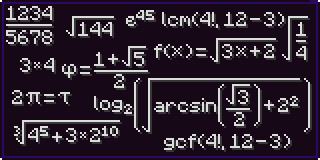


About this Mod
Note: This is a complete revamp of the mod ChatCalc by Kokeria, which is most likely abandoned. This mod features almost everything you'd need in a calculator, and if you want something to be added, just ask!
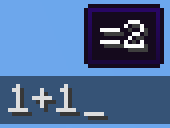
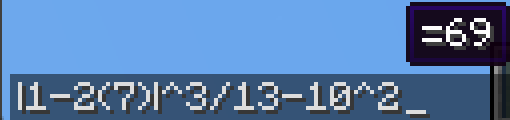
Firstly, I should clarify how you use ChatCalc, simply type an expression into chat, and it'll show the answer above. If you need to get the answer in text, just press tab. If you need the answer and the expression, type an equals sign and press tab.
1+2 (will make a tooltip showing =3 above)1+2 → TAB → 31+2= → TAB → 1+2=3
(Do note that ChatCalc evaluates the block of text that your cursor is in [separated by spaces], this means that you can type one thing beside another and ChatCalc will work completely fine [as long as there are some spaces in between])
ChatCalc also lets you define your own functions and constants, for example:f(z)=2z-1 → TAB → (empty to give feedback that it's defined that function)f(4) → TAB → 7
c=sqrt(2)/2 → TAB → (empty to give feedback that it's defined that constant)arcsin(c) → TAB → 45
You can also remove functions and constants like this:f(z)= → TAB → (empty to give feedback that it's removed that function)c= → TAB → (empty to give feedback that it's removed that constant)\
Functions can support as many parameters as you want, each separated by a semicolon (they cannot use a comma due to commas being permitted in constants, i.e. 1,000*2 → TAB → 2,000)
Here's an example function that can do some very complex behavior:angle(a;b)=round((((arctan((b-(z-0.5))/(a-(x-0.5)))+90+(min(1;cmp(a;(x-0.5))+1)*180)+180)%360)-180)*10)/10 (credit to thecolonel63)
This function takes in the x and y coordinates of a block and tells you the yaw to put your camera at to walk toward that block.
You can view the list of defined functions and constants by typing functions? or constants? into chat and pressing TAB.
ChatCalc features several config settings, each configurable by typing in the chat window; for example:radians → TAB → false (by default)radians= → TAB → radians=false (by default)radians=true → TAB (empty to give feedback that the value is set)
To change the format that values are outputted in, you can change the decimal_format; for example:decimal_format → TAB → #,##0.## (by default)decimal_format=#0.## → TAB → (to remove commas)decimal_format=#,###.## → TAB → (to remove the leading 0 on values like 0.23)decimal_format=#,##0.#### → TAB → (to get 4 decimal places of accuracy)
By default, ChatCalc stores previously evaluated expressions in the chat history (chat_history). You can set copy_type to none or clipboard to change this to the respective values.
If you (for whatever reason) want to disable the tooltip showing expressions above, you can change display_above to false.
Appendix A (function list)
sqrtcbrtsincostancscseccotarcsinasinarccosacosarctanatanarccscacscarcsecasecarccotacotfloorceilroundabsloglnexpsgnminmaxgcflcmclampcmp
Appendix B (constant list)
randomrandraddegyawpitchpitauephixyz
Available Versions
How to Install Chat Calc on Your Server
Order Server
Order a Minecraft Java server with at least 3 GB RAM (4 GB recommended).
Set fabric Loader
In the panel under "Egg", select the fabric loader and matching Minecraft version (1.20.4).
Install Mod
Open the mod browser in the dashboard and search for "Chat Calc". Click "Install" – done! Alternatively, upload the .jar via SFTP to the /mods folder.
Compatibility
Mod Loaders
Minecraft Versions
1.20.4, 1.20.3, 1.20.3-rc1 (+20 more)
Server-side
✗ UnsupportedRecommended RAM
4 GB(min. 3 GB)Frequently Asked Questions
Chat Calc server crashes on startup – what to do?
Most common cause: wrong fabric version or insufficient RAM. Check the server log (latest.log) for "OutOfMemoryError" or "Mixin" errors. With Mado Hosting: ensure at least 3 GB RAM is allocated and the loader matches the mod version (1.20.4). You can switch loaders with one click in the panel.
Is Chat Calc compatible with fabric and quilt?
Chat Calc officially supports fabric, quilt for Minecraft 1.20.4, 1.20.3, 1.20.3-rc1. The Mado dashboard automatically detects incompatible loader combinations.
Server lagging with Chat Calc – how to optimize performance?
Recommended RAM: 4 GB (per 8 players). Use /spark profiler to check if Chat Calc consumes the most tick time. Common fixes: reduce server view-distance to 8-10, install "performant" or "starlight" as supplementary mods on Forge. With Mado Hosting, your server runs on NVMe SSDs with dedicated CPU cores for minimal latency.
Similar Mods




![[ETF] Entity Texture Features](https://cdn.modrinth.com/data/BVzZfTc1/af683d206d50b05258d865b0d6e4aa2f2cee12f2_96.webp)
![[EMF] Entity Model Features](https://cdn.modrinth.com/data/4I1XuqiY/6e5bbd0d06b1741bfdab6c0cfab6de8fdaf0064c_96.webp)
Rent Modded Server
Install Chat Calc with just one click on your server.