
Chat Calcus
The Calculator Mod enhances your Minecraft experience by adding a convenient calculator functionality directly into the in-game chat.
Screenshots



About this Mod
Calculator Mod
Summary:
The Calculator Mod enhances your Minecraft experience by adding a convenient calculator functionality directly into the in-game chat. Perform complex mathematical calculations without ever leaving the game! Whether you're calculating resource requirements for your builds or solving intricate equations, the Calculator Mod has you covered. Keep in mind this is very simply coded and cant do everything!
Key Features:
- In-Game Calculator: Access a fully functional calculator directly in the Minecraft chat.
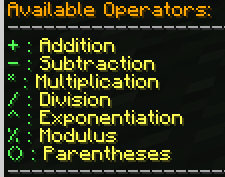
- Arithmetic Operations: Perform addition, subtraction, multiplication, and division effortlessly.
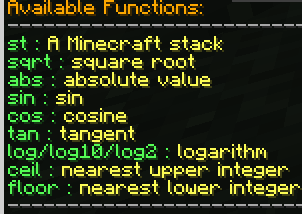
- Mathematical Functions: Access a wide range of mathematical functions such as square root, absolute value, trigonometric functions, logarithms, and more.
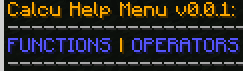
- Help Menu: View available functions, operators, and usage instructions conveniently within the game.
- Easy Installation: Simple installation process using Fabric Loader and Fabric API.
Why Choose Calculator Mod?
The Calculator Mod offers unparalleled convenience for Minecraft players who frequently need to perform mathematical calculations while playing. Say goodbye to tabbing out of the game to use an external calculator and hello to seamless in-game calculations!
Available Versions
How to Install Chat Calcus on Your Server
Order Server
Order a Minecraft Java server with at least 3 GB RAM (4 GB recommended).
Set fabric Loader
In the panel under "Egg", select the fabric loader and matching Minecraft version (1.21.1).
Install Mod
Open the mod browser in the dashboard and search for "Chat Calcus". Click "Install" – done! Alternatively, upload the .jar via SFTP to the /mods folder.
Compatibility
Mod Loaders
Minecraft Versions
1.21.1, 1.20.4
Server-side
✗ UnsupportedRecommended RAM
4 GB(min. 3 GB)Frequently Asked Questions
Chat Calcus server crashes on startup – what to do?
Most common cause: wrong fabric version or insufficient RAM. Check the server log (latest.log) for "OutOfMemoryError" or "Mixin" errors. With Mado Hosting: ensure at least 3 GB RAM is allocated and the loader matches the mod version (1.21.1). You can switch loaders with one click in the panel.
Is Chat Calcus compatible with fabric?
Chat Calcus officially supports fabric for Minecraft 1.21.1, 1.20.4. The Mado dashboard automatically detects incompatible loader combinations.
Server lagging with Chat Calcus – how to optimize performance?
Recommended RAM: 4 GB (per 8 players). Use /spark profiler to check if Chat Calcus consumes the most tick time. Common fixes: reduce server view-distance to 8-10, install "performant" or "starlight" as supplementary mods on Forge. With Mado Hosting, your server runs on NVMe SSDs with dedicated CPU cores for minimal latency.
Similar Mods




![[ETF] Entity Texture Features](https://cdn.modrinth.com/data/BVzZfTc1/af683d206d50b05258d865b0d6e4aa2f2cee12f2_96.webp)
![[EMF] Entity Model Features](https://cdn.modrinth.com/data/4I1XuqiY/6e5bbd0d06b1741bfdab6c0cfab6de8fdaf0064c_96.webp)
Rent Modded Server
Install Chat Calcus with just one click on your server.