
Chat Filtering
Prevents players from using blacklisted words.
Screenshots
About this Mod
Chat Filtering


Chat Filtering is a Minecraft mod that allows server owners to prevent players from using inappropriate or unwanted words or sentences.
Configuration
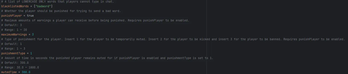
After installation, a config file will have generated at config/Chat Filter/chat-filter.toml. There you will find all the configuration there is available.
How it works
The mod has 3 different filters:
- Messages sent in chat
- Commands executed (
/say,/me,/tell,/msg) - Items renamed in an anvil
In first two cases, upon detecting a blacklisted word, the message in chat will not be sent or the command will not be executed, and the player will be notified. In the last case, the item's name will also be renamed to Inappropiate Name.
If in the config player punishment is enabled the player will receive a warning, and upon surpassing the customizable maximum amount of warnings, the player is punished according to one of the 3 available ways you can choose from in the config:
- The player is temporarily muted for a configurable amount of time
- The player is kicked
- The player is banned
The filter detects if the player is trying to camouflage the bad word, like adding spaces or punctuation in between and will still detect it, but it does not detect letter replacement, for example by numbers like in this example: h3llo instead of hello. Who configures the config must blacklist these mutated words as well.
Available Versions
How to Install Chat Filtering on Your Server
Order Server
Order a Minecraft Java server with at least 3 GB RAM (4 GB recommended).
Set neoforge Loader
In the panel under "Egg", select the neoforge loader and matching Minecraft version (1.21.5).
Install Mod
Open the mod browser in the dashboard and search for "Chat Filtering". Click "Install" – done! Alternatively, upload the .jar via SFTP to the /mods folder.
Compatibility
Mod Loaders
Minecraft Versions
1.21.5, 1.21.4, 1.21.3 (+3 more)
Server-side
✓ RequiredRecommended RAM
4 GB(min. 3 GB)Frequently Asked Questions
Chat Filtering server crashes on startup – what to do?
Most common cause: wrong neoforge version or insufficient RAM. Check the server log (latest.log) for "OutOfMemoryError" or "Mixin" errors. With Mado Hosting: ensure at least 3 GB RAM is allocated and the loader matches the mod version (1.21.5). You can switch loaders with one click in the panel.
Is Chat Filtering compatible with neoforge?
Chat Filtering officially supports neoforge for Minecraft 1.21.5, 1.21.4, 1.21.3. The Mado dashboard automatically detects incompatible loader combinations.
Server lagging with Chat Filtering – how to optimize performance?
Recommended RAM: 4 GB (per 8 players). Use /spark profiler to check if Chat Filtering consumes the most tick time. Common fixes: reduce server view-distance to 8-10, install "performant" or "starlight" as supplementary mods on Forge. With Mado Hosting, your server runs on NVMe SSDs with dedicated CPU cores for minimal latency.
Similar Mods




![[ETF] Entity Texture Features](https://cdn.modrinth.com/data/BVzZfTc1/af683d206d50b05258d865b0d6e4aa2f2cee12f2_96.webp)

Rent Modded Server
Install Chat Filtering with just one click on your server.