
chatqalc
The best overfeatured cli calculator is now in chat. Ctrl+Enter to execute, Tab+Enter to substitute
Screenshots
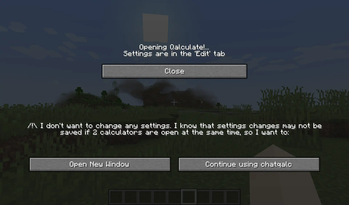
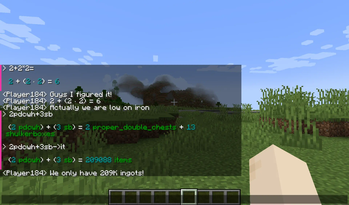
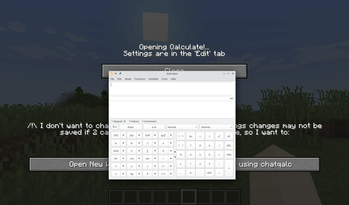
About this Mod
ChatQalc
An interface to Qalculate! qalc - the best cli calculator. (Included for Windows/Linux)
Features
- Installs and runs portable interactive
qalccli calculator when you start Minecraft - Operates in chat screen (
Tor/) NumPadEnterorCtrl+Enter= Send message to qalc instead of chatCtrl+Tab= Convert last expression without spaces to calculated result (escape spaces with\)Shift+Enter= Send message to qalc and replace chat field with last line of the result (You can look at the result and decide to share it with everybody by pressingEnter)Ctrl+Shift+Enter= Same asCtrl+Enter, but result is broadcast from your name to the whole server. And without colors. (Use when you want to share multiple lines)Shift+Tab= Get completions- Chat history of your queries. Very helpful.
- Open config in ModMenu to get a graphical interface. All settings are there. (
Edittab) - Some Minecraft-related units and variables (
100it = 1 stack + 36 items)itstsbpdcpdcwhgtiphhs,ch|chunk|chunks
Qalculate! features
https://qalculate.github.io/features.html
Manual: https://qalculate.github.io/manual/qalc.html
Most notably:
/helpthenCtrl+Enter- Use
->for unit conversion (1km->m = 1000 m) - Fault-tolerant parsing of strings (almost natural language)
- Ability to disable functions, variables, units or unknown variables for less confusion: e.g. when you do not want (a+b)^2 to mean (are+barn)^2 but ("a"+"b")^2
- Verbose error messages, Arbitrary precision
- Symbolic calculation
- Functions, Units, Variables, Constants (persistent between restarts)
- Gnuplot (opens a new window with plot, you have to install GNUplot separately for it to work)
- Comments start with
#
You can get a 30KB noinstall version if you install or link Qalculate to ./minecraft/config/chatqalc/ manually or run the full version once.

Available Versions
How to Install chatqalc on Your Server
Order Server
Order a Minecraft Java server with at least 3 GB RAM (4 GB recommended).
Set fabric Loader
In the panel under "Egg", select the fabric loader and matching Minecraft version (1.20.4).
Install Mod
Open the mod browser in the dashboard and search for "chatqalc". Click "Install" – done! Alternatively, upload the .jar via SFTP to the /mods folder.
Compatibility
Mod Loaders
Minecraft Versions
1.20.4, 1.20.3, 1.20.2 (+2 more)
Server-side
✗ UnsupportedRecommended RAM
4 GB(min. 3 GB)Frequently Asked Questions
chatqalc server crashes on startup – what to do?
Most common cause: wrong fabric version or insufficient RAM. Check the server log (latest.log) for "OutOfMemoryError" or "Mixin" errors. With Mado Hosting: ensure at least 3 GB RAM is allocated and the loader matches the mod version (1.20.4). You can switch loaders with one click in the panel.
Is chatqalc compatible with fabric?
chatqalc officially supports fabric for Minecraft 1.20.4, 1.20.3, 1.20.2. The Mado dashboard automatically detects incompatible loader combinations.
Server lagging with chatqalc – how to optimize performance?
Recommended RAM: 4 GB (per 8 players). Use /spark profiler to check if chatqalc consumes the most tick time. Common fixes: reduce server view-distance to 8-10, install "performant" or "starlight" as supplementary mods on Forge. With Mado Hosting, your server runs on NVMe SSDs with dedicated CPU cores for minimal latency.
Similar Mods




![[ETF] Entity Texture Features](https://cdn.modrinth.com/data/BVzZfTc1/af683d206d50b05258d865b0d6e4aa2f2cee12f2_96.webp)
![[EMF] Entity Model Features](https://cdn.modrinth.com/data/4I1XuqiY/6e5bbd0d06b1741bfdab6c0cfab6de8fdaf0064c_96.webp)
Rent Modded Server
Install chatqalc with just one click on your server.