
CheckYourChest
CheckYourChest is a Minecraft mod that lets you track chest contents in real-time and receive automated updates via Discord webhook.
Screenshots
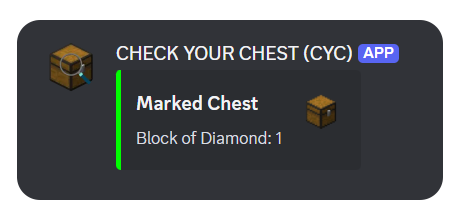
About this Mod
CheckYourChest
CheckYourChest is a Minecraft utility mod designed for both servers and single-player worlds, perfect for players managing farms or automated item systems. The mod allows players to mark specific chests, track their contents in real-time, and receive detailed inventories via a webhook directly to a Discord server.
Whether you're away from your base or want to monitor your storage, CheckYourChest provides a seamless way to stay updated on what's happening in your chests.

Features🛠️
Mark Any Chest
Mark any single or double chest in your world and monitor its contents.Track Single and Double Chests
Automatically handle both single and double chests with ease.Real-Time Updates
Monitor chest contents in real-time and automatically send updates at specified intervals.Discord Integration via Webhook
Send detailed inventory reports directly to a Discord channel using a webhook.Ideal for Automated Systems
Perfect for automation, farms, and large storage systems where keeping track of resources is essential.
How It Works
Marking a Chest
Use a custom item (Marking Stick) to mark any chest. When a chest is marked, its contents will be tracked and updated at regular intervals.Chest Monitoring
Track the chest's contents in real-time. The mod works with both single and double chests, ensuring comprehensive tracking for all your storage needs.Automatic Webhook Updates
At each interval (defined in the config), the contents of the marked chest(s) are sent to your designated Discord webhook, providing a detailed list of items and their quantities.
Installation
Requirements
- Minecraft Forge (Version 1.20.1 or above)
- Download the latest release of the mod
Install the Mod
- Place the downloaded
.jarfile into your Minecraftmodsfolder. - Ensure you have the correct Forge version installed.
- Place the downloaded
Configuration🔧
Webhook Setup
To set up a Discord webhook, follow these steps:- Go to your Discord channel settings.
- Under the "Integrations" tab, create a new webhook and copy its URL.
- Start the server / client world once.
- Now you can either enter the command
/cyc setWebhookURL <URL>or paste the URL in the mod's configuration file (config/checkyourchest-common.toml). - Restart the server.
Interval Settings
You can customize how often chest updates are sent to the webhook by adjusting thecheckIntervalin the config file. This value is in minutes. For example:checkInterval = 60 # Sends updates every hourAdditionally, you can set the interval dynamically in-game using the following command:
/cyc setCheckInterval <minutes>
Usage
Command to Get the Marking Stick
Use the/cyccommand in the game to get the Marking Stick. This special item allows you to mark chests for monitoring.Marking a Chest
To mark a chest, hold the Marking Stick and sneak right-click on the chest you want to track. The mod will start monitoring the contents of the chest and send updates to your webhook at the configured interval.Unmarking a Chest
To unmark a chest, simply sneak right-click on the marked chest or any other block with the Marking Stick, and the chest will be unmarked.
Force Load Chunks
You can also use the /cyc forceload <true|false> command to enable or disable chunk force loading for marked chests. This ensures that the chunk where the chest is located remains loaded, even if no players are nearby.
Additionally, you can configure this setting in the mod's configuration file (config/checkyourchest-common.toml). For example:
forceLoadChunks = true # Ensures marked chests' chunks are always loaded
By default, chunk force loading is disabled. If enabled, chunks containing marked chests will remain loaded to guarantee uninterrupted monitoring and updates.
Made with Love ❤️
Available Versions
How to Install CheckYourChest on Your Server
Order Server
Order a Minecraft Java server with at least 3 GB RAM (4 GB recommended).
Set forge Loader
In the panel under "Egg", select the forge loader and matching Minecraft version (1.21.1).
Install Mod
Open the mod browser in the dashboard and search for "CheckYourChest". Click "Install" – done! Alternatively, upload the .jar via SFTP to the /mods folder.
Compatibility
Mod Loaders
Minecraft Versions
1.21.1, 1.20.1
Server-side
✓ RequiredRecommended RAM
4 GB(min. 3 GB)Frequently Asked Questions
CheckYourChest server crashes on startup – what to do?
Most common cause: wrong forge version or insufficient RAM. Check the server log (latest.log) for "OutOfMemoryError" or "Mixin" errors. With Mado Hosting: ensure at least 3 GB RAM is allocated and the loader matches the mod version (1.21.1). You can switch loaders with one click in the panel.
Is CheckYourChest compatible with forge?
CheckYourChest officially supports forge for Minecraft 1.21.1, 1.20.1. The Mado dashboard automatically detects incompatible loader combinations.
Server lagging with CheckYourChest – how to optimize performance?
Recommended RAM: 4 GB (per 8 players). Use /spark profiler to check if CheckYourChest consumes the most tick time. Common fixes: reduce server view-distance to 8-10, install "performant" or "starlight" as supplementary mods on Forge. With Mado Hosting, your server runs on NVMe SSDs with dedicated CPU cores for minimal latency.
Similar Mods




Rent Modded Server
Install CheckYourChest with just one click on your server.