
Chest deposit
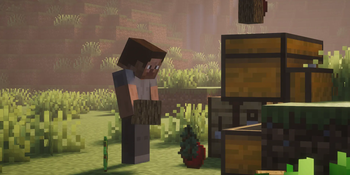
Deposit and withdraw items to your chest from your hands!!!!
Screenshots



About this Mod
Chest Deposit
A 26.x Fabric mod that allows you to seamlessly deposit and withdraw items from storage blocks without opening a GUI.
The issue was resolved, All previous versions are withdrawn
Description
Improve your storage management with Chest Deposit. Instead of opening chests, clicking, dragging, and manually getting through MASSIVE amounts of resources, this mod lets you transfer items between your inventory and storage blocks simply by interacting with them using hotkeys along with more quality of life features!
Features & Mechanics
Chest Deposit uses a customizable modifier key (Default: Left Alt) and shift key to give you total control over your items!!
Visual HUD
- Hotkey Tips and item logs (You can absolutely disable them in the settings)
Single deposit/withdraw
- Simply hold the item you want to deposit or take out, hold your
Left Altkey thenLeft Clickfor deposit ORRight Clickfor withdraw!
Bulk Mode
- Does the same as single deposit! But this time hold your
shiftkey. This will deposit/withdraw everything!
Key Combinations
- Alt + Left Click: Deposit held item and matching inventory items.
- Alt + Right Click: Withdraw matching items from the container.
- Alt + Shift + Left Click: Bulk Deposit all the matching items.
- Alt + Shift + Right Click: Bulk Withdraw all the matching items.
Holding a Shulker Box:
- Alt + Left Click: Deposit all items from the shulker that are already inside the chest.
- Alt + Right Click: Think of it like a search bar, put the items that you ONLY want the shulker to withdraw, it will pull matching items from the chest directly into your shulker box.
- Alt + Shift + Left Click: Deposit ALL items from the shulker into the chest without filters.
- Alt + Shift + Right Click: Withdraw everything from the chest til its full.
Empty hand:
- Alt + Left Click: Deposit all items from the inventory that are already inside the chest. (works the same as shulker box)
- Alt + Right Click: Take one item from the chest.
- Alt + Shift + Left Click: Deposit ALL items from the inventory into the chest without filters.
- Alt + Shift + Right Click: Withdraw everything from the chest til its full.
Ulitity:
- Middle click a slot in the inventory or a chest to lock an item, preventing deposit or withdraw the item
(Note: The "Alt" modifier can be rebound to any key in the standard Minecraft Controls menu.)
Configurability
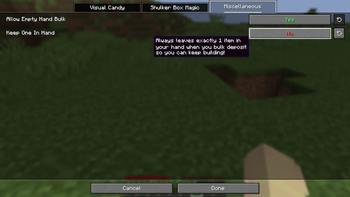
Customize your experience through the Mod Menu (requires Cloth Config/MidnightConfig):
- Toggle Tips: Turn the on-screen hotkey guides on or off.
- Toggle Item Tracker: Enable or disable the AMAZING DIGITAL items log.
- Shulker Support: Enable or disable the ability to interact with items inside Shulker Boxes.
- Keep Hand: Toggle whether the mod should protect the item stack currently in your hand during deposits.
Technical Details
- Interaction Safe: The mod prevent accidental block placement while you are transferring items.
- Server-Side: Almost all functions is handled on the server to prevent "ghost items" and ensure inventory desync never happens.
- Optimized: Batched packet processing ensures that moving thousands of items at once causes zero server lag.
- Requirements: Requires Fabric API. Must be installed on both Client and Server.
Available Versions
How to Install Chest deposit on Your Server
Order Server
Order a Minecraft Java server with at least 3 GB RAM (4 GB recommended).
Set fabric Loader
In the panel under "Egg", select the fabric loader and matching Minecraft version (26.2).
Install Mod
Open the mod browser in the dashboard and search for "Chest deposit". Click "Install" – done! Alternatively, upload the .jar via SFTP to the /mods folder.
Compatibility
Mod Loaders
Minecraft Versions
26.2, 26.1.2, 26.1.1 (+1 more)
Server-side
✗ UnsupportedRecommended RAM
4 GB(min. 3 GB)Frequently Asked Questions
Chest deposit server crashes on startup – what to do?
Most common cause: wrong fabric version or insufficient RAM. Check the server log (latest.log) for "OutOfMemoryError" or "Mixin" errors. With Mado Hosting: ensure at least 3 GB RAM is allocated and the loader matches the mod version (26.2). You can switch loaders with one click in the panel.
Is Chest deposit compatible with fabric and paper?
Chest deposit officially supports fabric, paper for Minecraft 26.2, 26.1.2, 26.1.1. The Mado dashboard automatically detects incompatible loader combinations.
Server lagging with Chest deposit – how to optimize performance?
Recommended RAM: 4 GB (per 8 players). Use /spark profiler to check if Chest deposit consumes the most tick time. Common fixes: reduce server view-distance to 8-10, install "performant" or "starlight" as supplementary mods on Forge. With Mado Hosting, your server runs on NVMe SSDs with dedicated CPU cores for minimal latency.
Similar Mods




Rent Modded Server
Install Chest deposit with just one click on your server.