
Chest LockSign
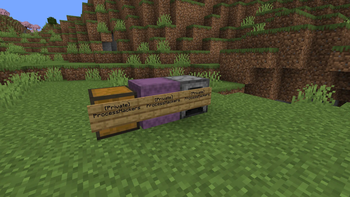
Sign Lock lets players protect chests, barrels, furnaces, and other containers by placing a sign on them. Simple, lightweight, and inspired by classic server protection plugins.
Screenshots
About this Mod
Chest SignLock
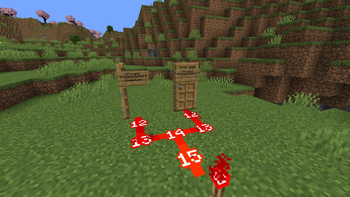
Chest SignLock is a server-side Fabric mod that lets players protect containers and doors using signs.
It is designed to be simple, lightweight, and easy to understand for players: place a sign, write who is allowed, and the block becomes private.
Chest SignLock is heavily inspired by the classic Spigot plugin BlockLocker, adapted for modern Fabric servers.
Features
- Protect containers and doors with
[Private]signs - Add extra allowed players with
[More Users]signs - Supports chests, trapped chests, barrels, shulker boxes, dispensers, droppers, furnaces, blast furnaces, smokers, lecterns, and all doors
- Handles double chests and doors as one protected object
- Prevents unauthorized players from opening protected blocks
- Prevents unauthorized players from editing protected signs
- Prevents protected blocks and signs from being broken by unauthorized players
- Protects locked blocks from explosions
- Blocks hoppers, hopper minecarts, and copper golems by default
- Supports
[Redstone]on signs to allow automation/redstone access - Includes English and French messages
- Server-side only
How It Works
Place a sign on a supported block to lock it.
A private sign uses:
[Private]
PlayerName
To add more players, use:
[More Users]
PlayerOne
PlayerTwo
PlayerThree
If a block has a valid [Private] sign, only listed players and server operators can interact with it.
Commands
/chestlocklang en
/chestlocklang fr
/debuglockedchest
The language commands require operator permission.
Support
Need help, found a bug, or want to suggest a feature?
Join the support Discord:
Open Source
Chest SignLock is open source. Contributions, feedback, and bug reports are welcome.
Maintenance
The mod will be updated and maintained as often as possible, with the goal of keeping it compatible with future Minecraft/Fabric versions.
```
Available Versions
How to Install Chest LockSign on Your Server
Order Server
Order a Minecraft Java server with at least 3 GB RAM (4 GB recommended).
Set fabric Loader
In the panel under "Egg", select the fabric loader and matching Minecraft version (1.21.11).
Install Mod
Open the mod browser in the dashboard and search for "Chest LockSign". Click "Install" – done! Alternatively, upload the .jar via SFTP to the /mods folder.
Compatibility
Mod Loaders
Minecraft Versions
1.21.11
Server-side
✓ RequiredRecommended RAM
4 GB(min. 3 GB)Frequently Asked Questions
Chest LockSign server crashes on startup – what to do?
Most common cause: wrong fabric version or insufficient RAM. Check the server log (latest.log) for "OutOfMemoryError" or "Mixin" errors. With Mado Hosting: ensure at least 3 GB RAM is allocated and the loader matches the mod version (1.21.11). You can switch loaders with one click in the panel.
Is Chest LockSign compatible with fabric?
Chest LockSign officially supports fabric for Minecraft 1.21.11. The Mado dashboard automatically detects incompatible loader combinations.
Server lagging with Chest LockSign – how to optimize performance?
Recommended RAM: 4 GB (per 8 players). Use /spark profiler to check if Chest LockSign consumes the most tick time. Common fixes: reduce server view-distance to 8-10, install "performant" or "starlight" as supplementary mods on Forge. With Mado Hosting, your server runs on NVMe SSDs with dedicated CPU cores for minimal latency.
Similar Mods




Rent Modded Server
Install Chest LockSign with just one click on your server.