
ChestMaster
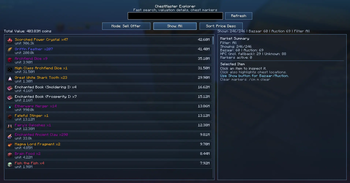
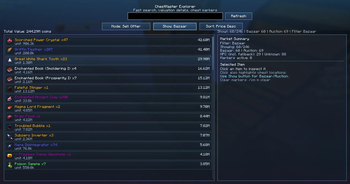
Client-side SkyBlock chest indexer with valuation and chest markers.
Screenshots

About this Mod
ChestMaster
Client-side Fabric mod for Hypixel SkyBlock written entirely with AI assistance — fully tested and working. If you find any bugs, reach out on Discord: Racap.
- Scans chest contents into a local SQLite database
- Lets you search saved items quickly
- Estimates item value (Bazaar / Auction House / NPC)
- Highlights chest locations for selected items in the world
The mod is read-only QoL: no automation, no movement/combat macros, no packet spoofing.
Supported versions
| Minecraft | Loader |
|---|---|
1.21.10 |
Fabric |
1.21.11 |
Fabric |
26.1 |
Fabric |
26.1.2 |
Fabric (requires Java 25) |
Installation
- Download the JAR for your Minecraft version from the Files tab.
- Place it in your instance
modsfolder. - Remove any old
chestmaster*.jarbefore updating. - Launch the game.
| Instance | JAR to use |
|---|---|
1.21.10 |
...+mc1.21.10.jar |
1.21.11 |
...+mc1.21.11.jar |
26.1 / 26.1.2 |
...+mc26.1.2.jar |
Commands
/cmor/chestmaster- open GUI/cm s on|off|status|now- auto scan control/cm db- show database path/cm reset confirm- clear DB and compact file/cm p status|reload- price cache status/reload/cm m clear- clear active chest markers/cm logs on|off|status- verbose logging toggle
Features
- Auto-scan of opened chest containers
- Local SQLite database — data persists between sessions
- Per-server item tracking — no cross-server data mixing
- Fast search with item stacking and aggregation
- Market price sources: Bazaar, Auction House lowest-bin, NPC
- "Last seen" timestamps for each scanned chest
- CSV export of scanned data
- Sort results by price, name, or count — saved between sessions
- Filter by price source: All / Bazaar / Auction / Unknown
- Rarity-colored item names in the GUI
- Auto-Scan toggle button directly in the GUI
- Chest highlights auto-clear on world/server change
- Settings persist across game restarts
Safety and Hypixel
ChestMaster is a read-only QoL mod — it only reads client-visible container data and stores it locally:
- no movement or combat automation
- no macro behavior
- no packet spoofing or bypass logic
This is not an official legal guarantee. Always follow the latest Hypixel policies.
License
MIT — source code available on GitHub.
Available Versions
How to Install ChestMaster on Your Server
Order Server
Order a Minecraft Java server with at least 3 GB RAM (4 GB recommended).
Set fabric Loader
In the panel under "Egg", select the fabric loader and matching Minecraft version (26.1.2).
Install Mod
Open the mod browser in the dashboard and search for "ChestMaster". Click "Install" – done! Alternatively, upload the .jar via SFTP to the /mods folder.
Compatibility
Mod Loaders
Minecraft Versions
26.1.2, 26.1.1, 26.1 (+2 more)
Server-side
✗ UnsupportedRecommended RAM
4 GB(min. 3 GB)Frequently Asked Questions
ChestMaster server crashes on startup – what to do?
Most common cause: wrong fabric version or insufficient RAM. Check the server log (latest.log) for "OutOfMemoryError" or "Mixin" errors. With Mado Hosting: ensure at least 3 GB RAM is allocated and the loader matches the mod version (26.1.2). You can switch loaders with one click in the panel.
Is ChestMaster compatible with fabric?
ChestMaster officially supports fabric for Minecraft 26.1.2, 26.1.1, 26.1. The Mado dashboard automatically detects incompatible loader combinations.
Server lagging with ChestMaster – how to optimize performance?
Recommended RAM: 4 GB (per 8 players). Use /spark profiler to check if ChestMaster consumes the most tick time. Common fixes: reduce server view-distance to 8-10, install "performant" or "starlight" as supplementary mods on Forge. With Mado Hosting, your server runs on NVMe SSDs with dedicated CPU cores for minimal latency.
Similar Mods




![[ETF] Entity Texture Features](https://cdn.modrinth.com/data/BVzZfTc1/af683d206d50b05258d865b0d6e4aa2f2cee12f2_96.webp)

Rent Modded Server
Install ChestMaster with just one click on your server.