
Chilled Flames
Chilled Flames adds the Frosted Absorber, a frozen sponge that absorbs lava and returns a regular sponge, simplifying lava removal in Minecraft.
Screenshots
About this Mod
Chilled Flames
Are you tired of dealing with dangerous lava lakes in your Minecraft adventures? Chilled Flames brings you a game-changing tool to simplify lava management!
Key Features:
Frosted Absorber:
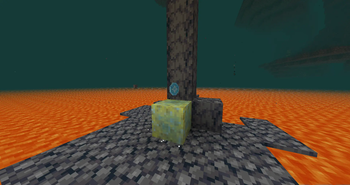
A frozen sponge with the unique ability to absorb lava instead of water. Perfect for clearing those treacherous lava pools in caves, Nether landscapes, or anywhere molten trouble lies.
Reusable Utility:
After absorbing lava, the Frosted Absorber transforms into a regular sponge, ready for crafting or future use.
Frozen Aesthetic:
The Frosted Absorber features a distinct icy design, blending seamlessly into any chilly build.
Why Choose Chilled Flames?
Clearing lava is one of the most tedious tasks in Minecraft, especially when building or exploring. Chilled Flames makes this process efficient and hassle-free while adding a cool, thematic twist to your toolbox.
How to Use:
- Equip the Frosted Absorber.
- Place it near lava to absorb the molten flow.
- Retrieve a regular sponge afterward for crafting or further use.
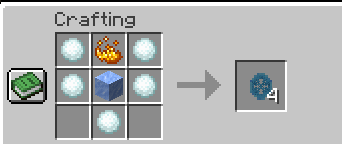
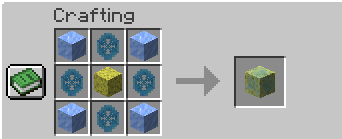
- In short, Use it like a regular sponge, but instead of heating a wet sponge, you'll need to craft it using Packed Ice, Ice Essence, and a Sponge.
Compatibility:
- Minecraft Version: 1.20.x (Recommended: 1.20.1)
- Mod Loader: Forge
Support Us on Patreon!
Support us on Patreon to unlock exclusive perks! By becoming a patron, you gain early access to mod updates, special features, and a dedicated space to engage with the development team. Patrons in the VIP tier also enjoy exclusive access to our Discord community, where you can connect with other players and share your suggestions. Your support helps us continue improving and creating exciting mods for everyone. Thank you for being a part of the journey!
Available Versions
How to Install Chilled Flames on Your Server
Order Server
Order a Minecraft Java server with at least 3 GB RAM (4 GB recommended).
Set forge Loader
In the panel under "Egg", select the forge loader and matching Minecraft version (1.20.4).
Install Mod
Open the mod browser in the dashboard and search for "Chilled Flames". Click "Install" – done! Alternatively, upload the .jar via SFTP to the /mods folder.
Compatibility
Mod Loaders
Minecraft Versions
1.20.4, 1.20.3, 1.20.2 (+2 more)
Server-side
✓ RequiredRecommended RAM
4 GB(min. 3 GB)Frequently Asked Questions
Chilled Flames server crashes on startup – what to do?
Most common cause: wrong forge version or insufficient RAM. Check the server log (latest.log) for "OutOfMemoryError" or "Mixin" errors. With Mado Hosting: ensure at least 3 GB RAM is allocated and the loader matches the mod version (1.20.4). You can switch loaders with one click in the panel.
Is Chilled Flames compatible with forge?
Chilled Flames officially supports forge for Minecraft 1.20.4, 1.20.3, 1.20.2. The Mado dashboard automatically detects incompatible loader combinations.
Server lagging with Chilled Flames – how to optimize performance?
Recommended RAM: 4 GB (per 8 players). Use /spark profiler to check if Chilled Flames consumes the most tick time. Common fixes: reduce server view-distance to 8-10, install "performant" or "starlight" as supplementary mods on Forge. With Mado Hosting, your server runs on NVMe SSDs with dedicated CPU cores for minimal latency.
Similar Mods




![[ETF] Entity Texture Features](https://cdn.modrinth.com/data/BVzZfTc1/af683d206d50b05258d865b0d6e4aa2f2cee12f2_96.webp)
![[EMF] Entity Model Features](https://cdn.modrinth.com/data/4I1XuqiY/6e5bbd0d06b1741bfdab6c0cfab6de8fdaf0064c_96.webp)
Rent Modded Server
Install Chilled Flames with just one click on your server.