
ChomagerieMod
Adding functionality to the server
Screenshots
About this Mod
Chomagerie
Chomagerie is a Fabric mod that adds an automatic item refill system using shulker boxes stored in a player's inventory or ender chest.
The mod detects when an item stack is fully consumed through normal gameplay and automatically refills it from available shulker boxes, improving building and survival workflows without requiring manual inventory management.
Features
Automatic Item Refill
- Automatically refills an item stack when it is fully consumed (block placement, item usage, etc.)
- Searches for matching items inside shulker boxes
- Refills directly into the emptied inventory slot
- Only triggers on active item usage (not on manual inventory manipulation)
Smart Search Logic
- Prioritizes the player inventory before checking the ender chest
- Prevents unnecessary refills if the item already exists elsewhere in the inventory
- Respects vanilla stack size limits when refilling items
Server-Side Design
- Designed primarily for server-side usage
- Clients must install the mod to use its features
- Fully compatible with Fabric-based environments
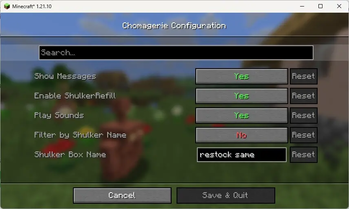
Client Configuration
Players can enable or disable the refill system using:
- Integrated ModMenu interface
- In-game commands
- Configuration file
Requirements
- Minecraft 1.21+
- Fabric Loader (latest recommended version)
- Fabric API
- ModMenu (optional, for graphical configuration)
- Cloth Config (optional, for configuration screens)
Installation
- Download the mod JAR file
- Place it in the
mods/directory of your Fabric server or client - Ensure Fabric API is installed
- Restart the game or server
Usage
- Store one or more shulker boxes (any color) in your inventory or ender chest
- Fill the shulker boxes with items
- Use items normally during gameplay
- When a stack is fully consumed, it is automatically refilled from the first shulker box containing the same item
Example
- Player holds a stack of 64 stone blocks
- A shulker box contains additional stone blocks
- The stack is fully placed
- A new stack of stone is automatically refilled into the same slot
Commands
/chomagerie shulkerrefill toggle
/chomagerie shulkerrefill enable
/chomagerie shulkerrefill disable
/chomagerie shulkerrefill status
Configuration
Configuration file: config/chomagerie.json
Available options:
enabled— Enables or disables the refill systemshowRefillMessages— Enables or disables refill messages
License
This project is distributed under an All Rights Reserved license.
- The source code is publicly available on GitHub for transparency and contribution purposes.
- Inclusion of the mod in modpacks is explicitly permitted, provided proper attribution is given.
- Redistribution, modification, or reuse of the source code is not permitted.
- Contributions are accepted via pull requests on the official repository, without granting any right to fork or redistribute the code.
Contributing
Pull requests and issues are welcome.
Please provide clear descriptions and reproduction steps when reporting bugs.
Available Versions
How to Install ChomagerieMod on Your Server
Order Server
Order a Minecraft Java server with at least 3 GB RAM (4 GB recommended).
Set fabric Loader
In the panel under "Egg", select the fabric loader and matching Minecraft version (1.21.11).
Install Mod
Open the mod browser in the dashboard and search for "ChomagerieMod". Click "Install" – done! Alternatively, upload the .jar via SFTP to the /mods folder.
Compatibility
Mod Loaders
Minecraft Versions
1.21.11, 1.21.10
Server-side
~ OptionalRecommended RAM
4 GB(min. 3 GB)Frequently Asked Questions
ChomagerieMod server crashes on startup – what to do?
Most common cause: wrong fabric version or insufficient RAM. Check the server log (latest.log) for "OutOfMemoryError" or "Mixin" errors. With Mado Hosting: ensure at least 3 GB RAM is allocated and the loader matches the mod version (1.21.11). You can switch loaders with one click in the panel.
Is ChomagerieMod compatible with fabric?
ChomagerieMod officially supports fabric for Minecraft 1.21.11, 1.21.10. The Mado dashboard automatically detects incompatible loader combinations.
Server lagging with ChomagerieMod – how to optimize performance?
Recommended RAM: 4 GB (per 8 players). Use /spark profiler to check if ChomagerieMod consumes the most tick time. Common fixes: reduce server view-distance to 8-10, install "performant" or "starlight" as supplementary mods on Forge. With Mado Hosting, your server runs on NVMe SSDs with dedicated CPU cores for minimal latency.
Similar Mods




Rent Modded Server
Install ChomagerieMod with just one click on your server.