
Chunky Extension
Ce (Chunky-extend) A small extension for Chunky, auto start and stop Chunky if players are online or offline.
Screenshots
About this Mod
Chunky Extended
Pregenerate your world without ever lagging your players.
Chunky Extended is a lightweight, server-side companion for the popular Chunky pregenerator. It automatically pauses Chunky while players are online and continues it once the server is empty, so all that heavy chunk generation only happens when nobody is around to feel it. Add an optional time scheduler and you get full control over exactly when pregeneration runs.
No more choosing between a fully pregenerated world and a smooth experience for your players — Chunky Extended gives you both.
Features
- Player-aware auto-pause / continue — Chunky runs only while the server is empty. The moment someone joins, it pauses; when the last player leaves, it resumes.
- Time scheduler — set rules like "continue at 03:00, pause at 08:00, Mon–Fri" so pregeneration runs overnight. Rules are per-day, with a configurable timezone.
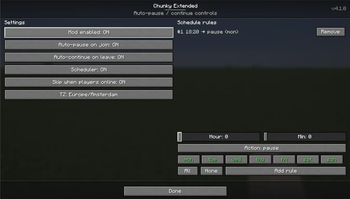
- In-game menu — manage everything from a clean GUI, no commands to memorize (see below).
- Commands too — full control via
/chunky-extendif you prefer the console. - Drives Chunky directly — uses Chunky's own
pause/continue, so it stays compatible with however you've configured Chunky. - Multi-loader — one mod for Fabric, Forge, and NeoForge on Minecraft 26.1.2.
How to open the menu
Type the client command:
/cemenu
This opens the Chunky Extended control panel, where you can:
- Toggle the mod on/off and the auto-pause / auto-continue behaviour.
- Add and remove schedule rules using simple Hour / Minute sliders and Mon–Sun day toggles — no typing times by hand, so there's nothing to get wrong.
- See the current status and settings at a glance.
Who can edit: server operators (gamemaster / permission level 2) and the singleplayer host can make changes. Everyone else can open the menu in read-only mode.
The menu syncs live with the server, so what you see is always the server's real state — handy on multiplayer where the settings live server-side.
Commands
Everything in the menu is also available through the /chunky-extend command tree:
/chunky-extend enable      # turn auto pause/continue on
/chunky-extend disable     # turn it off
/chunky-extend status      # show current status
/chunky-extend settings    # view settings (e.g. timezone)
/chunky-extend schedule    # add / list / remove scheduled rules
Requirements
Chunky Extended needs two dependencies installed alongside it:
- Chunky — the pregenerator it controls.
- CodxLib — a small shared library used by my mods (powers the menu, networking, and update checks). It's listed under Dependencies, so most launchers install it automatically.
Install all three (Chunky Extended + Chunky + CodxLib) on the server. The /cemenu GUI is client-side, but the mod itself does its work server-side.
Short description
Server-side automation for the Chunky pregenerator: auto-pause while players are online, auto-continue when the server is empty, plus a scheduler and an in-game menu. Fabric / Forge / NeoForge.
Available Versions
How to Install Chunky Extension on Your Server
Order Server
Order a Minecraft Java server with at least 4 GB RAM (6 GB recommended).
Set fabric Loader
In the panel under "Egg", select the fabric loader and matching Minecraft version (26.1.2).
Install Mod
Open the mod browser in the dashboard and search for "Chunky Extension". Click "Install" – done! Alternatively, upload the .jar via SFTP to the /mods folder.
Compatibility
Mod Loaders
Minecraft Versions
26.1.2, 26.1.1, 26.1 (+19 more)
Server-side
✓ RequiredRecommended RAM
6 GB(min. 4 GB)Frequently Asked Questions
Chunky Extension server crashes on startup – what to do?
Most common cause: wrong fabric version or insufficient RAM. Check the server log (latest.log) for "OutOfMemoryError" or "Mixin" errors. With Mado Hosting: ensure at least 4 GB RAM is allocated and the loader matches the mod version (26.1.2). You can switch loaders with one click in the panel.
Is Chunky Extension compatible with fabric and forge and neoforge and quilt?
Chunky Extension officially supports fabric, forge, neoforge, quilt for Minecraft 26.1.2, 26.1.1, 26.1. Note: Forge and Fabric mods are NOT cross-compatible – pick one loader and stick with it. The Mado dashboard automatically detects incompatible loader combinations.
Server lagging with Chunky Extension – how to optimize performance?
Recommended RAM: 6 GB (per 5 players). Use /spark profiler to check if Chunky Extension consumes the most tick time. Common fixes: reduce server view-distance to 8-10, install "performant" or "starlight" as supplementary mods on Forge. With Mado Hosting, your server runs on NVMe SSDs with dedicated CPU cores for minimal latency.
Similar Mods


Rent Modded Server
Install Chunky Extension with just one click on your server.